就在昨天晚上,Gemini 3 Pro 正式发布了。
作为迄今为止最强推理,最强多模态理解,以及最强智能体和vibe coding的模型,Gemini 3 Pro只发了一篇博客,就掀翻了Hacker News, Reddit等平台讨论区,就连OpenAI CEO奥特曼,也亲自发推祝贺

是的,用了这么多最字,但并不违反广告法。
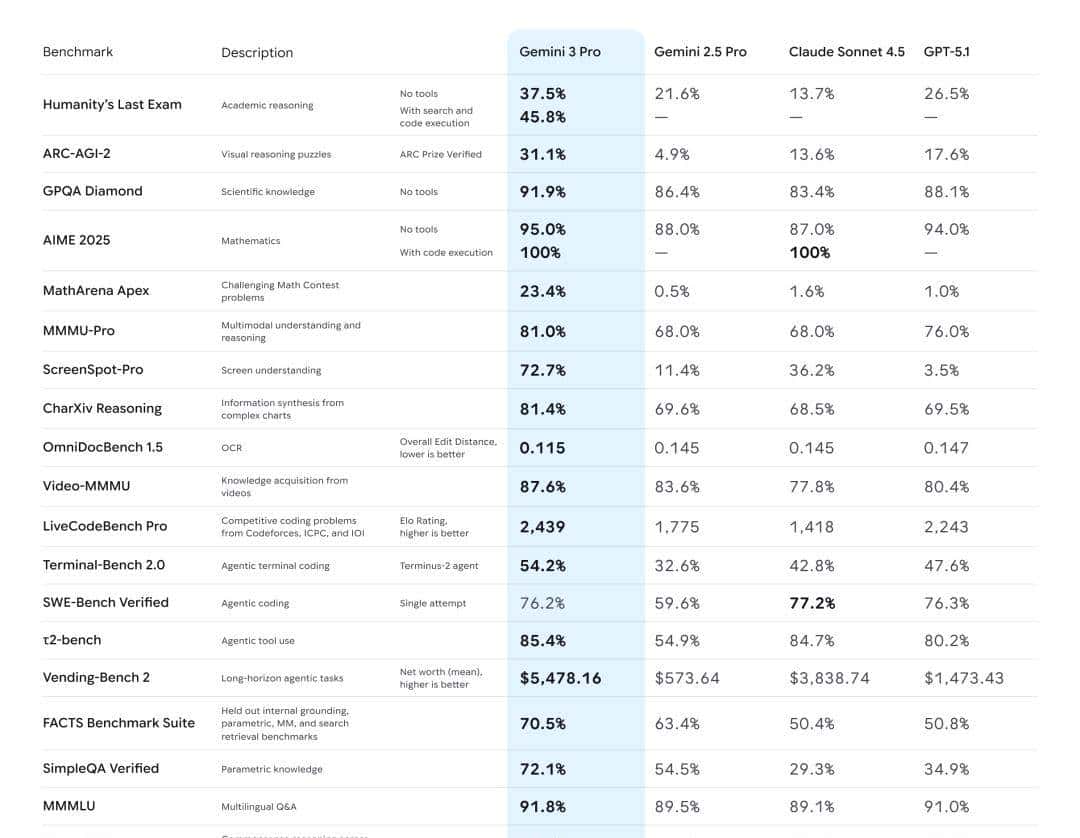
由于,这是Gemini 3 Pro 的综合表现:
除 在解决真实 GitHub 问题(SWE-Bench Verified)榜单表现略逊于 GPT-5.1和CLaude Sonnet 4.5之外,Gemini 3 Pro 在其余核心评测中全面领先 :
- 学术推理(Humanity's Last Exam):无工具 37.5%(工具加持达 45.8%),远超第二名 26.5%;
- 数学竞赛(MathArena Apex):23.4% 的得分,对手均不足 2%;
- 屏幕理解(ScreenSpot-Pro):72.7% 的准确率,大幅领先竞品最高 36.2%;
- 长程任务(Vending-Bench 2):平均净值 5478.16 美元,是第二名的 1.4 倍。
那么实际体验如何?如何将其落地企业知识库?本文将一一解读。
01
实测
Gemini 3 Pro 此次重点更新的能力主要有四方面:
- 多模态与推理:在抽象推理(ARC-AGI-2)、跨模态理解(MMMU-Pro)、视频知识获取(Video-MMMU)等场景表现断层领先,深度思考模式(Deep Think)可进一步提升复杂任务准确率。
- 编程与生成能力:支持一句话生成交互式 SVG、网页、3D 模型、游戏(如《我的世界》复刻、台球游戏)甚至类 Windows Web OS,前端开发效率极高,还能精准复刻网页设计或根据截图转代码。
- Agent 与工具调用:授权后可调动谷歌设备数据,完成行程规划、租车预订等长程任务(Vending-Bench 2 项目表现顶尖),支持终端编码、工具使用等专业场景。
- 生成式 UI 创新:未来将推出动态交互界面,替代传统 “一问一答” 模式,如生成可交互的旅行规划方案。
基于以上能力创新,以下是我们对Gemini 3 Pro 实测的几个案例
案例一:多模态理解能力(不论用户上传的是文字,视频,还是代码都能够清晰理解)
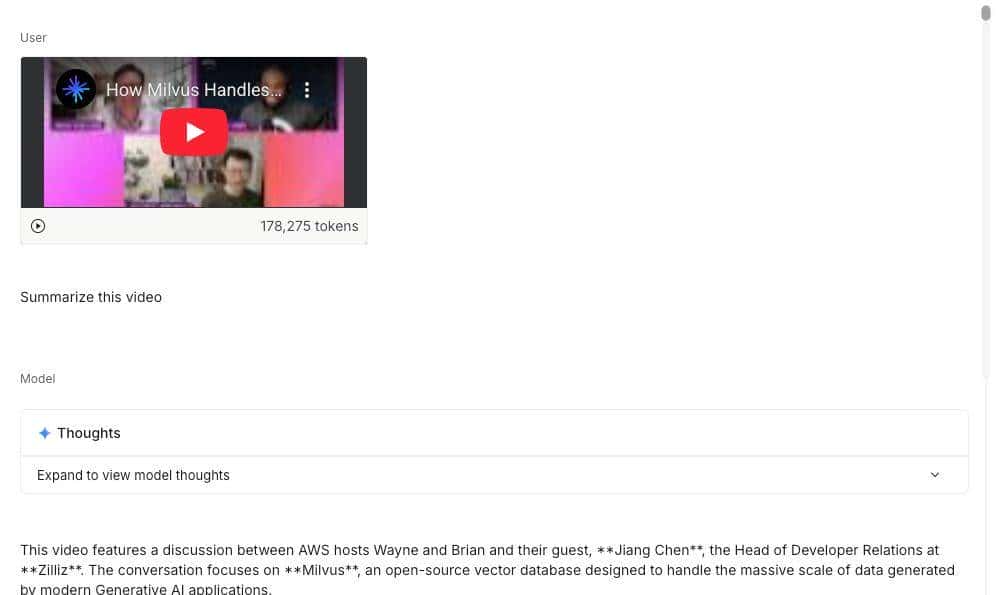
我们上传一个Zilliz在Youtube的视频,它能够在40秒左右完成阅读和理解,速度惊人
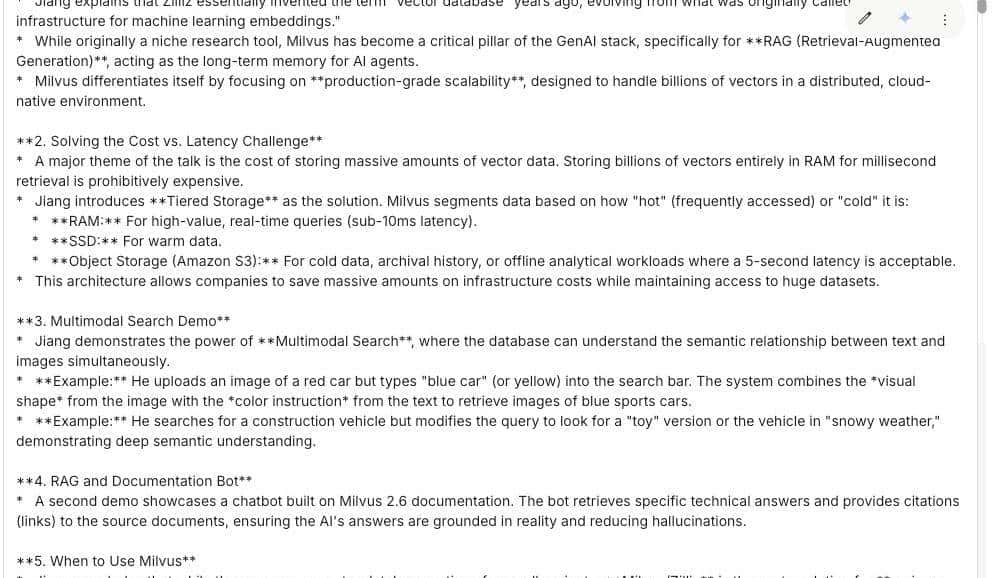
在官方测试中,上传各种不同语言手写的食谱,都其能够成功翻译成一本可共享的家庭食谱
案例二:在零样本(zero-shot)生成。
Gemini 3 Pro 能够处理各种复杂的提示词和命令,从而渲染出更加丰富和具有交互性的的Web UI.
我们用Gemini 3 Pro 编写了一个完美的80年代复古未来主义美学的3D飞行射击游戏,可以看到霓虹紫色网格地面配合赛博朋克风格的飞船和光效,视觉效果相当惊艳。
案例三:复杂任务规划
Gemini 3 Pro的负责任务规划能力也优于其他模型,可以看到,它就像一位AI行政秘书,能自动将杂乱的邮件按项目归类并预先起草好处理方案(如回复、建任务、归档),我们只需点击全部确认即可一键清空收件箱
02
RAG 教程
(1)依赖和环境准备
安装或升级 pymilvus、google-generativeai、requests、tqdm 这 4 个库到最新版本
! pip install --upgrade pymilvus google-generativeai requests tqdm登录 Google AI Studio 平台获取API KEY(地址:https://aistudio.google.com/api-keys)
import os

os.environ["GEMINI_API_KEY"] = "**********"(2)数据准备
以Milvus文档 2.4.x 中的常见问题解答页面作为我们 RAG 系统中的私有知识库.
下载该压缩文件,并将文档解压至“milvus_docs”文件夹中。
! wget https://github.com/milvus-io/milvus-docs/releases/download/v2.4.6-preview/milvus_docs_2.4.x_en.zip

! unzip -q milvus_docs_2.4.x_en.zip -d milvus_docs从“milvus_docs/en/faq”文件夹中加载所有的 Markdown 文件。对于每个文档,我们只是简单地用“# ”将文件中的内容隔开,这样就能大致将 Markdown 文件中每个主要部分的内容分离开来。
from glob import glob

text_lines = []

for file_path in glob("milvus_docs/en/faq/*.md", recursive=True):

    with open(file_path, "r") as file:

        file_text = file.read()

    text_lines += file_text.split("# ")(3)LLM和Embedding模型准备
我们将使用 gemini-3-pro-preview 作为LLM, text-embedding-004作为embedding模型
import google.generativeai as genai

genai.configure(api_key=os.environ["GEMINI_API_KEY"])

gemini_model = genai.GenerativeModel("gemini-3-pro-preview")

response = gemini_model.generate_content("who are you")

print(response.text)回复:
I am Gemini, a large language model built by Google.
生成一个测试向量,并打印其维度以及前几个元素。
test_embeddings = genai.embed_content(

    model="models/text-embedding-004", content=["This is a test1", "This is a test2"]

)["embedding"]

embedding_dim = len(test_embeddings[0])

print(embedding_dim)

print(test_embeddings[0][:10])768
[0.013588584, -0.004361838, -0.08481652, -0.039724775, 0.04723794, -0.0051557426, 0.026071774, 0.045514572, -0.016867816, 0.039378334]
(4)加载数据到Milvus
创建集合
from pymilvus import MilvusClient

milvus_client = MilvusClient(uri="./milvus_demo.db")

collection_name = "my_rag_collection"关于MilvusClient的参数设置:
- 将URI设置为本地文件(例如./milvus.db)是最便捷的方法,由于它会自动使用Milvus Lite将所有数据存储在该文件中。
- 如果你有大规模数据,可以在Docker或Kubernetes上搭建性能更强的Milvus服务器。在这种情况下,请使用服务器的URI(例如http://localhost:19530)作为你的URI。
- 如果你想使用Zilliz Cloud(Milvus的全托管云服务),请调整URI和令牌,它们分别对应Zilliz Cloud中的公共端点(Public Endpoint)和API密钥(Api key)。
检查集合是否存在,如果存在的话就删除重建
if milvus_client.has_collection(collection_name):

    milvus_client.drop_collection(collection_name)创建一个具有指定参数的新集合。
如果未指定任何字段信息,Milvus将自动创建一个默认的ID字段作为主键,以及一个向量字段用于存储向量数据。一个预留的JSON字段用于存储未在schema中定义的字段及其值。
milvus_client.create_collection(

    collection_name=collection_name,

    dimension=embedding_dim,

    metric_type="COSINE",

    consistency_level="Strong",  # Strong consistency level

)插入集合
逐行遍历文本,创建嵌入向量,然后将数据插入Milvus。
下面是一个新的字段text,它是集合中的一个未定义的字段。 它将自动创建一个对应的text字段(实际上它底层是由保留的JSON动态字段实现的 ,你不用关心其底层实现。)
from tqdm import tqdm

data = []

doc_embeddings = genai.embed_content(

    model="models/text-embedding-004", content=text_lines

)["embedding"]

for i, line in enumerate(tqdm(text_lines, desc="Creating embeddings")):

    data.append({"id": i, "vector": doc_embeddings[i], "text": line})

milvus_client.insert(collection_name=collection_name, data=data)输出结果示例:
Creating embeddings: 100%|█████████████████████████| 72/72 [00:00<00:00, 431414.13it/s]

{'insert_count': 72, 'ids': [0, 1, 2, 3, 4, 5, 6, 7, 8, 9, 10, 11, 12, 13, 14, 15, 16, 17, 18, 19, 20, 21, 22, 23, 24, 25, 26, 27, 28, 29, 30, 31, 32, 33, 34, 35, 36, 37, 38, 39, 40, 41, 42, 43, 44, 45, 46, 47, 48, 49, 50, 51, 52, 53, 54, 55, 56, 57, 58, 59, 60, 61, 62, 63, 64, 65, 66, 67, 68, 69, 70, 71], 'cost': 0}
(5)创建RAG
检索数据
我们来问一个关于Milvus的常见问题。
question = "How is data stored in milvus?"在集合中搜索该问题,并返回top 3最相关的问题
question_embedding = genai.embed_content(

    model="models/text-embedding-004", content=question

)["embedding"]

search_res = milvus_client.search(

    collection_name=collection_name,

    data=[question_embedding],

    limit=3,  # Return top 3 results

    search_params={"metric_type": "COSINE", "params": {}},  # Inner product distance

    output_fields=["text"],  # Return the text field

)

import json

retrieved_lines_with_distances = [

    (res["entity"]["text"], res["distance"]) for res in search_res[0]

]

print(json.dumps(retrieved_lines_with_distances, indent=4))结果按照距离从近到远排序返回
[

    [

        " Where does Milvus store data?

Milvus deals with two types of data, inserted data and metadata.

Inserted data, including vector data, scalar data, and collection-specific schema, are stored in persistent storage as incremental log. Milvus supports multiple object storage backends, including [MinIO](

https://min.io/

), [AWS S3](

https://aws.amazon.com/s3/?nc1=h_ls

), [Google Cloud Storage](

https://cloud.google.com/storage?hl=en#object-storage-for-companies-of-all-sizes

) (GCS), [Azure Blob Storage](

https://azure.microsoft.com/en-us/products/storage/blobs

), [Alibaba Cloud OSS](

https://www.alibabacloud.com/product/object-storage-service

), and [Tencent Cloud Object Storage](

https://www.tencentcloud.com/products/cos

) (COS).

Metadata are generated within Milvus. Each Milvus module has its own metadata that are stored in etcd.

###",

        0.8048489093780518

    ],

    [

        "Does the query perform in memory? What are incremental data and historical data?

Yes. When a query request comes, Milvus searches both incremental data and historical data by loading them into memory. Incremental data are in the growing segments, which are buffered in memory before they reach the threshold to be persisted in storage engine, while historical data are from the sealed segments that are stored in the object storage. Incremental data and historical data together constitute the whole dataset to search.

###",

        0.757495105266571

    ],

    [

        "What is the maximum dataset size Milvus can handle?


Theoretically, the maximum dataset size Milvus can handle is determined by the hardware it is run on, specifically system memory and storage:

- Milvus loads all specified collections and partitions into memory before running queries. Therefore, memory size determines the maximum amount of data Milvus can query.
- When new entities and and collection-related schema (currently only MinIO is supported for data persistence) are added to Milvus, system storage determines the maximum allowable size of inserted data.

###",

        0.7453694343566895

    ]

]使用大型语言模型(LLM)构建检索增强生成(RAG)响应
将检索到的文档转换为字符串格式。
context = "
".join(

    [line_with_distance[0] for line_with_distance in retrieved_lines_with_distances]

)为大语言模型提供系统提示(system prompt)和用户提示(user prompt)。这个提示是通过从Milvus检索到的文档生成的。
SYSTEM_PROMPT = """

Human: You are an AI assistant. You are able to find answers to the questions from the contextual passage snippets provided.

"""

USER_PROMPT = f"""

Use the following pieces of information enclosed in <context> tags to provide an answer to the question enclosed in <question> tags.

<context>

{context}

</context>

<question>

{question}

</question>

"""使用gemini-3-pro-preview模型和提示词生成回复
gemini_model = genai.GenerativeModel(

    "gemini-3-pro-preview", system_instruction=SYSTEM_PROMPT

)

response = gemini_model.generate_content(USER_PROMPT)

print(response.text)从输出结果可以看到,gemini 3 Pro 能够条理清晰地返回结果
Based on the provided documents, Milvus stores data in the following ways:

*   **Inserted Data:** Vector data, scalar data, and collection-specific schema are stored in persistent storage as an incremental log. Milvus supports multiple object storage backends for this purpose, including:

    *   MinIO

    *   AWS S3

    *   Google Cloud Storage (GCS)

    *   Azure Blob Storage

    *   Alibaba Cloud OSS

    *   Tencent Cloud Object Storage (COS)

*   **Metadata:** Metadata generated within Milvus modules is stored in **etcd**.

*   **Memory Buffering:** Incremental data (growing segments) are buffered in memory before being persisted, while historical data (sealed segments) resides in object storage but is loaded into memory for querying.友情提示
目前Gemini 3 Pro不向免费用户提供(详情:
https://ai.google.dev/gemini-api/docs/rate-limits#tier-1)
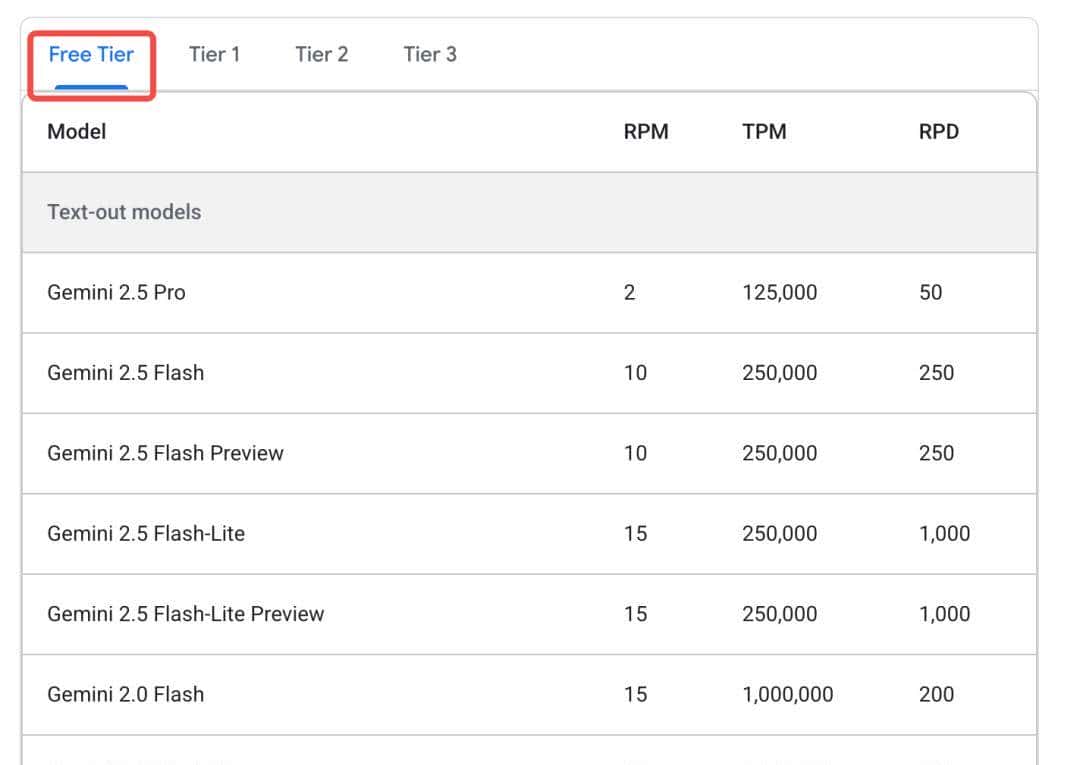
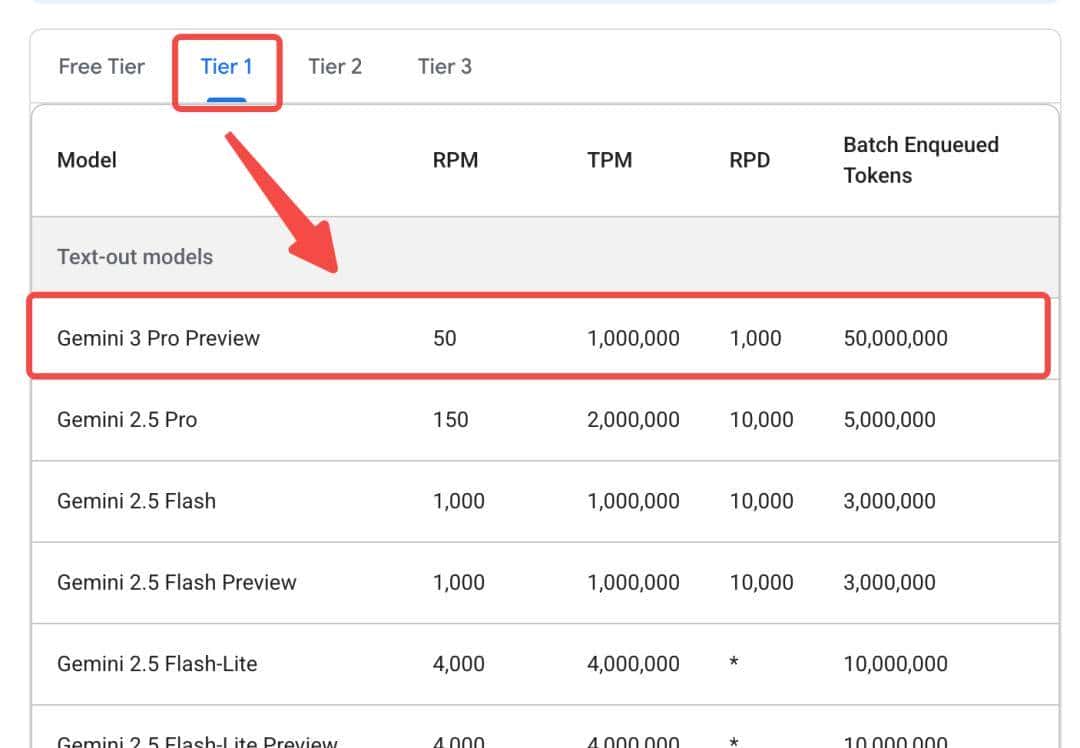
但是我们可以通过OpenRouter进行调用(
https://openrouter.ai/google/gemini-3-pro-preview/api)
具体用法参考下面
from openai import OpenAI

client = OpenAI(

  base_url="https://openrouter.ai/api/v1",

  api_key="<OPENROUTER_API_KEY>",

)

response2 = client.chat.completions.create(

  model="google/gemini-3-pro-preview",

  messages=[

        {

            "role": "system",

            "content": SYSTEM_PROMPT

        },

        {

            "role": "user",

            "content": USER_PROMPT

        }

    ],

  extra_body={"reasoning": {"enabled": True}}

)

response_message = response2.choices[0].message

print(response_message.content)
03
one more thing
这次与旗舰模型Gemini 3 Pro同步推出的,还有Google Antigravity(反重力)平台,作为一个AI编程平台,它可以自主访问我们的编辑器、终端、甚至内置浏览器;能力边界上,也从过去的执行具体指令、单次调用升级为自主任务导向型开发。
更直白一点说,之前,我们只能让AI编程软件写一段代码,然后自己校验、合并;但是借助Google Antigravity,我们可以直接告知AI,我要写一个宠物互动游戏,它就可以自动把这个任务进行一步步分解,执行,并且自动打开浏览器进行校验。整个过程,甚至还会学习你的个人风格,来进行持续的迭代优化。
当然,调度数据库,搭配MCP能力,读取你的Milvus数据库内容,自己搞一个知识库,长期来看,也不是不可能。
© 版权声明
文章版权归作者所有,未经允许请勿转载。
相关文章




暂无评论...