一.网络知识点概述
1.需要学习的重点
| 需要掌握的知识点 |
|---|
| OSI七层模型=TCP/IP四层模型 |
| TCP/UDP网络连接(三次握手,四次挥手) |
| 常见的协议:HTTP,HTTPS(HTTP+TLS),SSH,talnet,DNS协议,IP,IPIP,IPsec,SMTP… |
| Linux的网络配置管理命令 |
| 抓包工具【burp,wireshark】 |
| IP地址,子网掩码,子网划分… |
2.网络的传输介质
#网线
1类   # 电话线;频率低,速率低
2类   # 过去的令牌网;1Mhz,4Mbps
3类   # 10Mb网线,16Mhz,10M
4类
5类   # 100Mbps
6类   # 1Gbps
超6   # 200-250HZ频率,1000M
7类   # 万兆以太网,10Gbps
8类   # 100Gbps

光纤
无线wifi,5G

################
1000Mbps,1000mbit
1字节=8bit
1000M字节
3.网络设备
交换机
| 核心设备 | 作用 | 核心 |
|---|---|---|
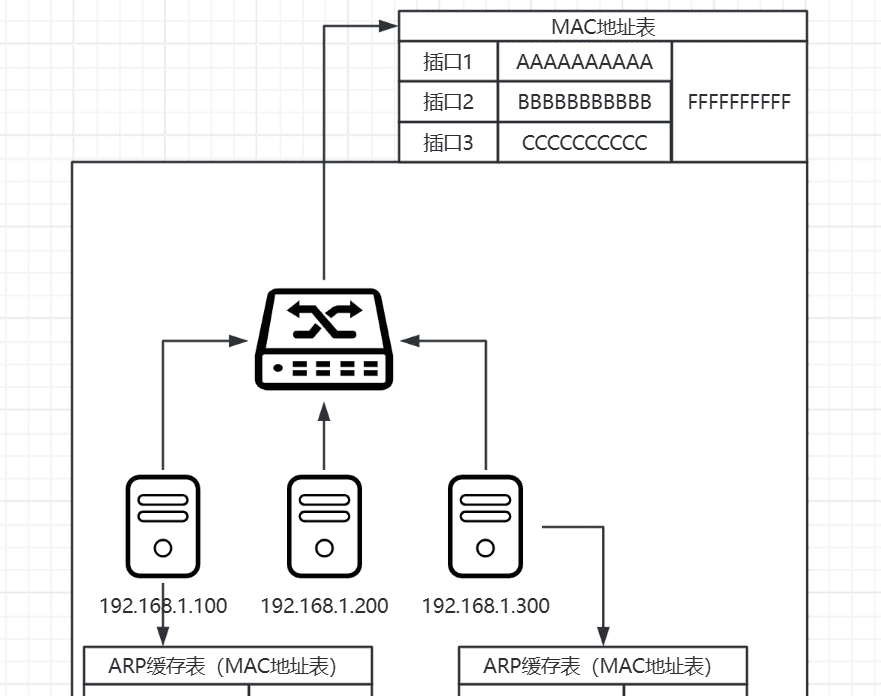
| 交换机【switch】 | 【二层设备】相同局域网下,不同主机之间进行通信 | mac地址表,arp协议(广播寻MAC地址) |
| 路由器【route】 | 【三层设备】不同局域网下,不同主机之间进行通讯 |
ARP协议:实现局域网不同主机通信
| 互联网通讯条件 | 解释 |
|---|---|
| ip地址【ipv4,ipv6】 | 类似于你的收货地址 |
| mac地址 | 收货人 |
| port端口号 | 你家的门【程序的入口】 |
路由器
# 不同网段的ip地址,不能直接通信;
	10.0.0.0/24     10.0.0.200
	172.16.0.0/24   172.16.0.200
# 路由器作用
	- 实现,不同网段之间,相互通信;
	- 寻址;112.14.14.14.14 在哪???
# 交换机:
	- mac地址表
	- 主机:arp缓存mac地址表
# 路由器
	- 路由表
	- 主机:路由表
路由表
[root@kylin ~]# route -n
Destination     Gateway         Genmask         Flags Metric Ref    Use Iface
0.0.0.0         10.0.0.2        0.0.0.0         UG    100    0        0 ens33
10.0.0.0        0.0.0.0         255.255.255.0   U     100    0        0 ens33

# 要前往的目标地址
	- 指定固定网段:10.0.0.0
	- 指定固定IP:10.0.0.250
	- 前往任意其他网段:0.0.0.0
# 下一跳【gateway网关】
	- 数据包下一步前往的地址
# 接口Iface
	- 从本机那个网卡ip出去
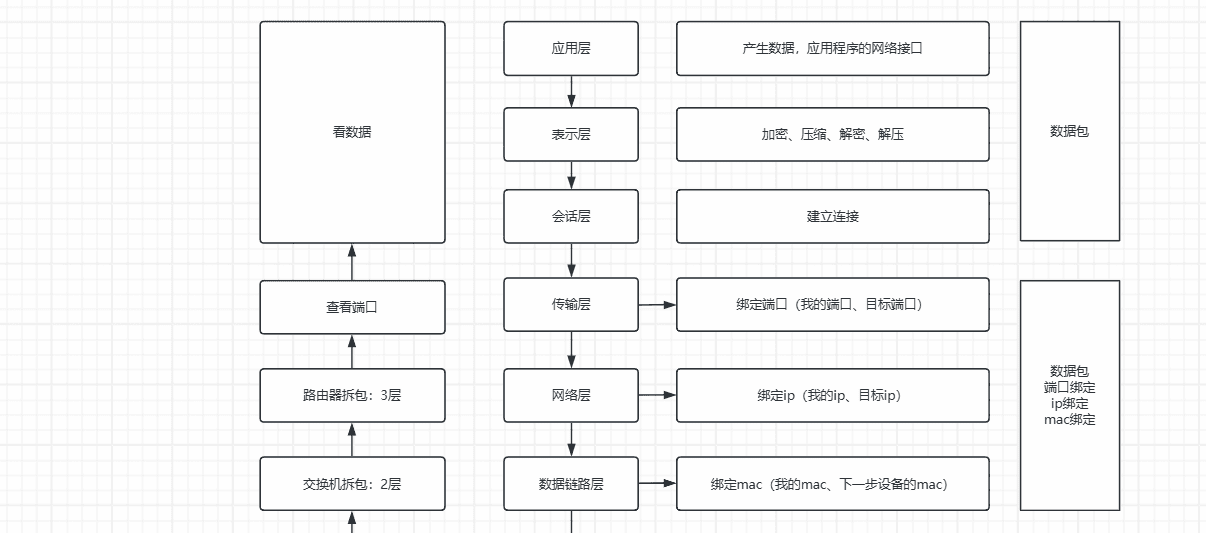
二.OSI七层模型
应用层
表示层
会话层
传输层
网络层
数据链路层
物理层
# 七层模型简化版:四层模型
	应用层【应用、表示、会话】
	主机到主机【传输层】
	因特网层【网络层】
	网络接入层【数据链路+物理层】
三.协议介绍
1.应用层协议
http/https(http+tls)
smtp
ssh
telnet
dns
DHCP
......
wireshark抓包工具
https://www.wireshark.org/download.html
第一列:抓取的数据包编号
第二列:抓取数据的时长
第三列:数据包发送方
第四列:数据包二接收方
第五列:protocol协议
第六列:数据包包的长度
第七列:数据包的大概内容
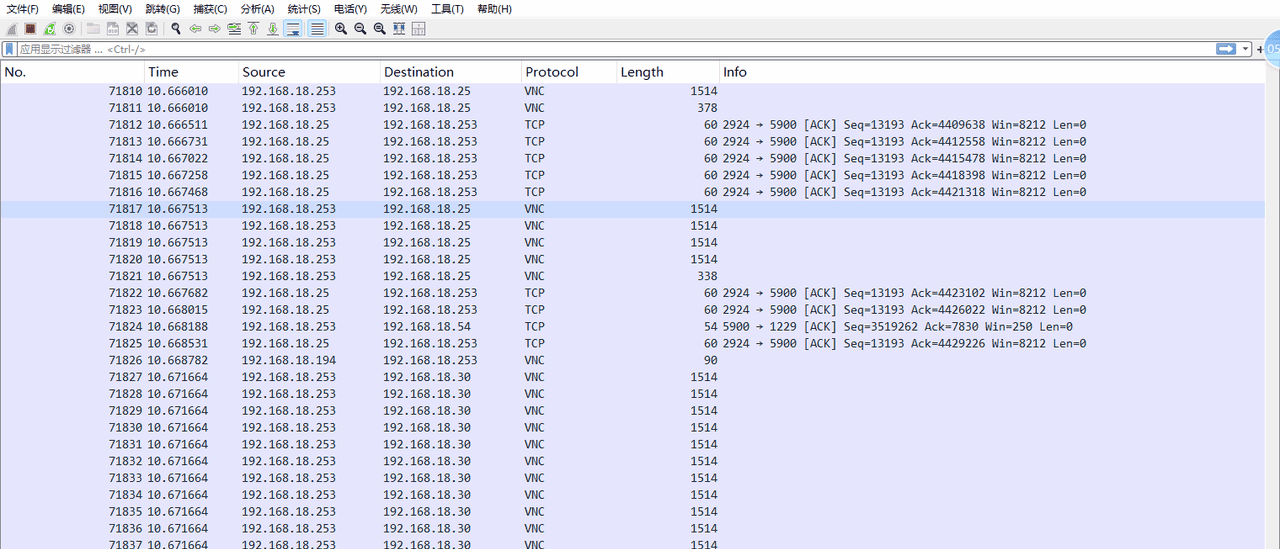
ssh与telnet
# 哈希算法加密
MD5    # 认为碰撞,不安全;
sha1   # 安全行很高;
sha2   # sha256 sha512 ....
sha3
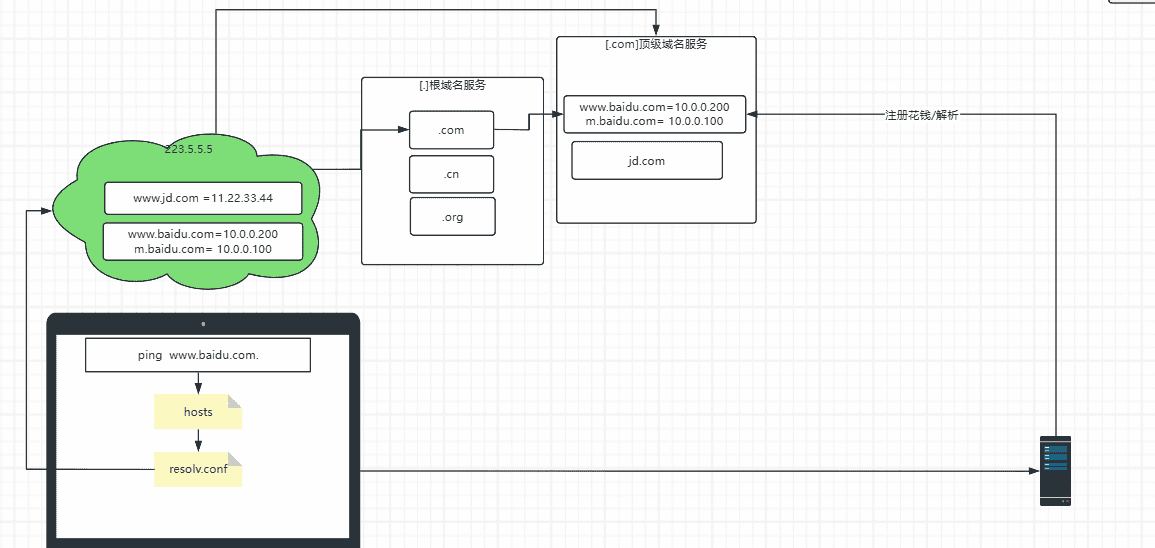
DNS解析原理⭐️
DNS解析含义:通过域名找到IP地址的过程;
ip
mac
端口

[root@kylin ~]# dig www.baidu.com

; <<>> DiG 9.11.21-9.11.21-10.ky10 <<>> www.baidu.com
;; global options: +cmd
;; Got answer:
;; ->>HEADER<<- opcode: QUERY, status: NOERROR, id: 64043
;; flags: qr rd ra; QUERY: 1, ANSWER: 3, AUTHORITY: 0, ADDITIONAL: 1

;; OPT PSEUDOSECTION:
; EDNS: version: 0, flags:; udp: 4096
;; QUESTION SECTION:
;www.baidu.com.			IN	A

;; ANSWER SECTION:
www.baidu.com.		689	IN	CNAME	www.a.shifen.com.
www.a.shifen.com.	14	IN	A	110.242.70.57
www.a.shifen.com.	14	IN	A	110.242.69.21

;; Query time: 8 msec
;; SERVER: 223.5.5.5#53(223.5.5.5)
;; WHEN: 二 10月 28 19:56:36 CST 2025
;; MSG SIZE  rcvd: 104

# dig指定dns服务器探测
[root@kylin ~]# dig @8.8.8.8 www.baidu.com

; <<>> DiG 9.11.21-9.11.21-10.ky10 <<>> @8.8.8.8 www.baidu.com
; (1 server found)
;; global options: +cmd
;; Got answer:
;; ->>HEADER<<- opcode: QUERY, status: NOERROR, id: 5260
;; flags: qr rd ra; QUERY: 1, ANSWER: 4, AUTHORITY: 0, ADDITIONAL: 1

;; OPT PSEUDOSECTION:
; EDNS: version: 0, flags:; udp: 512
;; QUESTION SECTION:
;www.baidu.com.			IN	A

;; ANSWER SECTION:
www.baidu.com.		76	IN	CNAME	www.a.shifen.com.
www.a.shifen.com.	16	IN	CNAME	www.wshifen.com.
www.wshifen.com.	247	IN	A	103.235.46.102
www.wshifen.com.	247	IN	A	103.235.46.115

;; Query time: 231 msec
;; SERVER: 8.8.8.8#53(8.8.8.8)
;; WHEN: 二 10月 28 19:57:21 CST 2025
;; MSG SIZE  rcvd: 127

#nslookup获取dns服务器中的域名解析ip
[root@kylin ~]# nslookup www.baidu.com
Server:		223.5.5.5
Address:	223.5.5.5#53

Non-authoritative answer:
www.baidu.com	canonical name = www.a.shifen.com.
Name:	www.a.shifen.com
Address: 110.242.70.57
Name:	www.a.shifen.com
Address: 110.242.69.21
Name:	www.a.shifen.com
Address: 2408:871a:2100:1b23:0:ff:b07a:7ebc
Name:	www.a.shifen.com
Address: 2408:871a:2100:186c:0:ff:b07e:3fbc

# 指定dns服务器探测
[root@kylin ~]# nslookup www.baidu.com 114.114.114.114
Server:		114.114.114.114
Address:	114.114.114.114#53

Non-authoritative answer:
Name:	www.baidu.com
Address: 110.242.70.57
Name:	www.baidu.com
Address: 110.242.69.21
Name:	www.baidu.com
Address: 2408:871a:2100:1b23:0:ff:b07a:7ebc
Name:	www.baidu.com
Address: 2408:871a:2100:186c:0:ff:b07e:3fbc
2.传输层协议⭐️
TCP/UDP
# TCP : 安全、保证数据包不丢;
	- 数据传输:
	- 数据备份;

# UDP : 快:
	- 直播:
	- 视频、通话;
UDP传输数据
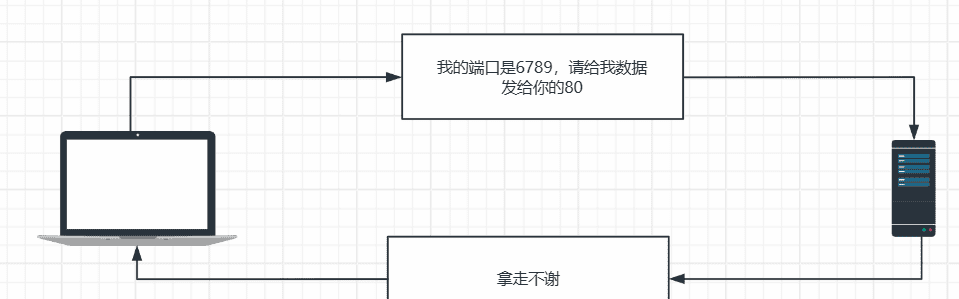
TCP连接传输数据的过程
三次握手、建立连接、开始传输数据
四次挥手、断开连接;
##############
给数据包编号
去顶数据包顺序;
三次握手的过程


四次挥手断开连接
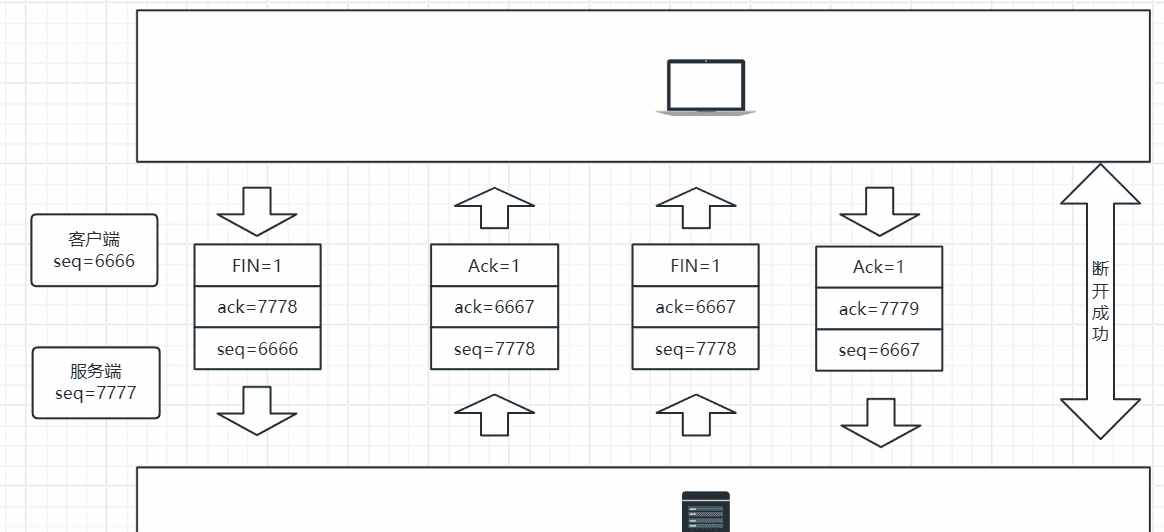
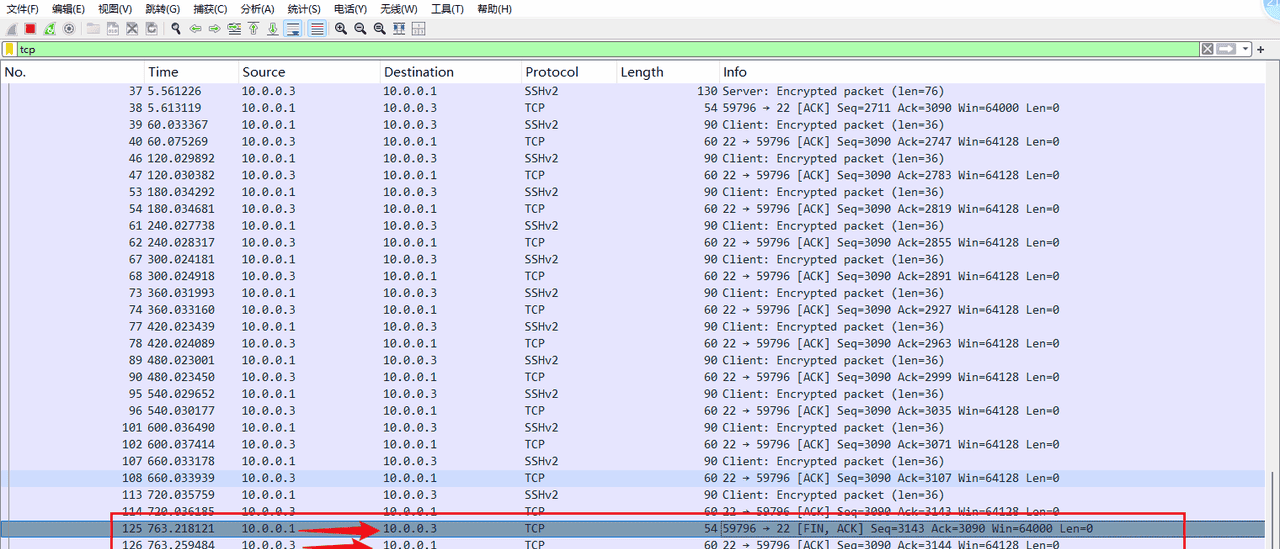
Ack=1  # 同意、收到
ack    # 你下次要发给我的数据包编号seq
seq    # 我当前数据包的序号
FIN    # 请求断开
SYN    # 请求连接
| 区别 | TCP传输控制协议 | UDP数据报文 |
|---|---|---|
| 面向连接 | 3次握手、四次挥手 | 无连接 |
| 可靠性 | 可靠 | 不可靠 |
| 流程控制 | 丢包之后重新传输 | 丢了就丢了 |
| 使用场景 | 网站服务为、邮件传输、文件传输、数据备份 | 直播、电话、视频、实时语音… |
3.网络层协议
arp协议
[root@kylin ~]# arp -a
_gateway (10.0.0.2) at 00:50:56:f5:d8:55 [ether] on ens33
? (10.0.0.1) at 00:50:56:c0:00:08 [ether] on ens33
ICMP协议
ping 命令
###########
iptables
openvpn
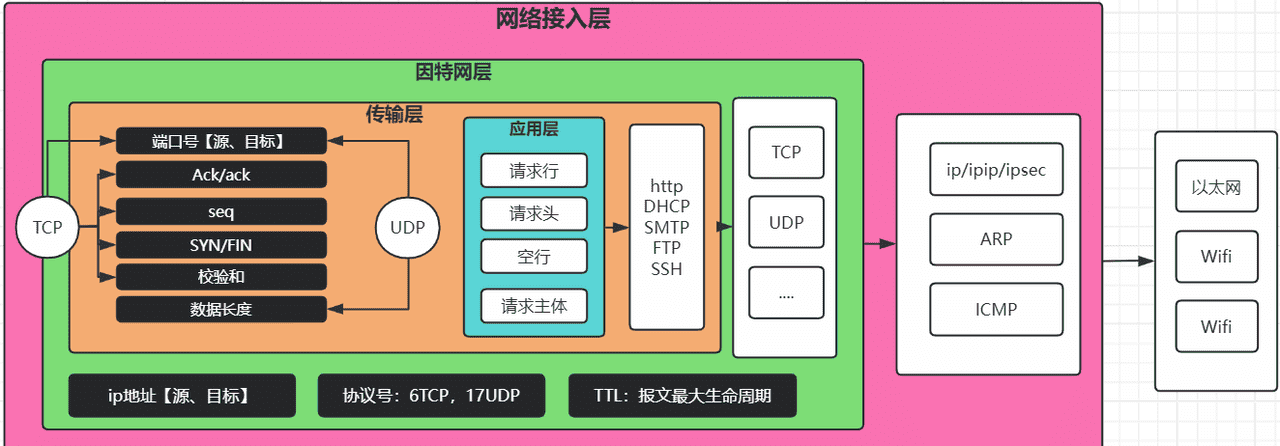
四、数据包格式
了 |
| 使用场景 | 网站服务为、邮件传输、文件传输、数据备份 | 直播、电话、视频、实时语音… |
3.网络层协议
arp协议
[root@kylin ~]# arp -a
_gateway (10.0.0.2) at 00:50:56:f5:d8:55 [ether] on ens33
? (10.0.0.1) at 00:50:56:c0:00:08 [ether] on ens33
ICMP协议
ping 命令
###########
iptables
openvpn
四、数据包格式
五.Linux网络配置文件
[root@kylin ~]# cat /etc/sysconfig/network-scripts/ifcfg-ens33
TYPE=Ethernet        #以太网
PROXY_METHOD=none
BROWSER_ONLY=no
BOOTPROTO=none        #none和static表示手动设置;DHCP表示动态获取
DEFROUTE=yes          #是否开启路由寻址功能
IPV4_FAILURE_FATAL=yes
IPV6INIT=yes
IPV6_AUTOCONF=yes
IPV6_DEFROUTE=yes
IPV6_FAILURE_FATAL=no
IPV6_ADDR_GEN_MODE=stable-privacy
NAME=ens33
UUID=ec76895d-3827-4fa2-9a64-e5c85c848ef1
DEVICE=ens33
ONBOOT=yes              #是否开启网卡
IPADDR=10.0.0.200       #IP地址
PREFIX=24               #子网掩码
GATEWAY=10.0.0.2
DNS1=223.5.5.5
DNS2=223.6.6.6
IPV6_PRIVACY=no

[root@kylin ~]# cat /etc/resolv.conf
# Generated by NetworkManager
nameserver 223.5.5.5
nameserver 223.6.6.6
六.网络管理命令
1.ss/netstat
查看本机开放端
[root@kylin ~]# netstat -tnulp
Active Internet connections (only servers)
Proto Recv-Q Send-Q Local Address           Foreign Address         State       PID/Program name
tcp        0      0 0.0.0.0:80              0.0.0.0:*               LISTEN      912/nginx: master p
tcp        0      0 0.0.0.0:22              0.0.0.0:*               LISTEN      841/sshd: /usr/sbin
tcp6       0      0 :::80                   :::*                    LISTEN      912/nginx: master p
tcp6       0      0 :::22                   :::*                    LISTEN      841/sshd: /usr/sbin
udp        0      0 127.0.0.1:323           0.0.0.0:*                           746/chronyd
udp6       0      0 ::1:323                 :::*                                746/chronyd

#参数说明
	n # 以数字的方式显示sshd==22
	t # tcp
	u # udp
	p # process显示进程号和名称
	l # 仅仅显示listen状态
    a # all显示所有连接和监听的状态
2.lsof探测端口的连接情况
[root@kylin ~]# lsof -i:22 -n         #列出所有正在使用 22 端口的进程的详细信息,并且在输出中直接显示 IP 地址,而不进行主机名解析。
COMMAND  PID USER   FD   TYPE DEVICE SIZE/OFF NODE NAME
sshd     841 root    4u  IPv4  26668      0t0  TCP *:ssh (LISTEN)
sshd     841 root    5u  IPv6  26670      0t0  TCP *:ssh (LISTEN)
sshd    1351 root    5u  IPv4  33737      0t0  TCP 10.0.0.200:ssh->10.0.0.1:51880 (ESTABLISHED)
sshd    1361 root    5u  IPv4  33737      0t0  TCP 10.0.0.200:ssh->10.0.0.1:51880 (ESTABLISHED)
3.telnet探测端口
[root@kylin ~]# telnet 10.0.0.200 22
Trying 10.0.0.200...
Connected to 10.0.0.200.
Escape character is '^]'.
SSH-2.0-OpenSSH_8.2

#非交互式探测
[root@kylin ~]# echo q | telnet -e q 10.0.0.200 22
Telnet escape character is 'q'.
Trying 10.0.0.200...
Connected to 10.0.0.200.
Escape character is 'q'.

telnet> Connection closed.

[root@kylin ~]# echo $?      #上一个进程是否成功,输出0表示成功,输出其他表示不成功
0
4.nmap扫描命令
[root@kylin ~]# nmap www.jd.com -p22-1000
Starting Nmap 7.92 ( https://nmap.org ) at 2025-10-29 16:17 CST
Nmap scan report for www.jd.com (125.36.9.73)
Host is up (0.0015s latency).
Other addresses for www.jd.com (not scanned): 2408:8710:1020:1844:8000::3
rDNS record for 125.36.9.73: no-data
Not shown: 975 filtered tcp ports (no-response)
PORT    STATE SERVICE
25/tcp  open  smtp
80/tcp  open  http
110/tcp open  pop3
443/tcp open  https

[root@kylin ~]# nmap 10.0.0.200 -p22,23,80,323,3306
Starting Nmap 7.92 ( https://nmap.org ) at 2025-10-29 16:19 CST
Nmap scan report for 10.0.0.200
Host is up (0.000049s latency).

PORT     STATE  SERVICE
22/tcp   open   ssh
23/tcp   closed telnet
80/tcp   open   http
323/tcp  closed rpki-rtr
3306/tcp closed mysql

Nmap done: 1 IP address (1 host up) scanned in 0.11 seconds


[root@kylin ~]# nmap 10.0.0.0/24 -p 22-50
Starting Nmap 7.92 ( https://nmap.org ) at 2025-10-29 16:47 CST
Nmap scan report for 10.0.0.1
Host is up (0.00039s latency).
All 29 scanned ports on 10.0.0.1 are in ignored states.
Not shown: 29 filtered tcp ports (no-response)
MAC Address: 00:50:56:C0:00:08 (VMware)

Nmap scan report for 10.0.0.2
Host is up (0.00013s latency).
All 29 scanned ports on 10.0.0.2 are in ignored states.
Not shown: 29 closed tcp ports (reset)
MAC Address: 00:50:56:F5:D8:55 (VMware)

Nmap scan report for 10.0.0.200
Host is up (0.000010s latency).
Not shown: 28 closed tcp ports (reset)
PORT   STATE SERVICE
22/tcp open  ssh

Nmap done: 256 IP addresses (3 hosts up) scanned in 3.67 seconds


[root@kylin ~]#  nmap www.baidu.com www.jd.com www.bilibili.com -p 22-100
Starting Nmap 7.92 ( https://nmap.org ) at 2025-10-29 16:51 CST
Nmap scan report for www.baidu.com (110.242.70.57)
Host is up (0.0019s latency).
Other addresses for www.baidu.com (not scanned): 110.242.69.21 2408:871a:2100:186c:0:ff:b07e:3fbc 2408:871a:2100:1b23:0:ff:b07a:7ebc
Not shown: 77 filtered tcp ports (no-response)
PORT   STATE SERVICE
25/tcp open  smtp
80/tcp open  http

Nmap scan report for www.jd.com (125.36.9.73)
Host is up (0.0020s latency).
Other addresses for www.jd.com (not scanned): 2408:8710:1020:1844:8000::3
rDNS record for 125.36.9.73: no-data
Not shown: 76 filtered tcp ports (no-response)
PORT   STATE SERVICE
25/tcp open  smtp
53/tcp open  domain
80/tcp open  http

Nmap scan report for www.bilibili.com (218.60.18.13)
Host is up (0.0031s latency).
Other addresses for www.bilibili.com (not scanned): 221.204.56.95 218.60.18.16 221.204.56.93 221.204.56.94 221.204.56.91 221.204.56.92 221.204.56.86 218.60.18.18 218.60.18.17 218.60.18.15 218.60.18.14 2408:8726:1100:100::2:20 2408:8726:1100:100::2:18 2408:8726:1100:100::2:21 2408:8726:1100:100::2:17 2408:8726:1100:100::2:12 2408:872f:20:b::14 2408:872f:20:b::13 2408:8726:1100:100::2:19
Not shown: 77 filtered tcp ports (no-response)
PORT   STATE SERVICE
25/tcp open  smtp
80/tcp open  http

Nmap done: 3 IP addresses (3 hosts up) scanned in 2.26 seconds
5.nc命令
探测端口
# 探测端口服务名称
[root@kylin ~]# nc 10.0.0.200 22 -v
Ncat: Version 7.92 ( https://nmap.org/ncat )
Ncat: Connected to 10.0.0.200:22.
SSH-2.0-OpenSSH_8.2

[root@kylin ~]# nc www.jd.com 80 -v
Ncat: Version 7.92 ( https://nmap.org/ncat )
Ncat: Connected to 125.36.9.73:80

#非交互式探测
[root@kylin ~]# nc www.jd.com 80 -z
[root@kylin ~]# echo $?
0
[root@kylin ~]# nc www.jjjjjjjjddddddddddddddddddjjjjjjj.com 80 -z
Ncat: Could not resolve hostname "www.jjjjjjjjddddddddddddddddddjjjjjjj.com": Name or service not known. QUITTING.
[root@kylin ~]# echo $?
2
开启端口
nc
   -v  # 显示过程
   -lncp 4567  # 开启本地监听4567端口; n是no的意思,禁用DNS解析,直接使用ip; l是listen监听的意思; p是指定监听的端口
   -lk # 保持监听(默认tcp监听),客户端断开后,继续接受新的连接进来;
   -lu #保持监听UDP
   -z #无io模式,非交互式,用于检查端口使用
6.iftop查看网络流量
[root@kylin ~]# iftop -nNP
	n # 禁用dns解析
	N # 以数字的形式显示服务;
	P # 显示端口

[root@kylin ~]# iftop -nNP -i ens34
	i ens33  # 指定监听的网卡
7.nethogs查看网络流量
[root@kylin ~]# nethogs
8.dig
[root@kylin ~]# dig www.baidu.com  #查询域名的 IP 地址等信息

; <<>> DiG 9.11.21-9.11.21-10.ky10 <<>> www.baidu.com
;; global options: +cmd
;; Got answer:
;; ->>HEADER<<- opcode: QUERY, status: NOERROR, id: 52604
;; flags: qr rd ra; QUERY: 1, ANSWER: 3, AUTHORITY: 0, ADDITIONAL: 1

;; OPT PSEUDOSECTION:
; EDNS: version: 0, flags:; udp: 4096
;; QUESTION SECTION:
;www.baidu.com.			IN	A

;; ANSWER SECTION:
www.baidu.com.		497	IN	CNAME	www.a.shifen.com.
www.a.shifen.com.	14	IN	A	110.242.69.21
www.a.shifen.com.	14	IN	A	110.242.70.57

;; Query time: 7 msec
;; SERVER: 223.5.5.5#53(223.5.5.5)
;; WHEN: 三 10月 29 17:07:39 CST 2025
;; MSG SIZE  rcvd: 104


[root@kylin ~]# dig @8.8.8.8 www.baidu.com

; <<>> DiG 9.11.21-9.11.21-10.ky10 <<>> @8.8.8.8 www.baidu.com
; (1 server found)
;; global options: +cmd
;; Got answer:
;; ->>HEADER<<- opcode: QUERY, status: NOERROR, id: 40490
;; flags: qr rd ra; QUERY: 1, ANSWER: 4, AUTHORITY: 0, ADDITIONAL: 1

;; OPT PSEUDOSECTION:
; EDNS: version: 0, flags:; udp: 512
;; QUESTION SECTION:
;www.baidu.com.			IN	A

;; ANSWER SECTION:
www.baidu.com.		460	IN	CNAME	www.a.shifen.com.
www.a.shifen.com.	9	IN	CNAME	www.wshifen.com.
www.wshifen.com.	248	IN	A	103.235.46.102
www.wshifen.com.	248	IN	A	103.235.46.115

;; Query time: 264 msec
;; SERVER: 8.8.8.8#53(8.8.8.8)
;; WHEN: 三 10月 29 17:08:20 CST 2025
;; MSG SIZE  rcvd: 127
9.nslookup
[root@kylin ~]# nslookup www.baidu.com
Server:		223.5.5.5
Address:	223.5.5.5#53

Non-authoritative answer:
www.baidu.com	canonical name = www.a.shifen.com.
Name:	www.a.shifen.com
Address: 110.242.69.21
Name:	www.a.shifen.com
Address: 110.242.70.57
Name:	www.a.shifen.com
Address: 2408:871a:2100:186c:0:ff:b07e:3fbc
Name:	www.a.shifen.com
Address: 2408:871a:2100:1b23:0:ff:b07a:7ebc


[root@kylin ~]# nslookup www.baidu.com 8.8.8.8
Server:		8.8.8.8
Address:	8.8.8.8#53

Non-authoritative answer:
www.baidu.com	canonical name = www.a.shifen.com.
www.a.shifen.com	canonical name = www.wshifen.com.
Name:	www.wshifen.com
Address: 103.235.46.115
Name:	www.wshifen.com
Address: 103.235.46.102
10.路由追踪命令traceroute
# windows
[C:~]$ tracert -d baidu.com

通过最多 30 个跃点跟踪
到 baidu.com [220.181.7.203] 的路由:

  1    <1 毫秒   <1 毫秒   <1 毫秒 192.168.18.1
  2     1 ms     *        1 ms  192.168.1.1
  3     1 ms     2 ms     1 ms  123.113.24.1
  4     *        *        *     请求超时。
  5     *        *        *     请求超时。
  6     *        *        *     请求超时。
  7     5 ms     *        *     219.158.45.118
  8     *        *        5 ms  202.97.88.201
  9     7 ms     *        *     36.110.245.46
 10     *        *        *     请求超时。
 11     *        *        *     请求超时。
 12     *        *        *     请求超时。
 13     *        *        *     请求超时。
 14     *        *        *     请求超时。
 15     *        *        *     请求超时。
 16     *        *        *     请求超时。
 17    15 ms    14 ms    13 ms  220.181.7.203

跟踪完成。


#Linux
# -I表示使用icmp探测(默认udp)
# -n表示不做dns解析
[root@oldboy01 ~]# traceroute -I baidu.com
traceroute to baidu.com (220.181.7.203), 30 hops max, 60 byte packets
 1  _gateway (10.0.0.2)  30.069 ms  0.145 ms  0.112 ms
 2  192.168.18.1 (192.168.18.1)  0.676 ms * *
 3  192.168.1.1 (192.168.1.1)  1.180 ms * *
 4  123.113.24.1 (123.113.24.1)  2.867 ms * *
 5  * * *
 6  * 123.126.0.225 (123.126.0.225)  6.266 ms *
 7  * * *
 8  * * *
 9  202.97.88.201 (202.97.88.201)  12.649 ms  9.337 ms *
10  * * *
11  * 36.110.249.58 (36.110.249.58)  8.570 ms *
12  * * *
13  * * *
14  * * *
15  * * *
16  * * *
17  * * *
18  220.181.7.203 (220.181.7.203)  7.724 ms  8.555 ms  7.523 m
11.路由表route命令
[root@kylin ~]# route -n
Kernel IP routing table
Destination     Gateway         Genmask         Flags Metric Ref    Use Iface
0.0.0.0         10.0.0.2        0.0.0.0         UG    100    0        0 ens33
10.0.0.0        0.0.0.0         255.255.255.0   U     100    0        0 ens33
[root@kylin ~]# ping -c3 www.baidu.com
PING www.a.shifen.com (110.242.70.57) 56(84) bytes of data.
64 bytes from 110.242.70.57 (110.242.70.57): icmp_seq=1 ttl=128 time=11.1 ms
64 bytes from 110.242.70.57 (110.242.70.57): icmp_seq=2 ttl=128 time=11.7 ms
64 bytes from 110.242.70.57 (110.242.70.57): icmp_seq=3 ttl=128 time=13.0 ms

--- www.a.shifen.com ping statistics ---
3 packets transmitted, 3 received, 0% packet loss, time 2004ms
rtt min/avg/max/mdev = 11.090/11.928/13.030/0.813 ms

[root@kylin ~]# route del default gw 10.0.0.2         #删除系统默认网关的命令,中断设备与除本地网络(10.0.0.0/24)之外的所有网络的连接。
[root@kylin ~]# route -n
Kernel IP routing table
Destination     Gateway         Genmask         Flags Metric Ref    Use Iface
10.0.0.0        0.0.0.0         255.255.255.0   U     100    0        0 ens33
[root@kylin ~]# ping -c3 www.baidu.com
ping: www.baidu.com: 未知的名称或服务
[root@kylin ~]# route del default gw 10.0.0.2
[root@kylin ~]# route -n
Kernel IP routing table
Destination     Gateway         Genmask         Flags Metric Ref    Use Iface
10.0.0.0        0.0.0.0         255.255.255.0   U     100    0        0 ens33
[root@kylin ~]# ping -c3 www.baidu.com
ping: www.baidu.com: 未知的名称或服务
[root@kylin ~]# route add 223.5.5.5 gw 10.0.0.2
[root@kylin ~]# route -n
Kernel IP routing table
Destination     Gateway         Genmask         Flags Metric Ref    Use Iface
10.0.0.0        0.0.0.0         255.255.255.0   U     100    0        0 ens33
223.5.5.5       10.0.0.2        255.255.255.255 UGH   0      0        0 ens3
[root@kylin ~]# ping -c3 223.5.5.5
PING 223.5.5.5 (223.5.5.5) 56(84) bytes of data.
64 bytes from 223.5.5.5: icmp_seq=1 ttl=128 time=7.91 ms
64 bytes from 223.5.5.5: icmp_seq=2 ttl=128 time=7.04 ms
64 bytes from 223.5.5.5: icmp_seq=3 ttl=128 time=7.05 ms

--- 223.5.5.5 ping statistics ---
3 packets transmitted, 3 received, 0% packet loss, time 2008ms
rtt min/avg/max/mdev = 7.041/7.333/7.911/0.408 ms
[root@kylin ~]# ping -c3 www.baidu.com
ping: connect: 网络不可达
[root@kylin ~]# route add 110.242.69.21 gw 10.0.0.2
[root@kylin ~]# ping -c3 www.baidu.com
PING www.a.shifen.com (110.242.69.21) 56(84) bytes of data.
64 bytes from 110.242.69.21 (110.242.69.21): icmp_seq=1 ttl=128 time=12.3 ms
64 bytes from 110.242.69.21 (110.242.69.21): icmp_seq=2 ttl=128 time=13.3 ms
64 bytes from 110.242.69.21 (110.242.69.21): icmp_seq=3 ttl=128 time=13.1 ms

--- www.a.shifen.com ping statistics ---
3 packets transmitted, 3 received, 0% packet loss, time 2003ms
rtt min/avg/max/mdev = 12.298/12.893/13.264/0.425 ms
[root@kylin ~]# ping -c3 www.jd.com
ping: connect: 网络不可达
12.tcpdump抓包命令
tcpdump -nn -vv -i ens33 port 22 and  host 10.0.0.1
        -nn # 不做dns解析,显示端口号
        -vv # 显示更详细的信息
        -i # 表示指定要抓包的网卡
        prot 22 # 过滤数据包中的端口号
             src port # 源端口
             dst port # 目标端口
        and # 再加个条件
        host 10.0.0.1 #过滤数据包中的ip
             src host
             dst host
        -w  # 写入文件
13.ping命令
ping
     -c3 # ping的次数
     -i 3  #每个数据包的间隔设置(默认1s)
     -f  # 快速ping
14.whois域名的基础信息
[root@kylin ~]# yum -y install  jwhois

[root@kylin ~]# whois baidu.com
....
Updated Date: 2025-04-08T01:08:58+0000     # 续期时间
Creation Date: 1999-10-11T11:05:17+0000    # 注册时间
Registrar Registration Expiration Date: 2028-10-11T11:05:17+0000    # 到期时间


#获取到期时间【时间戳:1970年1月1日0点,到此时此刻的秒数】
[root@kylin~]# date -d `whois baidu.com | grep "Updated Date" | cut -d ":" -f 2 | cut -d"T" -f1` +%s
1744041600
七.wireshark的使用
| 常见的抓包工具 | 学习重点 | 特点 |
|---|---|---|
| wireshark | ⭐️⭐️⭐️ | 可视化抓包工具,免费、windwos、mac、linux |
| tcpdump | ⭐️⭐️⭐️⭐️⭐️⭐️ | linux命令行工具; |
| burp suite | 网安必会工具 | 【收费】http包,应用层抓包;改包,爆破网站、扫描网站、… |
| fiddler | 了解 | 商业软件、收费、可以代理抓包 |
1.过滤协议
http
smtp
icmp
dns
tcp
udp
2.过滤端口号
tcp.port == 80
tcp.srcport == 80
tcp.dstport == 80
tcp.dstport > 22
tcp.dstport != 22
3.过滤ip
ip.src == 10.0.0.3
ip.dst == 10.0.0.3
4.匹配
# 匹配数据包中的字段
http~"baidu.com"

# 匹配数据包中的Host字段
http.host ~ "baidu.com"

# 匹配数据包中的useragent字段
http.user_agent ~ "curl"

# 匹配host字段以.com或者.cn结尾的
http.host ~ "(.com|.cn)"
http.host ~ "(.com|.cn)$"

#筛选出 HTTP 主机名中包含数字的流量
http.host ~ "[0-9]+"

#筛选出 HTTP 主机名中以www开头的流量
http.host ~ "^www"
5.组合使用
and  &&  # 与
or   ||  # 或
!        # 非
ip.dst == 110.242.70.57 && icmp

tcp.port >=22 && tcp.port <= 1024

ip.dst == 110.242.70.57 and http.host ~ "^www"
八.IP地址
1.IP格式
| 区别 | ipv4 | ipv6 |
|---|---|---|
| 写法 | 192.168.18.253 | 1001🔡130F:… |
| 格式 | 4组8位2进制数 | 8组4位16进制 |
| 位 | 32位bit | 128位bit |
[root@olkylin ~]# awk 'BEGIN{print 2^32}'
4294967296

[root@kylin ~]# awk 'BEGIN{print 2^128}'
340282366920938463463374607431768211456
2.ip组成结构
ip=网络位+主机位

192.168.18.253/24   == 网段:192.168.18.0   主机位:192.168.18.0  - 192.168.18.255  == 254设备可用;

11111111.11111111.11111111.11111111  == 255.255.255.255

00000000.00000000.00000000.00000000  == 0.0.0.0

10.0.0.200/24  = 10.0.0.0/24

255.255.255.0 == 24

255.255.0.0  == 16

10010011.10010011.10010011.10010011

11111111.11111111.00000000.00000000  == 16

65536

0-65535
3.IP地址分类
127.0.0.0/8本地网络通信专用
| 类别 | 8bit | 8bit | 8bit | 8bit | IP范围 | 用户 |
|---|---|---|---|---|---|---|
| A类/8 | 0NNNNNNN | host | host | host | 1.0.0.0~126.255.255.255 | 全球主干网络 |
| B类/16 | 10NNNNNN | N | host | host | 128.0.0.0~191.255.255.255 | 中型网络(局域网) |
| C类/24 | 110NNNNN | N | N | host | 192.0.0.0~223.255.255.255 | 小型网络(局域网) |
| D类/32 | 1110NNNN | 组播 | 组播 | 组播 | 224.0.0.0~ 239.255.255.255 | 组播(特殊协议专用) |
| E类/8 | 1111NNNN | host | host | host | 240.0.0.0~ 255.255.255.255 | 科研专用,实验用途 |
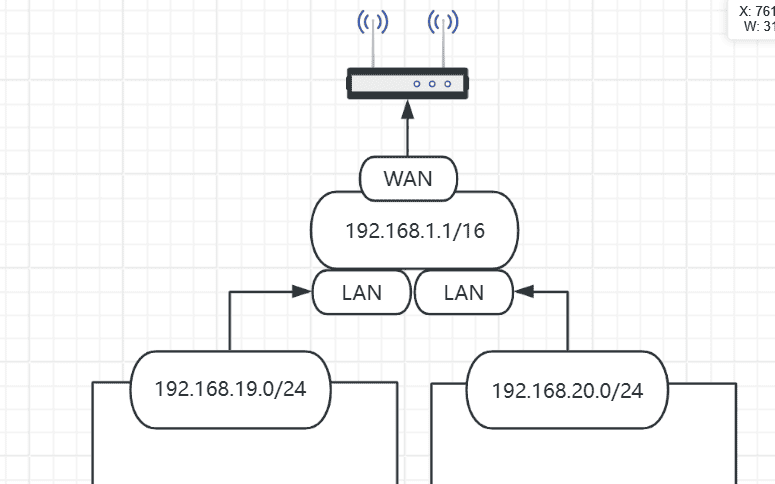
4.子网划分

© 版权声明
文章版权归作者所有,未经允许请勿转载。
相关文章





暂无评论...