“老板要今晚上线,运维只剩一杯咖啡的时间。”——收藏这篇,10 分钟交卷。
01 先瞄一眼拓扑
(把下图保存到手机,随时查)
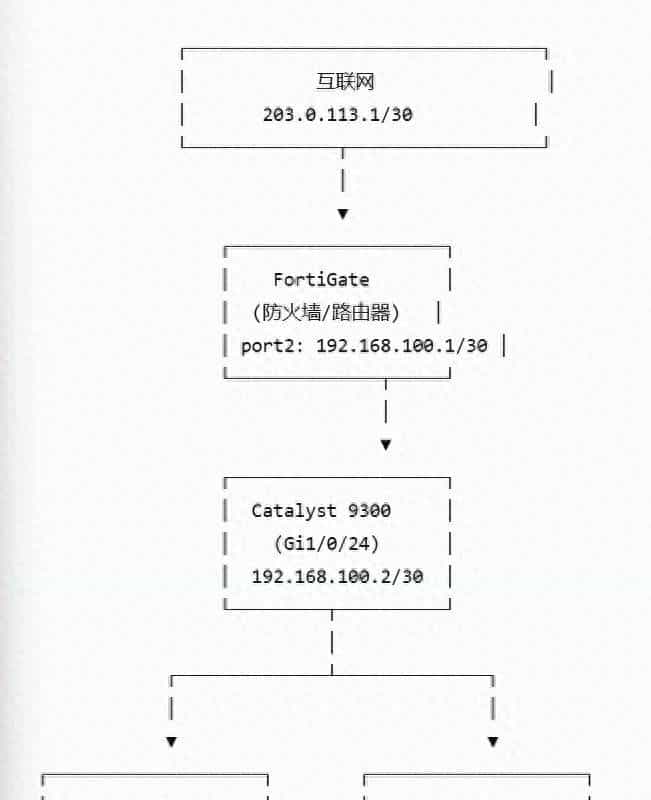
目标:
✅ 内网 VLAN 能上网
✅ 防火墙做 NAT + 策略控制
✅ 动态路由(OSPF)自动收敛,告别 static 地狱
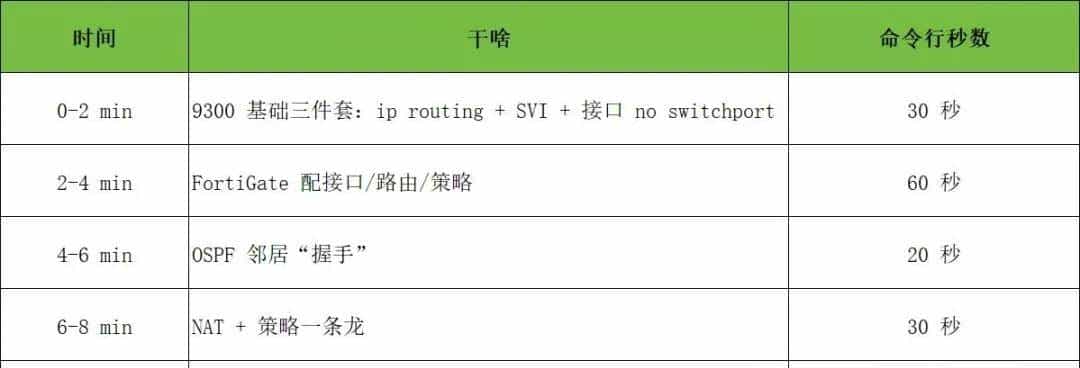
02 时间轴——10 分钟上线表
03 9300 侧配置(复制即可)
! ① 开三层
ip routing
! ② 接防火墙的口变路由口
interface GigabitEthernet1/0/24
no switchport
ip address 192.168.100.2 255.255.255.252
no shutdown
! ③ 两个 SVI
interface Vlan10
ip address 192.168.10.1 255.255.255.0
interface Vlan20
ip address 192.168.20.1 255.255.255.0
! ④ OSPF 一波带走
router ospf 1
router-id 192.168.100.2
network 192.168.10.0 0.0.0.255 area 0
network 192.168.20.0 0.0.0.255 area 0
network 192.168.100.0 0.0.0.3 area 0
04 FortiGate 侧配置(Web + CLI 双版本)
1.接口
- port2(inside)
IP 192.168.100.1/30
Administrative Access 勾选 ping、https(调试用)
- port1(outside)
IP 203.0.113.2/30
Gateway 203.0.113.1
2.CLI 补两条回程(防止 Web 漏点)
config router static
edit 1
set dst 192.168.10.0 255.255.255.0
set gateway 192.168.100.2
next
edit 2
set dst 192.168.20.0 255.255.255.0
set gateway 192.168.100.2
end
3.OSPF 邻居
config router ospf
set router-id 192.168.100.1
config area
edit 0.0.0.0
next
end
config network
edit 1
set prefix 192.168.100.0 255.255.255.252
next
edit 2
set prefix 192.168.10.0 255.255.255.0
next
edit 3
set prefix 192.168.20.0 255.255.255.0
next
end
end
顺手把default-information-originate 勾上,下行就能收到 0.0.0.0/0,省一条静态!
4.策略+ NAT(一条搞定)
config firewall policy
edit 0
set name "inside->outside"
set srcintf port2
set dstintf port1
set srcaddr all
set dstaddr all
set schedule always
set service ALL
set nat enable
next
end
想再细?把all 换成内网地址对象即可。
05 验证 —— 三句话
- 9300# show ip ospf neighbor —— 看到 192.168.100.1 FULL/DR
- FortiGate# get router info routing-table —— 收到 192.168.10.0/20 的路由
- PC ping 8.8.8.8 —— 通!微信发图不卡顿。
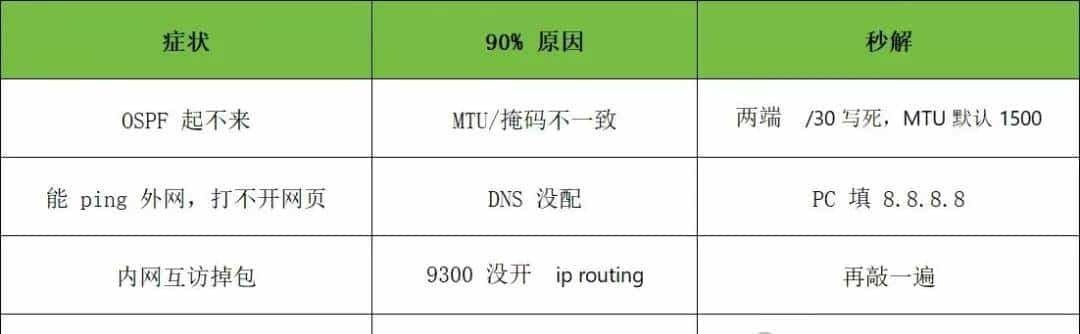
06 常见踩坑 & 秒解
07 一句话总结
“三层交换机跑 VLAN + OSPF,防火墙只做两件事:收默认路由、放策略+NAT。”——记住这句,后来任何品牌都能 5 分钟抄作业。
彩蛋
把本文转发到朋友圈,集齐30 个赞,私信我送《Cisco × Fortinet 拓扑 Visio 模板》,下次画拓扑直接拖图标!
© 版权声明
文章版权归作者所有,未经允许请勿转载。
相关文章



暂无评论...