前言
最近有点空余时间,所以,就研究了一下APP支付。前面很早就搞完APP的微信支付了,但是由于时间上和应用上的情况,支付宝一直没空去研究。然后等我空了的时候,发现支付宝居然升级了支付逻辑,虽然目前还兼容老的方法,但是新的既然出来了,肯定研究新的了。但是网上几乎都是旧的方法,所以,唯有自己看官方的文档,慢慢一步一步研究了。在研究的过程中,发现,他跟微信支付的差别蛮大的。好了废话不多说了,下面直接来干货。
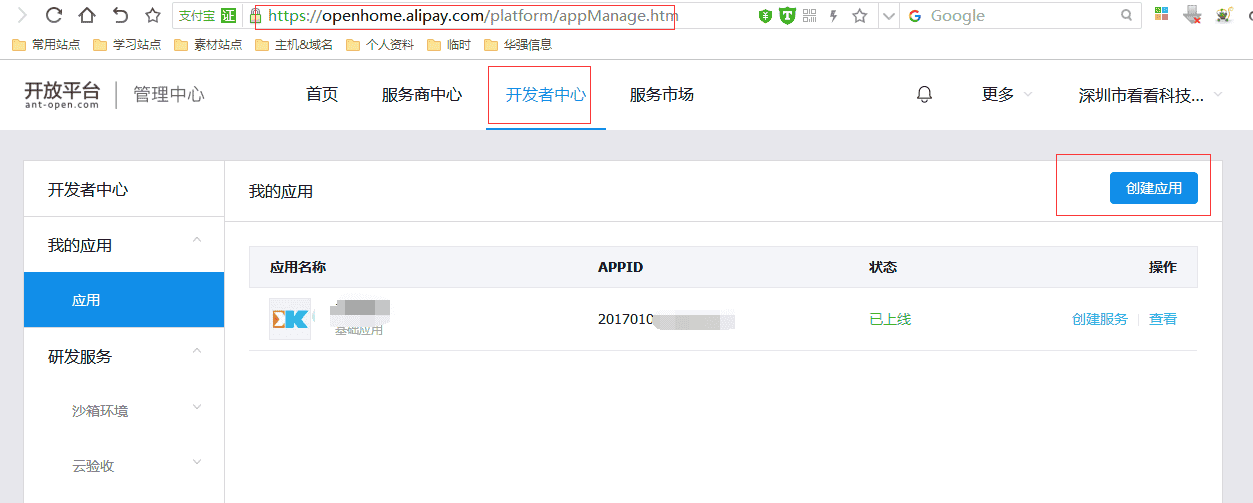
首先,你得去蚂蚁金服开放平台申请一个应用,地址:https://openhome.alipay.com注册一个应用,如下图:
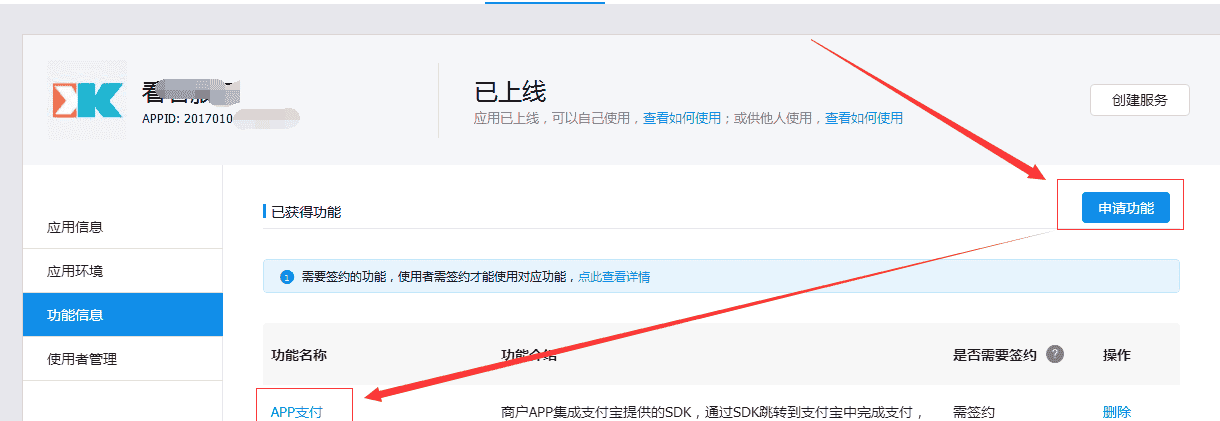
应用申请下来之后,需要申请功能,我们这里用到的是“APP支付”功能。如下图:
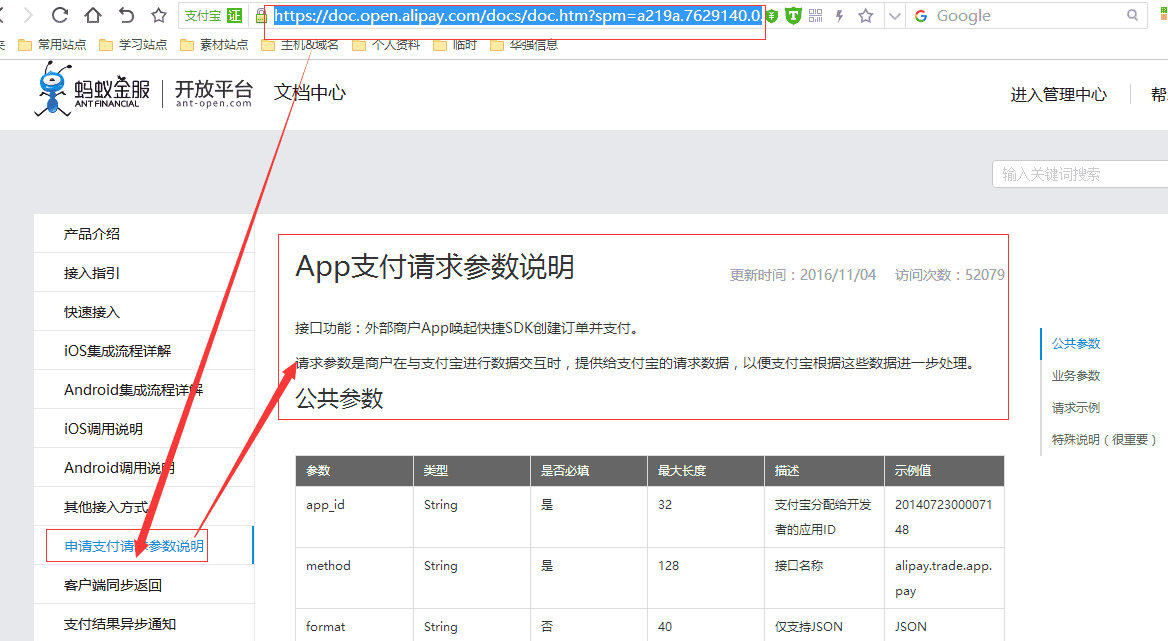
如果需要查看相关的文档,那就点击“APP支付”就可以跳转到相关的文档,这里我直接给出APP需要看到的文档,地址:
https://doc.open.alipay.com/docs/doc.htm?spm=a219a.7629140.0.0.J9S7XU&treeId=204&articleId=105465&docType=1
如下图:
我们在编写服务端的时候,需要用到两个参数,一个是APPID,这个上面的图里面有,还有一个就是密钥,这个是通过签名工具生成,可以通过下面这个地址下载工具,然后生成,地址:
https://doc.open.alipay.com/doc2/detail.htm?treeId=200&articleId=105351&docType=1
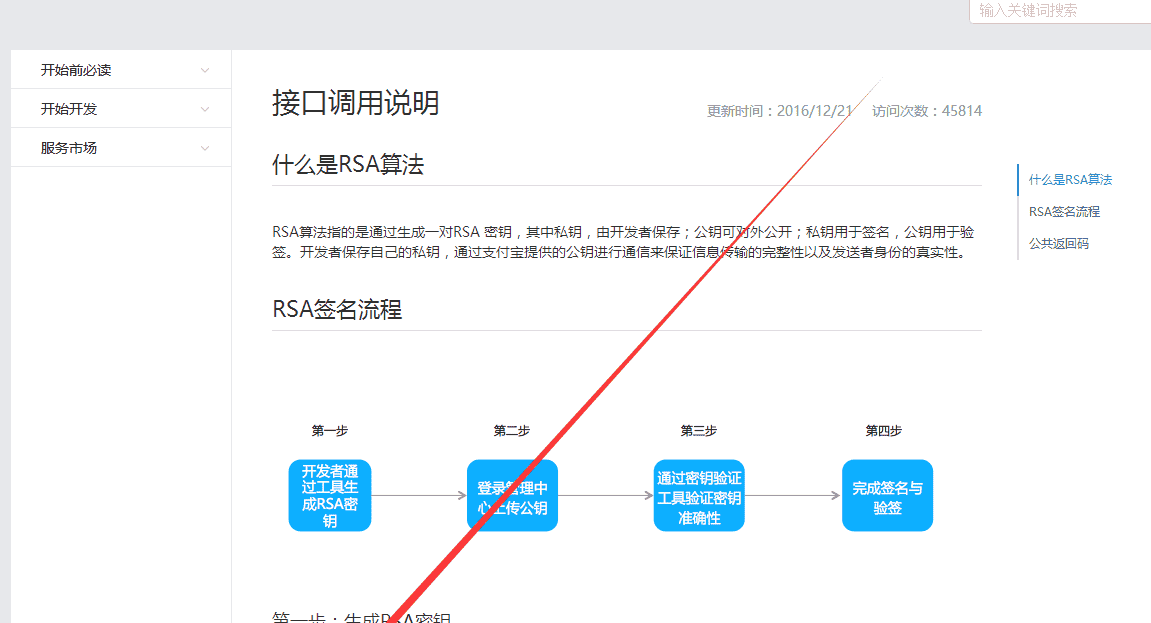
下载这个工具,然后解压,双击“
支付宝RAS密钥生成器SHAwithRSA1024_V1.0.bat
”生成即可,这里要注意:
TIPS:
工具不支持含中文或空格的路径,请下载到英文目录下使用。
打开工具后,如下图:
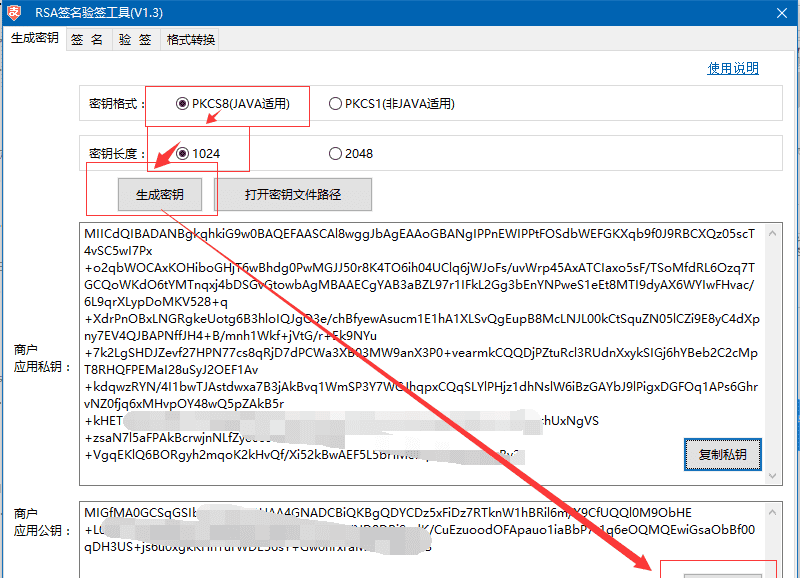
先“生成密钥”,然后再复制公钥,然后把公钥复制到平台,如下图:
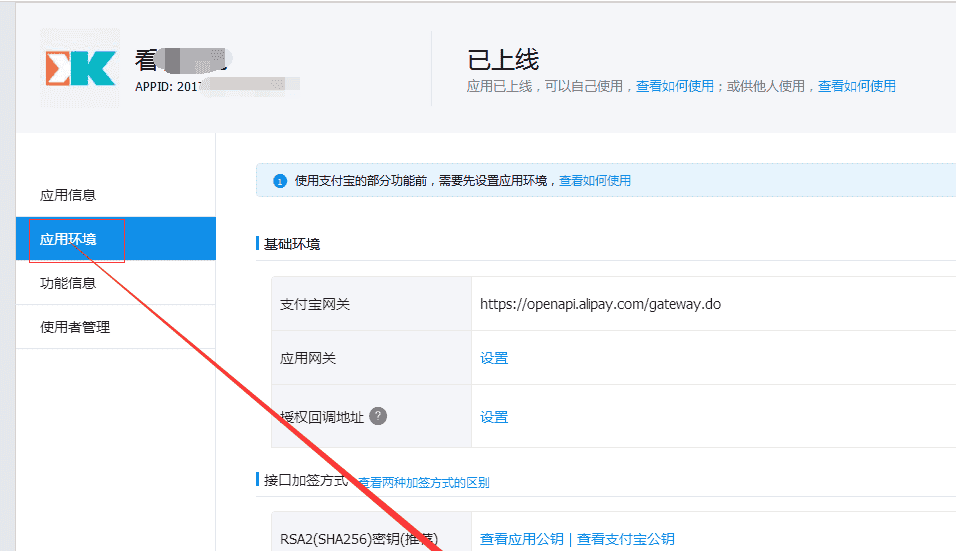
再保存,如下图:
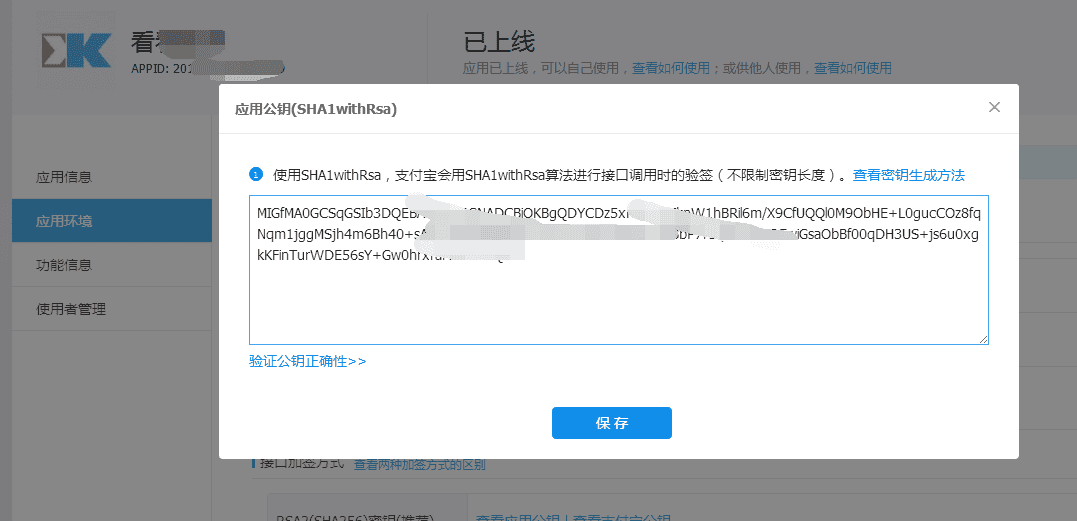
然后再验证公钥的正确性,这里,可以写个小工具来验证,方法如下:
/// <summary>
/// 测试公钥是否对
/// </summary>
/// <returns></returns>
public string testsign()
{
string privtekey = Config.privtekey;//这个就是生成器里面的那个私钥,第一个大框框那里的.
string data = “a=123”;//平台上提供的串
string sign = RSAFromPkcs8.sign(data, privtekey, “utf-8”);
return sign;
}
然后再把这个sign的值,复制出来,然后再点击“验证公钥正确性”,如下图:
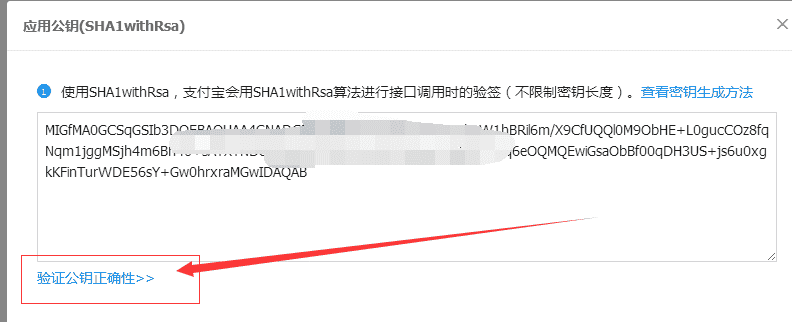
然后输入你的“sign”的值:
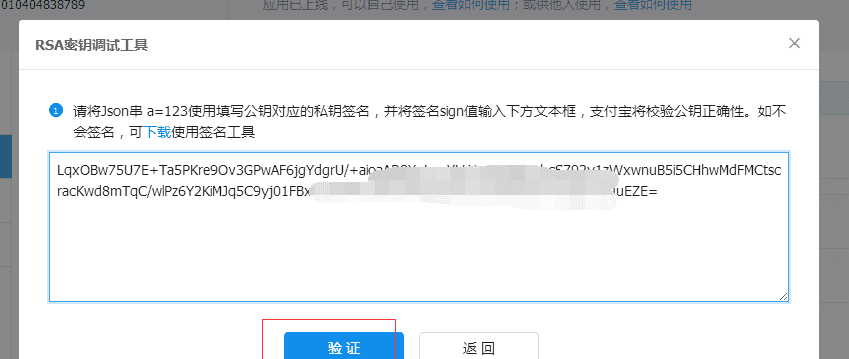
点击“验证”后,如果提示验证通过,那么你这个签名的方式就是对了,如下图:
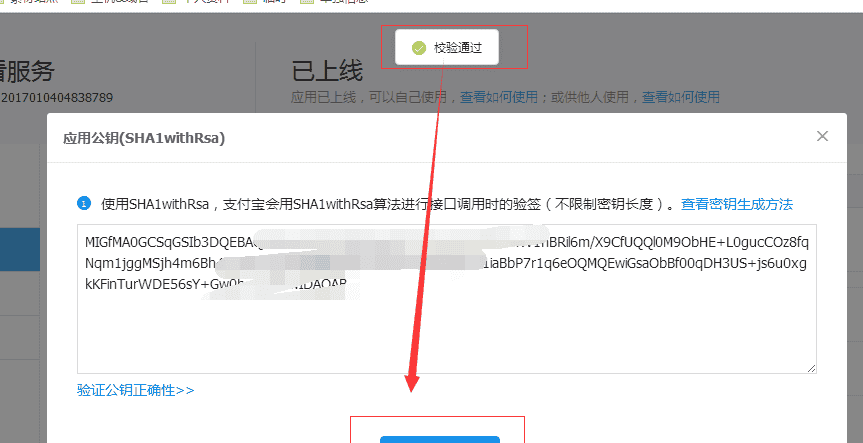
再点击“保存”即可。
接下来,我就写一下服务端生成相应的串的方法,全部贴出来,方便大家模仿吧,其实大家按照下面这个图,慢慢研究,也可以的,如下图:
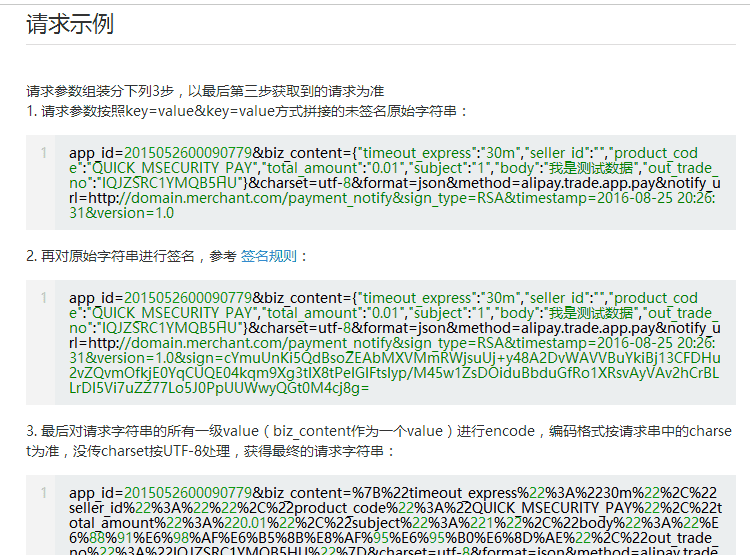
最后,我们要给回到APP的参数是这个,只要我们按照规则返回即可。下面,我把方法贴出:
public class AliPayController : Controller
{
public Dictionary<string, string> PayInfo = new Dictionary<string, string>();
//
// GET: /AliPay/
public ActionResult Index()
{
testsign();
GetPayInfo(“0.01”);
return View();
}
/// <summary>
/// 测试公钥是否对
/// </summary>
/// <returns></returns>
public string testsign()
{
string privtekey = Config.privtekey;//这个就是生成器里面的那个私钥,第一个大框框那里的.
string data = “a=123”;//平台上提供的串
string sign = RSAFromPkcs8.sign(data, privtekey, “utf-8″);
return sign;
}
/// <summary>
/// 获取支付信息
/// </summary>
/// <param name=”_amount”></param>
/// <returns></returns>
public string GetPayInfo(string _amount)//_amount:付款金额
{
string strJson = string.Empty;
try
{
string orderInfo = GetOrderInfoWithOutEncode(_amount);
// 对订单做RSA 签名
string sign = RSAFromPkcs8.sign(orderInfo, Config.privtekey, “utf-8”);
//仅需对sign做URL编码
sign = HttpUtility.UrlEncode(sign, Encoding.UTF8);
string payInfo = GetOrderInfoWithEncode() + “&sign=” + sign;
strJson = payInfo.Replace(“+”, “%20”);//日期那里会有一个空格(2017-01-05 11:11:11)转化为+,所以这里要替换一下
FileLog.WriteLog(“支付宝串:” + strJson);
}
catch (Exception ex)
{
FileLog.WriteLog(ex.ToString());
}
return strJson;
}
/// <summary>
/// 不包含Encode的字符串拼接
/// </summary>
/// <param name=”price”></param>
/// <returns></returns>
public string GetOrderInfoWithOutEncode(string price)
{
PayInfo.Add(“app_id”, Config.app_id);
PayInfo.Add(“biz_content”, GetBizContent(price));
PayInfo.Add(“charset”, “utf-8”);
PayInfo.Add(“format”, “json”);
PayInfo.Add(“method”, “alipay.trade.app.pay”);
PayInfo.Add(“notify_url”, “http://wxpay.lmx.ren/ResultNotify”);
PayInfo.Add(“sign_type”, “RSA”);
PayInfo.Add(“timestamp”, DateTime.Now.ToString(“yyyy-MM-dd HH:mm:ss”));
PayInfo.Add(“version”, “1.0”);
string strUrl = BuildQueryWithOutEncode(PayInfo);
return strUrl;
}
/// <summary>
/// 包含Encode的字符串拼接
/// </summary>
/// <param name=”price”></param>
/// <returns></returns>
public string GetOrderInfoWithEncode()
{
string strUrl = BuildQuery(PayInfo, “utf-8″);
return strUrl;
}
/// <summary>
/// 获取支付内容详情
/// </summary>
/// <param name=”total_amount”></param>
/// <returns></returns>
public string GetBizContent(string total_amount)
{
Dictionary<string, string> biz_content_info = new Dictionary<string, string>();
biz_content_info.Add(“timeout_express”, “30m”);//该笔订单允许的最晚付款时间,逾期将关闭交易。
biz_content_info.Add(“seller_id”, “”);//收款支付宝用户ID。 如果该值为空,则默认为商户签约账号对应的支付宝用户ID
biz_content_info.Add(“product_code”, “QUICK_MSECURITY_PAY”);//销售产品码,商家和支付宝签约的产品码,为固定值QUICK_MSECURITY_PAY
biz_content_info.Add(“total_amount”, “0.01”);//订单总金额,单位为元,精确到小数点后两位,取值范围[0.01,100000000]
biz_content_info.Add(“subject”, “Iphone7 128G”);//商品的标题/交易标题/订单标题/订单关键字等。
biz_content_info.Add(“body”, “最新款的手机啦”);//对一笔交易的具体描述信息。如果是多种商品,请将商品描述字符串累加传给body。
biz_content_info.Add(“out_trade_no”, DateTime.Now.ToString(“yyyyMMddHHmmssffffff”));//商户网站唯一订单号
string strBizContent = JsonHelper.Serialize(biz_content_info);
return strBizContent;
}
/// <summary>
/// 组装普通文本请求参数(带Encode)。
/// </summary>
/// <param name=”parameters”>Key-Value形式请求参数字典</param>
/// <returns>URL编码后的请求数据</returns>
public static string BuildQuery(IDictionary<string, string> parameters, string charset)
{
StringBuilder postData = new StringBuilder();
bool hasParam = false;
IEnumerator<KeyValuePair<string, string>> dem = parameters.GetEnumerator();
while (dem.MoveNext())
{
string name = dem.Current.Key;
string value = dem.Current.Value;
// 忽略参数名或参数值为空的参数
if (!string.IsNullOrEmpty(name) && !string.IsNullOrEmpty(value))
{
if (hasParam)
{
postData.Append(“&”);
}
postData.Append(name);
postData.Append(“=”);
string encodedValue = HttpUtility.UrlEncode(value, Encoding.GetEncoding(charset));
postData.Append(encodedValue);
hasParam = true;
}
}
return postData.ToString();
}
/// <summary>
/// 组装普通文本请求参数(不带Encode)。
/// </summary>
/// <param name=”parameters”>Key-Value形式请求参数字典</param>
/// <returns>URL编码后的请求数据</returns>
public static string BuildQueryWithOutEncode(IDictionary<string, string> parameters)
{
StringBuilder postData = new StringBuilder();
bool hasParam = false;
IEnumerator<KeyValuePair<string, string>> dem = parameters.GetEnumerator();
while (dem.MoveNext())
{
string name = dem.Current.Key;
string value = dem.Current.Value;
// 忽略参数名或参数值为空的参数
if (!string.IsNullOrEmpty(name) && !string.IsNullOrEmpty(value))
{
if (hasParam)
{
postData.Append(“&”);
}
postData.Append(name);
postData.Append(“=”);
string encodedValue = value;
postData.Append(encodedValue);
hasParam = true;
}
}
return postData.ToString();
}
/// <summary>
/// 配置(请自行填上下面两个参数)
/// </summary>
public class Config
{
/// <summary>
/// 应用APPID
/// </summary>
public const string app_id = “”;
/// <summary>
/// 私钥,通过工具生成
/// </summary>
public const string privtekey = “”;
}
}
然后还有一个签名的文件,代码如下:
/// <summary>
/// 类名:RSAFromPkcs8
/// 功能:RSA解密、签名、验签
/// 详细:该类对Java生成的密钥进行解密和签名以及验签专用类,不需要修改
/// 版本:2.0
/// 修改日期:2011-05-10
/// 说明:
/// 以下代码只是为了方便商户测试而提供的样例代码,商户可以根据自己网站的需要,按照技术文档编写,并非一定要使用该代码。
/// 该代码仅供学习和研究支付宝接口使用,只是提供一个参考。
/// </summary>
public sealed class RSAFromPkcs8
{
/// <summary>
/// 签名
/// </summary>
/// <param name=”content”>需要签名的内容</param>
/// <param name=”privateKey”>私钥</param>
/// <param name=”input_charset”>编码格式</param>
/// <returns></returns>
public static string sign(string content, string privateKey, string input_charset)
{
Encoding code = Encoding.GetEncoding(input_charset);
byte[] Data = code.GetBytes(content);
RSACryptoServiceProvider rsa = DecodePemPrivateKey(privateKey);
SHA1 sh = new SHA1CryptoServiceProvider();
byte[] signData = rsa.SignData(Data, sh);
return Convert.ToBase64String(signData);
}
/// <summary>
/// 验证签名
/// </summary>
/// <param name=”content”>需要验证的内容</param>
/// <param name=”signedString”>签名结果</param>
/// <param name=”publicKey”>公钥</param>
/// <param name=”input_charset”>编码格式</param>
/// <returns></returns>
public static bool verify(string content, string signedString, string publicKey, string input_charset)
{
bool result = false;
Encoding code = Encoding.GetEncoding(input_charset);
byte[] Data = code.GetBytes(content);
byte[] data = Convert.FromBase64String(signedString);
RSAParameters paraPub = ConvertFromPublicKey(publicKey);
RSACryptoServiceProvider rsaPub = new RSACryptoServiceProvider();
rsaPub.ImportParameters(paraPub);
SHA1 sh = new SHA1CryptoServiceProvider();
result = rsaPub.VerifyData(Data, sh, data);
return result;
}
/// <summary>
/// 用RSA解密
/// </summary>
/// <param name=”resData”>待解密字符串</param>
/// <param name=”privateKey”>私钥</param>
/// <param name=”input_charset”>编码格式</param>
/// <returns>解密结果</returns>
public static string decryptData(string resData, string privateKey, string input_charset)
{
byte[] DataToDecrypt = Convert.FromBase64String(resData);
List<byte> result = new List<byte>();
for (int j = 0; j < DataToDecrypt.Length / 128; j++)
{
byte[] buf = new byte[128];
for (int i = 0; i < 128; i++)
{
buf[i] = DataToDecrypt[i + 128 * j];
}
result.AddRange(decrypt(buf, privateKey, input_charset));
}
byte[] source = result.ToArray();
char[] asciiChars = new char[Encoding.GetEncoding(input_charset).GetCharCount(source, 0, source.Length)];
Encoding.GetEncoding(input_charset).GetChars(source, 0, source.Length, asciiChars, 0);
return new string(asciiChars);
}
private static byte[] decrypt(byte[] data, string privateKey, string input_charset)
{
RSACryptoServiceProvider rsa = DecodePemPrivateKey(privateKey);
SHA1 sh = new SHA1CryptoServiceProvider();
return rsa.Decrypt(data, false);
}
/// <summary>
/// 解析java生成的pem文件私钥
/// </summary>
/// <param name=”pemstr”></param>
/// <returns></returns>
private static RSACryptoServiceProvider DecodePemPrivateKey(String pemstr)
{
byte[] pkcs8privatekey;
pkcs8privatekey = Convert.FromBase64String(pemstr);
if (pkcs8privatekey != null)
{
RSACryptoServiceProvider rsa = DecodePrivateKeyInfo(pkcs8privatekey);
return rsa;
}
else
return null;
}
private static RSACryptoServiceProvider DecodePrivateKeyInfo(byte[] pkcs8)
{
byte[] SeqOID = { 0x30, 0x0D, 0x06, 0x09, 0x2A, 0x86, 0x48, 0x86, 0xF7, 0x0D, 0x01, 0x01, 0x01, 0x05, 0x00 };
byte[] seq = new byte[15];
MemoryStream mem = new MemoryStream(pkcs8);
int lenstream = (int)mem.Length;
BinaryReader binr = new BinaryReader(mem); //wrap Memory Stream with BinaryReader for easy reading
byte bt = 0;
ushort twobytes = 0;
try
{
twobytes = binr.ReadUInt16();
if (twobytes == 0x8130) //data read as little endian order (actual data order for Sequence is 30 81)
binr.ReadByte(); //advance 1 byte
else if (twobytes == 0x8230)
binr.ReadInt16(); //advance 2 bytes
else
return null;
bt = binr.ReadByte();
if (bt != 0x02)
return null;
twobytes = binr.ReadUInt16();
if (twobytes != 0x0001)
return null;
seq = binr.ReadBytes(15); //read the Sequence OID
if (!CompareBytearrays(seq, SeqOID)) //make sure Sequence for OID is correct
return null;
bt = binr.ReadByte();
if (bt != 0x04) //expect an Octet string
return null;
bt = binr.ReadByte(); //read next byte, or next 2 bytes is 0x81 or 0x82; otherwise bt is the byte count
if (bt == 0x81)
binr.ReadByte();
else
if (bt == 0x82)
binr.ReadUInt16();
//—— at this stage, the remaining sequence should be the RSA private key
byte[] rsaprivkey = binr.ReadBytes((int)(lenstream – mem.Position));
RSACryptoServiceProvider rsacsp = DecodeRSAPrivateKey(rsaprivkey);
return rsacsp;
}
catch (Exception)
{
return null;
}
finally { binr.Close(); }
}
private static bool CompareBytearrays(byte[] a, byte[] b)
{
if (a.Length != b.Length)
return false;
int i = 0;
foreach (byte c in a)
{
if (c != b[i])
return false;
i++;
}
return true;
}
private static RSACryptoServiceProvider DecodeRSAPrivateKey(byte[] privkey)
{
byte[] MODULUS, E, D, P, Q, DP, DQ, IQ;
// ——— Set up stream to decode the asn.1 encoded RSA private key ——
MemoryStream mem = new MemoryStream(privkey);
BinaryReader binr = new BinaryReader(mem); //wrap Memory Stream with BinaryReader for easy reading
byte bt = 0;
ushort twobytes = 0;
int elems = 0;
try
{
twobytes = binr.ReadUInt16();
if (twobytes == 0x8130) //data read as little endian order (actual data order for Sequence is 30 81)
binr.ReadByte(); //advance 1 byte
else if (twobytes == 0x8230)
binr.ReadInt16(); //advance 2 bytes
else
return null;
twobytes = binr.ReadUInt16();
if (twobytes != 0x0102) //version number
return null;
bt = binr.ReadByte();
if (bt != 0x00)
return null;
//—— all private key components are Integer sequences —-
elems = GetIntegerSize(binr);
MODULUS = binr.ReadBytes(elems);
elems = GetIntegerSize(binr);
E = binr.ReadBytes(elems);
elems = GetIntegerSize(binr);
D = binr.ReadBytes(elems);
elems = GetIntegerSize(binr);
P = binr.ReadBytes(elems);
elems = GetIntegerSize(binr);
Q = binr.ReadBytes(elems);
elems = GetIntegerSize(binr);
DP = binr.ReadBytes(elems);
elems = GetIntegerSize(binr);
DQ = binr.ReadBytes(elems);
elems = GetIntegerSize(binr);
IQ = binr.ReadBytes(elems);
// ——- create RSACryptoServiceProvider instance and initialize with public key —–
RSACryptoServiceProvider RSA = new RSACryptoServiceProvider();
RSAParameters RSAparams = new RSAParameters();
RSAparams.Modulus = MODULUS;
RSAparams.Exponent = E;
RSAparams.D = D;
RSAparams.P = P;
RSAparams.Q = Q;
RSAparams.DP = DP;
RSAparams.DQ = DQ;
RSAparams.InverseQ = IQ;
RSA.ImportParameters(RSAparams);
return RSA;
}
catch (Exception)
{
return null;
}
finally { binr.Close(); }
}
private static int GetIntegerSize(BinaryReader binr)
{
byte bt = 0;
byte lowbyte = 0x00;
byte highbyte = 0x00;
int count = 0;
bt = binr.ReadByte();
if (bt != 0x02) //expect integer
return 0;
bt = binr.ReadByte();
if (bt == 0x81)
count = binr.ReadByte(); // data size in next byte
else
if (bt == 0x82)
{
highbyte = binr.ReadByte(); // data size in next 2 bytes
lowbyte = binr.ReadByte();
byte[] modint = { lowbyte, highbyte, 0x00, 0x00 };
count = BitConverter.ToInt32(modint, 0);
}
else
{
count = bt; // we already have the data size
}
while (binr.ReadByte() == 0x00)
{ //remove high order zeros in data
count -= 1;
}
binr.BaseStream.Seek(-1, SeekOrigin.Current); //last ReadByte wasn't a removed zero, so back up a byte
return count;
}
#region 解析.net 生成的Pem
private static RSAParameters ConvertFromPublicKey(string pemFileConent)
{
byte[] keyData = Convert.FromBase64String(pemFileConent);
if (keyData.Length < 162)
{
throw new ArgumentException(“pem file content is incorrect.”);
}
byte[] pemModulus = new byte[128];
byte[] pemPublicExponent = new byte[3];
Array.Copy(keyData, 29, pemModulus, 0, 128);
Array.Copy(keyData, 159, pemPublicExponent, 0, 3);
RSAParameters para = new RSAParameters();
para.Modulus = pemModulus;
para.Exponent = pemPublicExponent;
return para;
}
private static RSAParameters ConvertFromPrivateKey(string pemFileConent)
{
byte[] keyData = Convert.FromBase64String(pemFileConent);
if (keyData.Length < 609)
{
throw new ArgumentException(“pem file content is incorrect.”);
}
int index = 11;
byte[] pemModulus = new byte[128];
Array.Copy(keyData, index, pemModulus, 0, 128);
index += 128;
index += 2;//141
byte[] pemPublicExponent = new byte[3];
Array.Copy(keyData, index, pemPublicExponent, 0, 3);
index += 3;
index += 4;//148
byte[] pemPrivateExponent = new byte[128];
Array.Copy(keyData, index, pemPrivateExponent, 0, 128);
index += 128;
index += ((int)keyData[index + 1] == 64 ? 2 : 3);//279
byte[] pemPrime1 = new byte[64];
Array.Copy(keyData, index, pemPrime1, 0, 64);
index += 64;
index += ((int)keyData[index + 1] == 64 ? 2 : 3);//346
byte[] pemPrime2 = new byte[64];
Array.Copy(keyData, index, pemPrime2, 0, 64);
index += 64;
index += ((int)keyData[index + 1] == 64 ? 2 : 3);//412/413
byte[] pemExponent1 = new byte[64];
Array.Copy(keyData, index, pemExponent1, 0, 64);
index += 64;
index += ((int)keyData[index + 1] == 64 ? 2 : 3);//479/480
byte[] pemExponent2 = new byte[64];
Array.Copy(keyData, index, pemExponent2, 0, 64);
index += 64;
index += ((int)keyData[index + 1] == 64 ? 2 : 3);//545/546
byte[] pemCoefficient = new byte[64];
Array.Copy(keyData, index, pemCoefficient, 0, 64);
RSAParameters para = new RSAParameters();
para.Modulus = pemModulus;
para.Exponent = pemPublicExponent;
para.D = pemPrivateExponent;
para.P = pemPrime1;
para.Q = pemPrime2;
para.DP = pemExponent1;
para.DQ = pemExponent2;
para.InverseQ = pemCoefficient;
return para;
}
#endregion
}
服务端的完整代码就如上了。
下面我吧HBuilder里面的代码也写一下,就是选择好“支付宝”之后,执行的代码是:
plus.nativeUI.showWaiting();
mui.post(“http://wxpay.lmx.ren/AliPay/GetPayInfo”, {
_amount: 0.01
}, function(data) {
plus.nativeUI.closeWaiting();
if (data) {
plus.payment.request(payChanel, data, function(result) {
console.log(JSON.stringify(result));
mui.alert(JSON.stringify(result), title);
mui.alert(“付费成功”, title);
}, function(e) {
console.log(JSON.stringify(e));
alert(JSON.stringify(e));
mui.alert(“付费失败”, title);
});
} else {
plus.nativeUI.alert(“支付失败”);
}
});
好了,就是如此简单。下面贴几张成功的图片,方便大家预览。
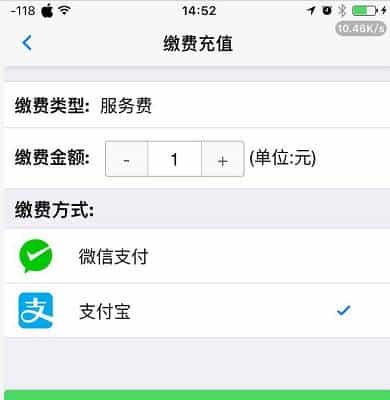
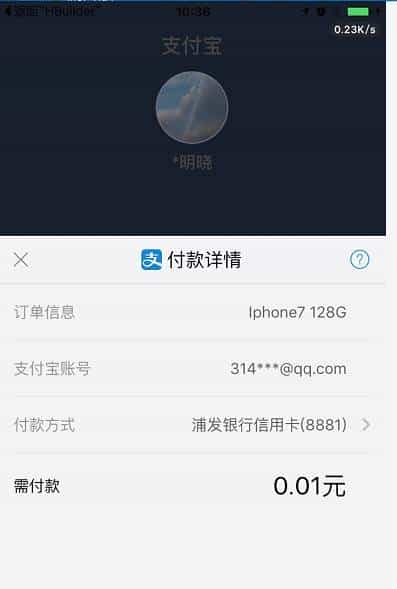
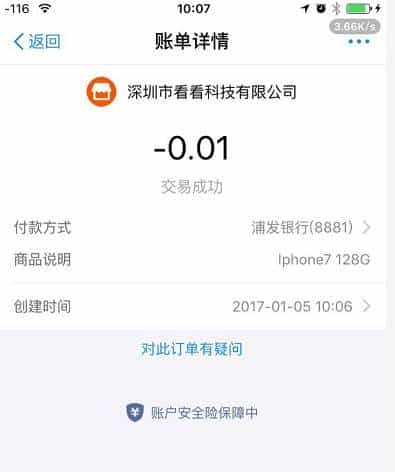
好了,这次教程到此结束。如果代码有漏的,回复评论,我会上来看。如果需要讨论的,加群讨论,QQ个人好友已满,加不了了,抱歉。
到这里,就大功告成啦,接下来的东西,就由大家自己去展开拓展了,本次经验分享到此结束,写过博客的人都知道,好好写一个博客,需要自己从头重新走一遍代码,所以,各种辛苦,只有自己能体会。所以您如果觉得写得不错,或者对你有帮助,请点“
好文要顶
”或者“
关注我
”,顺带也可以评论一两句,大家互相交流交流,
转载请保留原作者地址以及姓名
。
我新建一个QQ群,如果有问题,可以在群里提。如果合适,也会根据大家提的比较多的问题,来写篇博文,帮助更多的人,群号:275523437
点击链接加入群【.Net,MVC,EasyUI,MUI,Html,JS】:
http://jq.qq.com/?_wv=1027&k=2A0RbLd
(如果有私活,或者一起合作的,也可以私信找我呀,嘿嘿);
作者:南宫萧尘
E-mail:314791147@qq.com
QQ:314791147
日期:2017-01-05
需要实时测试的,可以关注公众号,测试相关功能(根据实际情况,可能会不定时更新程序,如果需要最新程序的,可以加群联系,QQ群号在上面):

【原创分享·微信支付】C# 微信支付教程系列之现金红包
【原创分享·微信支付】 C# MVC 微信支付教程系列之扫码支付
【原创分享·微信支付】 C# MVC 微信支付教程系列之公众号支付
【原创分享·微信支付】C# MVC 微信支付之微信模板消息推送
【原创分享·支付宝支付】HBuilder打包APP调用支付宝客户端支付
© 版权声明
文章版权归作者所有,未经允许请勿转载。
相关文章



暂无评论...