Spring Boot集成Redis Stream消息队列:从入门到实战
在现代分布式系统中,消息队列是实现系统解耦、异步处理和流量削峰的重要组件。Redis Stream作为Redis 5.0引入的新数据类型,提供了完整的消息队列功能,成为轻量级消息中间件的优秀选择。
前言
早期我使用 redis pubsub 的方式实现了消息订阅,但是在使用过程,发现如果部署多实例将会重复处理消息事件,导致业务重复处理的情况。
根本原因是 redis pubsub 都是直接广播,无法控制多实例重复订阅消息的情况。
为了解决这个问题,则需要改动 Redis Stream 的方式来构建消息队列。
以下我分别三个案例逐步实践,达到一个可以适应生产环境要求的成熟方案:
简单使用 StringRedisTemplate 构建一个消费队列使用 StringRedisTemplate 构建多个消费队列使用 RedissonClient 构建多个消费队列,包含消费队列的运维监控、消费队列查询/重置 等功能
一、Redis Stream简介与核心特性
Redis Stream是Redis 5.0版本专门为消息队列场景设计的数据结构,它借鉴了Kafka的设计理念,提供了消息持久化、消费者组和消息确认机制等核心功能。
Redis Stream核心优势
高性能:基于内存操作,吞吐量高持久化:消息可持久化保存,支持RDB和AOF消费者组:支持多消费者负载均衡,确保消息不被重复消费阻塞操作:支持类似Kafka的长轮询机制
Redis Stream基础操作示例
1. 添加消息到Stream
# 自动生成消息ID
XADD mystream * name "订单创建" order_id "1001" amount "299.99"

# 限制Stream最大长度(保留最新1000条消息)
XADD mystream MAXLEN 1000 * name "订单支付" order_id "1001"
2. 查询消息
# 查询所有消息
XRANGE mystream - +

# 分页查询,每次返回10条
XRANGE mystream - + COUNT 10

# 反向查询(从新到旧)
XREVRANGE mystream + - COUNT 5
3. 监控新消息
# 阻塞监听新消息(0表示不超时)
XREAD BLOCK 0 STREAMS mystream $
二、Spring Boot 简单集成案例
1. 添加依赖
<parent>
    <groupId>org.springframework.boot</groupId>
    <artifactId>spring-boot-starter-parent</artifactId>
    <version>2.7.18</version>
    <relativePath/> <!-- lookup parent from repository -->
</parent>

<dependencies>
    <dependency>
        <groupId>org.springframework.boot</groupId>
        <artifactId>spring-boot-starter-data-redis</artifactId>
    </dependency>
    <dependency>
        <groupId>org.apache.commons</groupId>
        <artifactId>commons-pool2</artifactId>
    </dependency>
</dependencies>
2. 配置文件
# redis 配置
spring:
  redis:
    host: localhost
    port: 6379
    database: 0
    lettuce:
      pool:
        max-active: 8
        max-wait: -1
        max-idle: 8
        min-idle: 0

# redis stream 消费组配置
app:
  stream:
    key: "order_stream"
    group: "order_group"
3. 消息生产者服务
package com.lijw.mp.event;

import lombok.extern.slf4j.Slf4j;
import org.springframework.beans.factory.annotation.Autowired;
import org.springframework.beans.factory.annotation.Value;
import org.springframework.data.redis.connection.stream.RecordId;
import org.springframework.data.redis.core.StringRedisTemplate;
import org.springframework.stereotype.Service;

import java.util.Map;
import java.util.UUID;

@Service
@Slf4j
public class MessageProducerService {

    @Autowired
    private StringRedisTemplate stringRedisTemplate;

    @Value("${app.stream.key}")
    private String streamKey;

    /**
     * 发送消息到Redis Stream
     */
    public String sendMessage(String messageType, Map<String, String> data) {
        try {
            // 添加消息类型和时间戳
            data.put("messageType", messageType);
            data.put("timestamp", String.valueOf(System.currentTimeMillis()));
            data.put("messageId", UUID.randomUUID().toString());

            RecordId messageId = stringRedisTemplate.opsForStream()
                    .add(streamKey, data);

            log.info("消息发送成功: {}", messageId);
            return messageId.toString();
        } catch (Exception e) {
            log.error("消息发送失败: {}", e.getMessage());
            throw new RuntimeException("消息发送失败", e);
        }
    }
}
4. 消息消费者服务(支持幂等性)
package com.lijw.mp.event;

import lombok.extern.slf4j.Slf4j;
import org.springframework.beans.factory.annotation.Autowired;
import org.springframework.beans.factory.annotation.Value;
import org.springframework.data.redis.connection.stream.MapRecord;
import org.springframework.data.redis.core.StringRedisTemplate;
import org.springframework.data.redis.stream.StreamListener;
import org.springframework.stereotype.Component;

import java.time.Duration;
import java.util.Map;

@Component
@Slf4j
public class MessageConsumerService implements StreamListener<String, MapRecord<String, String, String>> {

    @Autowired
    private StringRedisTemplate stringRedisTemplate;

    @Value("${app.stream.group}")
    private String groupName;

    @Value("${app.stream.key}")
    private String streamKey;

    @Override
    public void onMessage(MapRecord<String, String, String> message) {
        String messageId = message.getId().toString();
        Map<String, String> messageBody = message.getValue();

        // 幂等性检查:防止重复处理[1](@ref)
        if (isMessageProcessed(messageId)) {
            log.info("消息已处理,跳过: {}", messageId);
            acknowledgeMessage(message);
            return;
        }

        try {
            log.info("消费者收到消息 - ID: {}, 内容: {}", messageId, messageBody);

            // 处理业务逻辑
            boolean processSuccess = processBusiness(messageBody);

            if (processSuccess) {
                // 标记消息已处理
                markMessageProcessed(messageId);
                // 清除重试次数
                clearRetryCount(messageId);
                // 手动确认消息
                acknowledgeMessage(message);
                log.info("消息处理完成: {}", messageId);
            } else {
                log.error("业务处理失败,消息将重试: {}", messageId);
                handleRetry(messageId, messageBody, message, "业务处理失败");
            }

        } catch (Exception e) {
            log.error("消息处理异常: {}", messageId, e);
            handleRetry(messageId, messageBody, message, "消息处理异常");
        }
    }

    /**
     * 幂等性检查
     */
    private boolean isMessageProcessed(String messageId) {
        // 使用Redis存储,判断redis是否已存在处理key,如果存在则说明消息已处理,确保多实例间幂等性
        return stringRedisTemplate.opsForValue().get("processed:" + messageId) != null;
    }

    /**
     * 标记消息已处理
     */
    private void markMessageProcessed(String messageId) {
        // 使用Redis存储事件处理ID,设置过期时间
        stringRedisTemplate.opsForValue().set("processed:" + messageId, "1",
                Duration.ofHours(24));
    }

    /**
     * 业务处理逻辑
     */
    private boolean processBusiness(Map<String, String> messageBody) {
        try {
            String messageType = messageBody.get("messageType");
            String orderId = messageBody.get("orderId");

            log.info("处理{}消息,订单ID: {}", messageType, orderId);

            // 模拟业务处理
            Thread.sleep(5000);

            return true;
        } catch (Exception e) {
            log.error("业务处理异常", e);
            return false;
        }
    }

    /**
     * 手动确认消息
     */
    private void acknowledgeMessage(MapRecord<String, String, String> message) {
        try {
            stringRedisTemplate.opsForStream()
                    .acknowledge(groupName, message);
        } catch (Exception e) {
            log.error("消息确认失败: {}", message.getId(), e);
        }
    }

    /**
     * 增加重试次数
     */
    private int incrementRetryCount(String messageId) {
        String retryKey = "retry:count:" + messageId;
        String countStr = stringRedisTemplate.opsForValue().get(retryKey);
        int retryCount = countStr == null ? 0 : Integer.parseInt(countStr);
        retryCount++;
        // 设置重试次数,过期时间为24小时
        stringRedisTemplate.opsForValue().set(retryKey, String.valueOf(retryCount), Duration.ofHours(24));
        return retryCount;
    }

    /**
     * 清除重试次数
     */
    private void clearRetryCount(String messageId) {
        String retryKey = "retry:count:" + messageId;
        stringRedisTemplate.delete(retryKey);
    }

    /**
     * 处理消息重试逻辑
     */
    private void handleRetry(String messageId, Map<String, String> messageBody,
                             MapRecord<String, String, String> message, String errorDescription) {
        // 记录重试次数
        int retryCount = incrementRetryCount(messageId);
        // 检查是否超过最大重试次数
        int maxRetryCount = 3; // 最大重试次数,可根据业务需求调整
        if (retryCount >= maxRetryCount) {
            log.error("消息{}重试次数已达上限({}),将停止重试并记录: {}", errorDescription, maxRetryCount, messageId);
            // 记录失败消息到死信队列或告警(可根据业务需求实现)
            handleMaxRetryExceeded(messageId, messageBody, retryCount);
            // 确认消息,避免无限重试
            acknowledgeMessage(message);
        } else {
            log.warn("消息{},当前重试次数: {}/{}, 消息ID: {}", errorDescription, retryCount, maxRetryCount, messageId);
            // 不确认消息,等待重试
        }
    }

    /**
     * 处理超过最大重试次数的消息
     */
    private void handleMaxRetryExceeded(String messageId, Map<String, String> messageBody, int retryCount) {
        try {
            // 记录失败消息详情(可根据业务需求实现,如存储到数据库、发送告警等)
            String failedKey = "failed:message:" + messageId;
            String failedInfo = String.format("消息ID: %s, 重试次数: %d, 消息内容: %s, 失败时间: %s",
                    messageId, retryCount, messageBody, System.currentTimeMillis());
            stringRedisTemplate.opsForValue().set(failedKey, failedInfo, Duration.ofDays(7));
            log.error("失败消息已记录: {}", failedInfo);
            // TODO: 可根据业务需求添加其他处理逻辑,如:
            // 1. 发送告警通知
            // 2. 存储到数据库死信表
            // 3. 发送到死信队列
        } catch (Exception e) {
            log.error("处理超过最大重试次数消息异常: {}", messageId, e);
        }
    }
}
5. 消费者容器配置(支持多实例负载均衡)
package com.lijw.mp.config.redisstream;

import com.lijw.mp.event.MessageConsumerService;
import lombok.extern.slf4j.Slf4j;
import org.springframework.beans.factory.annotation.Autowired;
import org.springframework.beans.factory.annotation.Value;
import org.springframework.boot.context.event.ApplicationReadyEvent;
import org.springframework.context.annotation.Bean;
import org.springframework.context.annotation.Configuration;
import org.springframework.context.event.EventListener;
import org.springframework.data.redis.connection.RedisConnectionFactory;
import org.springframework.data.redis.connection.stream.Consumer;
import org.springframework.data.redis.connection.stream.MapRecord;
import org.springframework.data.redis.connection.stream.ReadOffset;
import org.springframework.data.redis.connection.stream.StreamOffset;
import org.springframework.data.redis.core.StringRedisTemplate;
import org.springframework.data.redis.stream.StreamMessageListenerContainer;
import org.springframework.scheduling.concurrent.ThreadPoolTaskExecutor;

import java.net.InetAddress;
import java.time.Duration;
import java.lang.management.ManagementFactory;
import java.util.UUID;
import java.util.concurrent.ExecutorService;

@Configuration
@Slf4j
public class RedisStreamConfig {

    @Autowired
    private RedisConnectionFactory redisConnectionFactory;

    @Autowired
    private StringRedisTemplate stringRedisTemplate;

    @Value("${app.stream.key}")
    private String streamKey;

    @Value("${app.stream.group}")
    private String groupName;

    /**
     * 创建消费者组(如果不存在)
     */
    @EventListener(ApplicationReadyEvent.class)
    public void createConsumerGroup() {
        try {
            stringRedisTemplate.opsForStream()
                    .createGroup(streamKey, groupName);
            log.info("创建消费者组成功: {}", groupName);
        } catch (Exception e) {
            log.info("消费者组已存在: {}", e.getMessage());
        }
    }

    /**
     * 配置Stream消息监听容器
     */
    @Bean
    public StreamMessageListenerContainer<String, MapRecord<String, String, String>>
    streamMessageListenerContainer(MessageConsumerService messageConsumerService) {

        // 容器配置
        StreamMessageListenerContainer<String, MapRecord<String, String, String>> container =
                StreamMessageListenerContainer.create(redisConnectionFactory,
                        StreamMessageListenerContainer.StreamMessageListenerContainerOptions.builder()
                                .pollTimeout(Duration.ofSeconds(2))
                                .batchSize(10) // 批量处理提高性能
                                .executor(createThreadPool()) // 自定义线程池
                                .build());

        // 为每个实例生成唯一消费者名称
        String consumerName = generateUniqueConsumerName();

        // 配置消费偏移量
        StreamOffset<String> offset = StreamOffset.create(streamKey, ReadOffset.lastConsumed());

        // 创建消费者
        Consumer consumer = Consumer.from(groupName, consumerName);

        // 构建读取请求(手动确认模式)
        StreamMessageListenerContainer.StreamReadRequest<String> request =
                StreamMessageListenerContainer.StreamReadRequest.builder(offset)
                        .consumer(consumer)
                        .autoAcknowledge(false) // 手动确认确保可靠性[2](@ref)
                        .cancelOnError(e -> false) // 错误时不停止消费
                        .build();

        container.register(request, messageConsumerService);
        container.start();

        log.info("Redis Stream消费者启动成功 - 消费者名称: {}", consumerName);
        return container;
    }

    /**
     * 生成唯一消费者名称(支持多实例部署的关键)
     * 使用IP+进程ID确保集群环境下唯一性
     */
    private String generateUniqueConsumerName() {
        try {
            String hostAddress = InetAddress.getLocalHost().getHostAddress();
            String processId = ManagementFactory.getRuntimeMXBean().getName().split("@")[0];
            return hostAddress + "_" + processId + "_" + System.currentTimeMillis();
        } catch (Exception e) {
            //  fallback:使用UUID
            return "consumer_" + UUID.randomUUID().toString().substring(0, 8);
        }
    }

    /**
     * 创建专用线程池
     */
    private ExecutorService createThreadPool() {
        ThreadPoolTaskExecutor executor = new ThreadPoolTaskExecutor();
        executor.setCorePoolSize(2);
        executor.setMaxPoolSize(5);
        executor.setQueueCapacity(100);
        executor.setThreadNamePrefix("redis-stream-");
        executor.setDaemon(true);
        executor.initialize();
        return executor.getThreadPoolExecutor();
    }
}
6. 待处理消息重试机制
package com.lijw.mp.config.redisstream;

import lombok.extern.slf4j.Slf4j;
import org.springframework.beans.factory.annotation.Autowired;
import org.springframework.beans.factory.annotation.Value;
import org.springframework.data.redis.connection.stream.PendingMessage;
import org.springframework.data.redis.connection.stream.PendingMessages;
import org.springframework.data.redis.connection.stream.PendingMessagesSummary;
import org.springframework.data.redis.core.StringRedisTemplate;
import org.springframework.scheduling.annotation.Scheduled;
import org.springframework.stereotype.Component;

import java.time.Duration;

@Component
@Slf4j
public class PendingMessageRetryService {

    @Autowired
    private StringRedisTemplate stringRedisTemplate;

    @Value("${app.stream.key}")
    private String streamKey;

    @Value("${app.stream.group}")
    private String groupName;

    /**
     * 定时处理未确认的消息
     * 执行时机:每30秒执行一次(通过@Scheduled注解配置)
     */
    @Scheduled(fixedDelay = 30000) // 每30秒执行一次
    public void retryPendingMessages() {
        try {
            // 获取待处理消息摘要
            PendingMessagesSummary pendingSummary = stringRedisTemplate.opsForStream()
                    .pending(streamKey, groupName);

            if (pendingSummary != null) {
                log.info("检查待处理消息,消费者组: {}", groupName);

                // TODO: 根据Spring Data Redis版本,使用正确的API获取详细的pending消息列表
                // 例如:使用pendingRange方法或其他方法获取PendingMessages
                // 获取到PendingMessages后,调用processPendingMessages方法进行处理
                //
                // 示例调用(需要根据实际API调整):
                // PendingMessages pendingMessages = stringRedisTemplate.opsForStream()
                //         .pendingRange(streamKey, groupName, ...);
                // if (pendingMessages != null && pendingMessages.size() > 0) {
                //     processPendingMessages(pendingMessages);
                // }
            }
        } catch (Exception e) {
            log.error("处理待处理消息异常", e);
        }
    }

    /**
     * 处理待处理消息列表
     *
     * 执行时机:
     * 1. 由 retryPendingMessages() 定时任务调用(每30秒执行一次)
     * 2. 当 retryPendingMessages() 获取到 PendingMessages 列表后调用
     * 3. 用于处理Redis Stream中未被确认(ACK)的消息
     *
     * 处理逻辑:
     * - 遍历每条pending消息
     * - 记录消息ID和消费者名称
     * - 检查消息空闲时间,如果超过阈值则重新分配
     */
    private void processPendingMessages(PendingMessages pendingMessages) {
        pendingMessages.forEach(message -> {
            String messageId = message.getId().toString();
            String consumerName = message.getConsumerName();

            // 注意:根据Spring Data Redis版本,PendingMessage的API可能不同
            // 获取空闲时间的方法名可能是getIdleTimeMs()、getElapsedTimeMs()等
            // 这里提供基础框架,需要根据实际API调整

            log.info("处理待处理消息: {}, 消费者: {}", messageId, consumerName);

            // 如果消息空闲时间超过阈值(如5分钟),重新分配
            // 示例逻辑(需要根据实际API调整):
            // Duration idleTime = Duration.ofMillis(message.getIdleTimeMs());
            // if (idleTime.toMinutes() > 5) {
            //     log.info("重新分配超时消息: {}, 原消费者: {}, 空闲时间: {}分钟",
            //             messageId, consumerName, idleTime.toMinutes());
            //     // 可以使用XCLAIM命令将消息重新分配给其他消费者
            //     // stringRedisTemplate.opsForStream().claim(...);
            // }
        });
    }
}
7. REST控制器
package com.lijw.mp.controller;

import com.lijw.mp.event.MessageProducerService;
import lombok.extern.slf4j.Slf4j;
import org.springframework.beans.factory.annotation.Autowired;
import org.springframework.http.ResponseEntity;
import org.springframework.web.bind.annotation.*;

import java.util.HashMap;
import java.util.Map;

@RestController
@RequestMapping("/api/message")
@Slf4j
public class MessageController {

    @Autowired
    private MessageProducerService messageProducerService;

    @PostMapping("/send-order")
    public ResponseEntity<Map<String, Object>> sendOrderMessage(
            @RequestParam String orderId,
            @RequestParam String amount) {

        Map<String, String> message = new HashMap<>();
        message.put("orderId", orderId);
        message.put("amount", amount);
        message.put("messageType", "ORDER_CREATED");

        try {
            String messageId = messageProducerService.sendMessage("ORDER", message);

            Map<String, Object> result = new HashMap<>();
            result.put("success", true);
            result.put("messageId", messageId);
            result.put("timestamp", System.currentTimeMillis());

            return ResponseEntity.ok(result);
        } catch (Exception e) {
            log.error("发送消息失败", e);

            Map<String, Object> result = new HashMap<>();
            result.put("success", false);
            result.put("error", e.getMessage());

            return ResponseEntity.status(500).body(result);
        }
    }

    @PostMapping("/send-custom")
    public ResponseEntity<Map<String, Object>> sendCustomMessage(
            @RequestBody Map<String, String> messageData) {

        try {
            String messageId = messageProducerService.sendMessage("CUSTOM", messageData);

            Map<String, Object> result = new HashMap<>();
            result.put("success", true);
            result.put("messageId", messageId);

            return ResponseEntity.ok(result);
        } catch (Exception e) {
            log.error("发送自定义消息失败", e);

            Map<String, Object> result = new HashMap<>();
            result.put("success", false);
            result.put("error", e.getMessage());

            return ResponseEntity.status(500).body(result);
        }
    }
}
7.1 测试发送订单消息
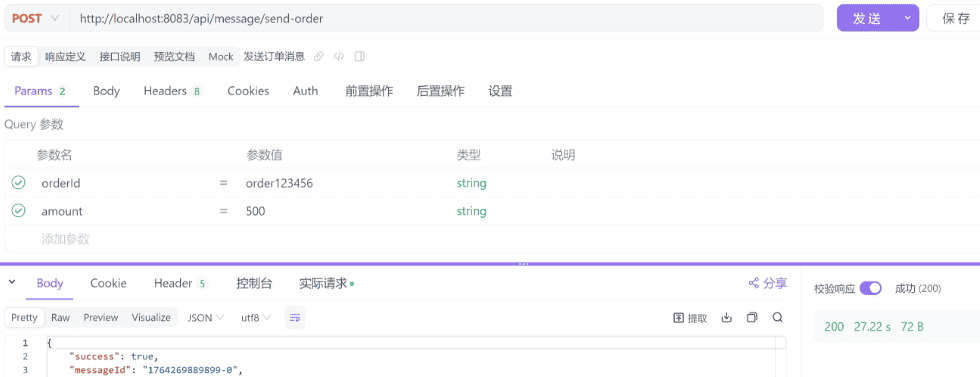
POST http://localhost:8083/api/message/send-order

orderId=order123456
amount=500
7.2 测试发送自定义消息
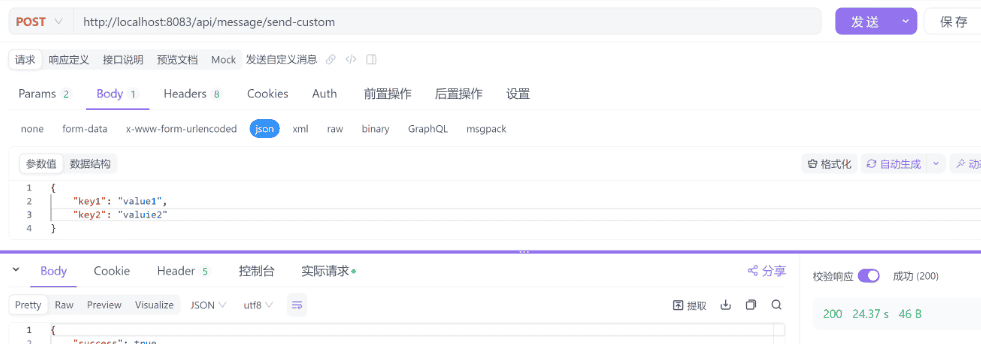
POST http://localhost:8083/api/message/send-custom

{
    "key1": "value1",
    "key2": "valuie2"
}
8.启动多个SpringBoot实例,测试实例是否会重复处理事件
8.1 通过修改端口号,启动多个实例
实例1
server:
  port: 8083
实例2
server:
  port: 8084
8.2 发送自定义事件消息
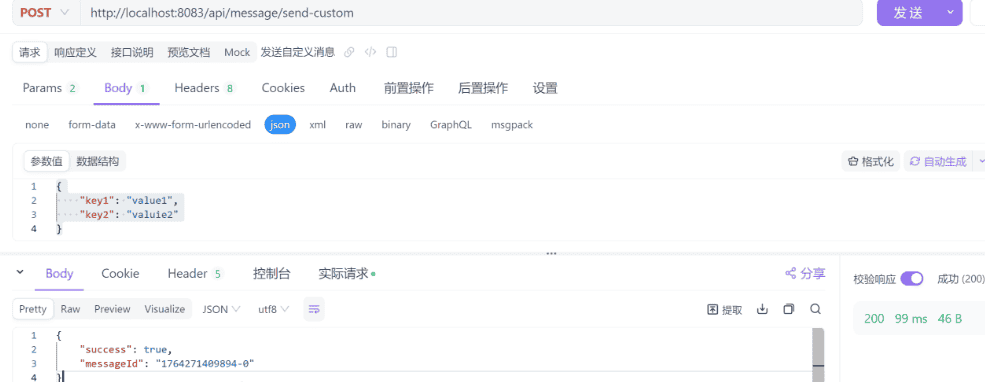
发送多条事件消息
8.3 查看实例日志,确认事件未被重复消费
实例1
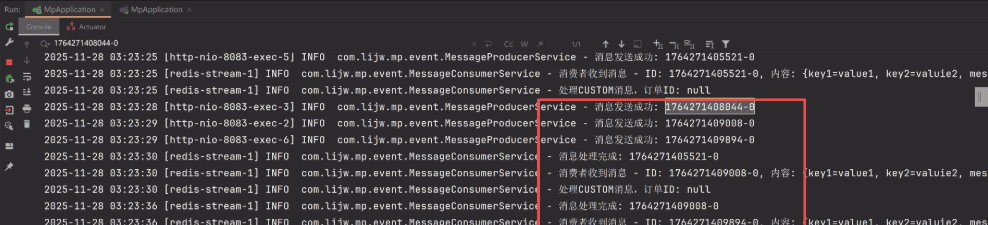
实例2

可以看到 1764271408044-0 只在实例2处理,并没有在实例1处理。说明多个实例并不会重复消费同一事件。
三、SpringBoot 使用 StringRedisTemplate 集成 Redis Stream 进阶:配置多个消费组
1.配置文件
配置多个消费组key
# redis 配置
spring:
  redis:
    host: localhost
    port: 6379
    database: 0
    lettuce:
      pool:
        max-active: 8
        max-wait: -1
        max-idle: 8
        min-idle: 0

# redis stream 配置多个消费组key
app:
  stream:
    groups:
      - key: "order_stream"
        group: "order_group"
        consumer-prefix: "consumer_"
      - key: "payment_stream"
        group: "payment_group"
        consumer-prefix: "consumer_"
      - key: "notification_stream"
        group: "notification_group"
        consumer-prefix: "consumer_"
2.Redis Stream消费组配置属性
package com.lijw.mp.config.redisstream;

import lombok.Data;
import org.springframework.boot.context.properties.ConfigurationProperties;
import org.springframework.stereotype.Component;

import java.util.List;

/**
 * Redis Stream消费组配置属性
 * - 读取 app.stream 配置前缀下的所有配置项
 *
 * @author Aron.li
 * @date 2025/11/30 11:21
 */
@Data
@Component
@ConfigurationProperties(prefix = "app.stream")
public class StreamGroupProperties {

    /**
     * 消费组列表
     */
    private List<StreamGroupConfig> groups;

    /**
     * 单个消费组配置
     */
    @Data
    public static class StreamGroupConfig {
        /**
         * Stream键名
         */
        private String key;

        /**
         * 消费组名称
         */
        private String group;

        /**
         * 消费者名称前缀
         */
        private String consumerPrefix;
    }
}
3. 消息生产者服务
package com.lijw.mp.event;

import com.lijw.mp.config.redisstream.StreamGroupProperties;
import lombok.extern.slf4j.Slf4j;
import org.springframework.beans.factory.annotation.Autowired;
import org.springframework.data.redis.connection.stream.RecordId;
import org.springframework.data.redis.core.StringRedisTemplate;
import org.springframework.stereotype.Service;

import java.util.Map;
import java.util.UUID;

/**
 * Redis Stream消息生产者服务
 * 负责向Redis Stream发送消息
 */
@Service
@Slf4j
public class MessageProducerService {

    /**
     * Redis字符串模板
     */
    @Autowired
    private StringRedisTemplate stringRedisTemplate;

    /**
     * Stream消费组配置属性
     */
    @Autowired
    private StreamGroupProperties streamGroupProperties;

    /**
     * 发送消息到Redis Stream(根据消息类型自动选择stream)
     *
     * @param messageType 消息类型
     * @param data 消息数据
     * @return 消息ID
     */
    public String sendMessage(String messageType, Map<String, String> data) {
        // 根据消息类型自动选择stream key
        String streamKey = getStreamKeyByMessageType(messageType);
        return sendMessage(streamKey, messageType, data);
    }

    /**
     * 发送消息到指定的Redis Stream
     *
     * @param streamKey Stream键名
     * @param messageType 消息类型
     * @param data 消息数据
     * @return 消息ID
     */
    public String sendMessage(String streamKey, String messageType, Map<String, String> data) {
        try {
            // 添加消息类型和时间戳
            data.put("messageType", messageType);
            data.put("timestamp", String.valueOf(System.currentTimeMillis()));
            data.put("messageId", UUID.randomUUID().toString());

            RecordId messageId = stringRedisTemplate.opsForStream()
                    .add(streamKey, data);

            log.info("消息发送成功 - Stream: {}, MessageId: {}", streamKey, messageId);
            return messageId.toString();
        } catch (Exception e) {
            log.error("消息发送失败 - Stream: {}", streamKey, e);
            throw new RuntimeException("消息发送失败", e);
        }
    }

    /**
     * 根据消息类型获取对应的stream key
     *
     * @param messageType 消息类型
     * @return Stream键名
     */
    private String getStreamKeyByMessageType(String messageType) {
        if (streamGroupProperties.getGroups() == null || streamGroupProperties.getGroups().isEmpty()) {
            throw new RuntimeException("未配置任何消费组");
        }

        // 根据消息类型前缀匹配stream key
        String upperMessageType = messageType.toUpperCase();
        if (upperMessageType.contains("ORDER")) {
            return findStreamKey("order");
        } else if (upperMessageType.contains("PAYMENT") || upperMessageType.contains("PAY")) {
            return findStreamKey("payment");
        } else if (upperMessageType.contains("NOTIFICATION") || upperMessageType.contains("NOTIFY")) {
            return findStreamKey("notification");
        } else {
            // 默认使用第一个stream
            log.warn("未匹配到消息类型对应的stream,使用默认stream: {}", messageType);
            return streamGroupProperties.getGroups().get(0).getKey();
        }
    }

    /**
     * 根据关键字查找stream key
     *
     * @param keyword 关键字
     * @return Stream键名
     */
    private String findStreamKey(String keyword) {
        if (streamGroupProperties.getGroups() != null) {
            for (StreamGroupProperties.StreamGroupConfig groupConfig : streamGroupProperties.getGroups()) {
                if (groupConfig.getKey().toLowerCase().contains(keyword.toLowerCase())) {
                    return groupConfig.getKey();
                }
            }
        }
        // 如果找不到,返回第一个stream
        if (streamGroupProperties.getGroups() != null && !streamGroupProperties.getGroups().isEmpty()) {
            return streamGroupProperties.getGroups().get(0).getKey();
        }
        throw new RuntimeException("未找到匹配的stream key: " + keyword);
    }
}
4. 消息消费者服务(支持幂等性)
package com.lijw.mp.event;

import com.lijw.mp.config.redisstream.StreamGroupProperties;
import lombok.extern.slf4j.Slf4j;
import org.springframework.beans.factory.annotation.Autowired;
import org.springframework.data.redis.connection.stream.MapRecord;
import org.springframework.data.redis.core.StringRedisTemplate;
import org.springframework.data.redis.stream.StreamListener;
import org.springframework.stereotype.Component;

import java.time.Duration;
import java.util.Map;
import java.util.concurrent.ConcurrentHashMap;

/**
 * Redis Stream消息消费者服务
 * 负责消费Redis Stream中的消息并进行业务处理
 */
@Component
@Slf4j
public class MessageConsumerService implements StreamListener<String, MapRecord<String, String, String>> {

    /**
     * Redis字符串模板
     */
    @Autowired
    private StringRedisTemplate stringRedisTemplate;

    /**
     * Stream消费组配置属性
     */
    @Autowired
    private StreamGroupProperties streamGroupProperties;

    /**
     * 缓存stream key到group name的映射关系
     */
    private final Map<String, String> streamToGroupMap = new ConcurrentHashMap<>();

    /**
     * 消息消费处理方法
     * 当Redis Stream中有新消息时,会调用此方法
     *
     * @param message Stream消息记录
     */
    @Override
    public void onMessage(MapRecord<String, String, String> message) {
        String messageId = message.getId().toString();
        String streamKey = message.getStream();
        Map<String, String> messageBody = message.getValue();

        // 获取对应的消费组名称
        String groupName = getGroupNameByStreamKey(streamKey);
        if (groupName == null) {
            log.error("未找到stream key对应的消费组: {}, 消息ID: {}", streamKey, messageId);
            return;
        }

        // 幂等性检查:防止重复处理
        if (isMessageProcessed(messageId)) {
            log.info("消息已处理,跳过: {}", messageId);
            acknowledgeMessage(message, groupName);
            return;
        }

        try {
            log.info("消费者收到消息 - Stream: {}, Group: {}, ID: {}, 内容: {}", streamKey, groupName, messageId, messageBody);

            // 处理业务逻辑(根据stream key路由到不同的业务处理)
            boolean processSuccess = processBusiness(streamKey, messageBody);

            if (processSuccess) {
                // 标记消息已处理
                markMessageProcessed(messageId);
                // 清除重试次数
                clearRetryCount(messageId);
                // 手动确认消息
                acknowledgeMessage(message, groupName);
                log.info("消息处理完成: {}", messageId);
            } else {
                log.error("业务处理失败,消息将重试: {}", messageId);
                handleRetry(messageId, messageBody, message, groupName, "业务处理失败");
            }

        } catch (Exception e) {
            log.error("消息处理异常: {}", messageId, e);
            handleRetry(messageId, messageBody, message, groupName, "消息处理异常");
        }
    }

    /**
     * 根据stream key获取对应的消费组名称
     *
     * @param streamKey Stream键名
     * @return 消费组名称,如果未找到返回null
     */
    private String getGroupNameByStreamKey(String streamKey) {
        // 先从缓存中获取
        if (streamToGroupMap.containsKey(streamKey)) {
            return streamToGroupMap.get(streamKey);
        }

        // 从配置中查找
        if (streamGroupProperties.getGroups() != null) {
            for (StreamGroupProperties.StreamGroupConfig groupConfig : streamGroupProperties.getGroups()) {
                if (groupConfig.getKey().equals(streamKey)) {
                    streamToGroupMap.put(streamKey, groupConfig.getGroup());
                    return groupConfig.getGroup();
                }
            }
        }

        return null;
    }

    /**
     * 幂等性检查
     * 使用Redis存储,判断redis是否已存在处理key,如果存在则说明消息已处理,确保多实例间幂等性
     *
     * @param messageId 消息ID
     * @return 如果消息已处理返回true,否则返回false
     */
    private boolean isMessageProcessed(String messageId) {
        // 使用Redis存储,判断redis是否已存在处理key,如果存在则说明消息已处理,确保多实例间幂等性
        return stringRedisTemplate.opsForValue().get("processed:" + messageId) != null;
    }

    /**
     * 标记消息已处理
     * 使用Redis存储事件处理ID,设置过期时间
     *
     * @param messageId 消息ID
     */
    private void markMessageProcessed(String messageId) {
        // 使用Redis存储事件处理ID,设置过期时间
        stringRedisTemplate.opsForValue().set("processed:" + messageId, "1",
                Duration.ofHours(24));
    }

    /**
     * 业务处理逻辑(根据stream key路由到不同的业务处理)
     */
    private boolean processBusiness(String streamKey, Map<String, String> messageBody) {
        try {
            // 根据stream key路由到不同的业务处理
            if (streamKey.contains("order")) {
                return processOrderBusiness(messageBody);
            } else if (streamKey.contains("payment")) {
                return processPaymentBusiness(messageBody);
            } else if (streamKey.contains("notification")) {
                return processNotificationBusiness(messageBody);
            } else {
                log.warn("未识别的stream key: {}, 使用默认处理逻辑", streamKey);
                return processDefaultBusiness(messageBody);
            }
        } catch (Exception e) {
            log.error("业务处理异常", e);
            return false;
        }
    }

    /**
     * 处理订单业务
     */
    private boolean processOrderBusiness(Map<String, String> messageBody) {
        String messageType = messageBody.get("messageType");
        String orderId = messageBody.get("orderId");
        log.info("处理订单{}消息,订单ID: {}", messageType, orderId);
        // TODO: 实现订单业务处理逻辑
        try {
            // 模拟10秒处理业务
            Thread.sleep(10000);
        } catch (InterruptedException e) {
            throw new RuntimeException(e);
        }
        return true;
    }

    /**
     * 处理支付业务
     */
    private boolean processPaymentBusiness(Map<String, String> messageBody) {
        String messageType = messageBody.get("messageType");
        String paymentId = messageBody.get("paymentId");
        log.info("处理支付{}消息,支付ID: {}", messageType, paymentId);
        // TODO: 实现支付业务处理逻辑
        return true;
    }

    /**
     * 处理通知业务
     */
    private boolean processNotificationBusiness(Map<String, String> messageBody) {
        String messageType = messageBody.get("messageType");
        String userId = messageBody.get("userId");
        log.info("处理通知{}消息,用户ID: {}", messageType, userId);
        // TODO: 实现通知业务处理逻辑
        return true;
    }

    /**
     * 默认业务处理
     */
    private boolean processDefaultBusiness(Map<String, String> messageBody) {
        String messageType = messageBody.get("messageType");
        log.info("处理默认业务消息: {}", messageType);
        // TODO: 实现默认业务处理逻辑
        return true;
    }

    /**
     * 手动确认消息
     *
     * @param message 消息记录
     * @param groupName 消费组名称
     */
    private void acknowledgeMessage(MapRecord<String, String, String> message, String groupName) {
        try {
            stringRedisTemplate.opsForStream()
                    .acknowledge(groupName, message);
        } catch (Exception e) {
            log.error("消息确认失败: {}", message.getId(), e);
        }
    }

    /**
     * 增加重试次数
     *
     * @param messageId 消息ID
     * @return 当前重试次数
     */
    private int incrementRetryCount(String messageId) {
        String retryKey = "retry:count:" + messageId;
        String countStr = stringRedisTemplate.opsForValue().get(retryKey);
        int retryCount = countStr == null ? 0 : Integer.parseInt(countStr);
        retryCount++;
        // 设置重试次数,过期时间为24小时
        stringRedisTemplate.opsForValue().set(retryKey, String.valueOf(retryCount), Duration.ofHours(24));
        return retryCount;
    }

    /**
     * 清除重试次数
     *
     * @param messageId 消息ID
     */
    private void clearRetryCount(String messageId) {
        String retryKey = "retry:count:" + messageId;
        stringRedisTemplate.delete(retryKey);
    }

    /**
     * 处理消息重试逻辑
     *
     * @param messageId 消息ID
     * @param messageBody 消息内容
     * @param message 消息记录
     * @param groupName 消费组名称
     * @param errorDescription 错误描述
     */
    private void handleRetry(String messageId, Map<String, String> messageBody,
                             MapRecord<String, String, String> message, String groupName, String errorDescription) {
        // 记录重试次数
        int retryCount = incrementRetryCount(messageId);
        // 检查是否超过最大重试次数
        int maxRetryCount = 3; // 最大重试次数,可根据业务需求调整
        if (retryCount >= maxRetryCount) {
            log.error("消息{}重试次数已达上限({}),将停止重试并记录: {}", errorDescription, maxRetryCount, messageId);
            // 记录失败消息到死信队列或告警(可根据业务需求实现)
            handleMaxRetryExceeded(messageId, messageBody, retryCount);
            // 确认消息,避免无限重试
            acknowledgeMessage(message, groupName);
        } else {
            log.warn("消息{},当前重试次数: {}/{}, 消息ID: {}", errorDescription, retryCount, maxRetryCount, messageId);
            // 不确认消息,等待重试
        }
    }

    /**
     * 处理超过最大重试次数的消息
     * 记录失败消息详情,可根据业务需求扩展(如存储到数据库、发送告警等)
     *
     * @param messageId 消息ID
     * @param messageBody 消息内容
     * @param retryCount 重试次数
     */
    private void handleMaxRetryExceeded(String messageId, Map<String, String> messageBody, int retryCount) {
        try {
            // 记录失败消息详情(可根据业务需求实现,如存储到数据库、发送告警等)
            String failedKey = "failed:message:" + messageId;
            String failedInfo = String.format("消息ID: %s, 重试次数: %d, 消息内容: %s, 失败时间: %s",
                    messageId, retryCount, messageBody, System.currentTimeMillis());
            stringRedisTemplate.opsForValue().set(failedKey, failedInfo, Duration.ofDays(7));
            log.error("失败消息已记录: {}", failedInfo);
            // TODO: 可根据业务需求添加其他处理逻辑,如:
            // 1. 发送告警通知
            // 2. 存储到数据库死信表
            // 3. 发送到死信队列
        } catch (Exception e) {
            log.error("处理超过最大重试次数消息异常: {}", messageId, e);
        }
    }
}
5.消费者容器配置(支持多实例负载均衡)
package com.lijw.mp.config.redisstream;

import com.lijw.mp.event.MessageConsumerService;
import lombok.extern.slf4j.Slf4j;
import org.springframework.beans.factory.annotation.Autowired;
import org.springframework.boot.context.event.ApplicationReadyEvent;
import org.springframework.context.annotation.Bean;
import org.springframework.context.annotation.Configuration;
import org.springframework.context.event.EventListener;
import org.springframework.data.redis.connection.RedisConnectionFactory;
import org.springframework.data.redis.connection.stream.Consumer;
import org.springframework.data.redis.connection.stream.MapRecord;
import org.springframework.data.redis.connection.stream.ReadOffset;
import org.springframework.data.redis.connection.stream.StreamOffset;
import org.springframework.data.redis.core.StringRedisTemplate;
import org.springframework.data.redis.stream.StreamMessageListenerContainer;
import org.springframework.scheduling.concurrent.ThreadPoolTaskExecutor;

import java.net.InetAddress;
import java.time.Duration;
import java.lang.management.ManagementFactory;
import java.util.ArrayList;
import java.util.HashMap;
import java.util.List;
import java.util.Map;
import java.util.UUID;
import java.util.concurrent.ExecutorService;

/**
 * Redis Stream配置类
 * 负责创建消费组、配置消息监听容器等
 */
@Configuration
@Slf4j
public class RedisStreamConfig {

    /**
     * Redis连接工厂
     */
    @Autowired
    private RedisConnectionFactory redisConnectionFactory;

    /**
     * Redis字符串模板
     */
    @Autowired
    private StringRedisTemplate stringRedisTemplate;

    /**
     * Stream消费组配置属性
     */
    @Autowired
    private StreamGroupProperties streamGroupProperties;

    /**
     * 应用启动完成后,验证所有消费组是否已创建
     * 主要用于日志记录和验证
     */
    @EventListener(ApplicationReadyEvent.class)
    public void verifyConsumerGroups() {
        if (streamGroupProperties.getGroups() == null || streamGroupProperties.getGroups().isEmpty()) {
            log.warn("未配置任何消费组");
            return;
        }

        log.info("验证所有消费组状态...");
        for (StreamGroupProperties.StreamGroupConfig groupConfig : streamGroupProperties.getGroups()) {
            try {
                // 验证消费组是否存在
                stringRedisTemplate.opsForStream().pending(groupConfig.getKey(), groupConfig.getGroup());
                log.info("消费组验证成功: stream={}, group={}", groupConfig.getKey(), groupConfig.getGroup());
            } catch (Exception e) {
                log.warn("消费组验证失败,尝试重新创建: stream={}, group={}",
                        groupConfig.getKey(), groupConfig.getGroup());
                // 尝试重新创建
                try {
                    ensureStreamExists(groupConfig.getKey());
                    stringRedisTemplate.opsForStream()
                            .createGroup(groupConfig.getKey(), groupConfig.getGroup());
                    log.info("重新创建消费者组成功: stream={}, group={}",
                            groupConfig.getKey(), groupConfig.getGroup());
                } catch (Exception ex) {
                    log.error("重新创建消费者组失败: stream={}, group={}, error={}",
                            groupConfig.getKey(), groupConfig.getGroup(), ex.getMessage());
                }
            }
        }
    }

    /**
     * 确保stream存在,如果不存在则创建
     *
     * @param streamKey Stream键名
     */
    private void ensureStreamExists(String streamKey) {
        try {
            // 检查stream是否存在
            Long size = stringRedisTemplate.opsForStream().size(streamKey);
            if (size == null || size == 0) {
                // Stream不存在,创建一个空消息然后立即删除,以创建stream
                // 或者直接使用XGROUP CREATE的MKSTREAM选项
                // 由于Spring Data Redis可能不支持MKSTREAM,我们通过添加一条临时消息来创建stream
                Map<String, String> tempData = new HashMap<>();
                tempData.put("_init", "true");
                tempData.put("_timestamp", String.valueOf(System.currentTimeMillis()));

                try {
                    stringRedisTemplate.opsForStream().add(streamKey, tempData);
                    log.debug("创建stream成功: {}", streamKey);
                } catch (Exception ex) {
                    log.debug("Stream可能已存在或创建失败: {}, {}", streamKey, ex.getMessage());
                }
            }
        } catch (Exception e) {
            // Stream不存在,创建它
            try {
                Map<String, String> tempData = new HashMap<>();
                tempData.put("_init", "true");
                tempData.put("_timestamp", String.valueOf(System.currentTimeMillis()));
                stringRedisTemplate.opsForStream().add(streamKey, tempData);
                log.info("创建stream成功: {}", streamKey);
            } catch (Exception ex) {
                log.warn("创建stream失败: {}, {}", streamKey, ex.getMessage());
            }
        }
    }

    /**
     * 为每个消费组配置Stream消息监听容器
     * 在创建监听容器之前,先确保所有消费组都已创建
     */
    @Bean
    public List<StreamMessageListenerContainer<String, MapRecord<String, String, String>>>
    streamMessageListenerContainers(MessageConsumerService messageConsumerService) {

        List<StreamMessageListenerContainer<String, MapRecord<String, String, String>>> containers = new ArrayList<>();

        if (streamGroupProperties.getGroups() == null || streamGroupProperties.getGroups().isEmpty()) {
            log.warn("未配置任何消费组,无法创建监听容器");
            return containers;
        }

        // 在创建监听容器之前,先确保所有消费组都已创建
        createAllConsumerGroups();

        for (StreamGroupProperties.StreamGroupConfig groupConfig : streamGroupProperties.getGroups()) {
            StreamMessageListenerContainer<String, MapRecord<String, String, String>> container =
                    createListenerContainer(groupConfig, messageConsumerService);
            containers.add(container);
        }

        return containers;
    }

    /**
     * 创建所有消费者组(如果不存在)
     * 如果stream不存在,会先创建stream
     */
    private void createAllConsumerGroups() {
        if (streamGroupProperties.getGroups() == null || streamGroupProperties.getGroups().isEmpty()) {
            log.warn("未配置任何消费组");
            return;
        }

        for (StreamGroupProperties.StreamGroupConfig groupConfig : streamGroupProperties.getGroups()) {
            try {
                // 先检查stream是否存在,如果不存在则创建
                ensureStreamExists(groupConfig.getKey());

                // 创建消费组
                stringRedisTemplate.opsForStream()
                        .createGroup(groupConfig.getKey(), groupConfig.getGroup());
                log.info("创建消费者组成功: stream={}, group={}", groupConfig.getKey(), groupConfig.getGroup());
            } catch (Exception e) {
                // 如果消费组已存在,这是正常情况
                String errorMsg = e.getMessage() != null ? e.getMessage() : "";
                if (errorMsg.contains("BUSYGROUP") || errorMsg.contains("already exists")) {
                    log.info("消费者组已存在: stream={}, group={}", groupConfig.getKey(), groupConfig.getGroup());
                } else {
                    log.warn("创建消费者组失败: stream={}, group={}, error={}",
                            groupConfig.getKey(), groupConfig.getGroup(), errorMsg);
                    // 即使创建失败,也继续处理其他消费组
                }
            }
        }
    }

    /**
     * 为单个消费组创建监听容器
     *
     * @param groupConfig 消费组配置
     * @param messageConsumerService 消息消费者服务
     * @return Stream消息监听容器
     */
    private StreamMessageListenerContainer<String, MapRecord<String, String, String>>
    createListenerContainer(StreamGroupProperties.StreamGroupConfig groupConfig,
                           MessageConsumerService messageConsumerService) {

        // 容器配置
        StreamMessageListenerContainer<String, MapRecord<String, String, String>> container =
                StreamMessageListenerContainer.create(redisConnectionFactory,
                        StreamMessageListenerContainer.StreamMessageListenerContainerOptions.builder()
                                .pollTimeout(Duration.ofSeconds(2)) // 轮询超时时间
                                .batchSize(10) // 批量处理提高性能
                                .executor(createThreadPool()) // 自定义线程池
                                .build());

        // 为每个实例生成唯一消费者名称
        String consumerName = generateUniqueConsumerName(groupConfig.getConsumerPrefix());

        // 配置消费偏移量(从最后消费的位置开始)
        StreamOffset<String> offset = StreamOffset.create(groupConfig.getKey(), ReadOffset.lastConsumed());

        // 创建消费者
        Consumer consumer = Consumer.from(groupConfig.getGroup(), consumerName);

        // 构建读取请求(手动确认模式)
        StreamMessageListenerContainer.StreamReadRequest<String> request =
                StreamMessageListenerContainer.StreamReadRequest.builder(offset)
                        .consumer(consumer)
                        .autoAcknowledge(false) // 手动确认确保可靠性
                        .cancelOnError(e -> false) // 错误时不停止消费
                        .build();

        // 注册监听器并启动容器
        container.register(request, messageConsumerService);
        container.start();

        log.info("Redis Stream消费者启动成功 - Stream: {}, Group: {}, Consumer: {}",
                groupConfig.getKey(), groupConfig.getGroup(), consumerName);
        return container;
    }

    /**
     * 生成唯一消费者名称(支持多实例部署的关键)
     * 使用IP+进程ID确保集群环境下唯一性
     *
     * @param prefix 消费者名称前缀
     * @return 唯一的消费者名称
     */
    private String generateUniqueConsumerName(String prefix) {
        try {
            String hostAddress = InetAddress.getLocalHost().getHostAddress();
            String processId = ManagementFactory.getRuntimeMXBean().getName().split("@")[0];
            return (prefix != null ? prefix : "consumer_") + hostAddress + "_" + processId + "_" + System.currentTimeMillis();
        } catch (Exception e) {
            //  fallback:使用UUID
            return (prefix != null ? prefix : "consumer_") + UUID.randomUUID().toString().substring(0, 8);
        }
    }

    /**
     * 创建专用线程池
     * 用于处理Redis Stream消息消费
     *
     * @return 线程池执行器
     */
    private ExecutorService createThreadPool() {
        ThreadPoolTaskExecutor executor = new ThreadPoolTaskExecutor();
        executor.setCorePoolSize(2); // 核心线程数
        executor.setMaxPoolSize(5); // 最大线程数
        executor.setQueueCapacity(100); // 队列容量
        executor.setThreadNamePrefix("redis-stream-"); // 线程名前缀
        executor.setDaemon(true); // 守护线程
        executor.initialize();
        return executor.getThreadPoolExecutor();
    }
}
6.处理消息告警机制
当消息堵塞达到一定,则出发告警,提醒需要扩容实例服务
package com.lijw.mp.config.redisstream;

import lombok.extern.slf4j.Slf4j;
import org.springframework.beans.factory.annotation.Autowired;
import org.springframework.data.redis.connection.stream.PendingMessagesSummary;
import org.springframework.data.redis.core.StringRedisTemplate;
import org.springframework.scheduling.annotation.Scheduled;
import org.springframework.stereotype.Component;

/**
 * 待处理消息告警服务
 * 定时检查Redis Stream中未被确认(ACK)的消息,仅用于监控和告警
 * 注意:不进行实际的消息处理,通过增加消费实例来提升处理能力
 */
@Component
@Slf4j
public class PendingMessageAlertService {

    /**
     * Redis字符串模板
     */
    @Autowired
    private StringRedisTemplate stringRedisTemplate;

    /**
     * Stream消费组配置属性
     */
    @Autowired
    private StreamGroupProperties streamGroupProperties;


    /**
     * 定时监控未确认的消息
     * 执行时机:每30秒执行一次(通过@Scheduled注解配置)
     * 仅用于监控和告警,不进行实际的消息处理
     * 建议通过增加消费实例来提升处理能力
     */
    @Scheduled(fixedDelay = 30000) // 每30秒执行一次
    public void monitorPendingMessages() {
        if (streamGroupProperties.getGroups() == null || streamGroupProperties.getGroups().isEmpty()) {
            return;
        }

        // 遍历所有配置的消费组
        for (StreamGroupProperties.StreamGroupConfig groupConfig : streamGroupProperties.getGroups()) {
            try {
                // 获取待处理消息摘要
                PendingMessagesSummary pendingSummary = stringRedisTemplate.opsForStream()
                        .pending(groupConfig.getKey(), groupConfig.getGroup());

                if (pendingSummary != null && pendingSummary.getTotalPendingMessages() > 0) {
                    // 记录监控信息
                    logPendingMessageInfo(pendingSummary, groupConfig);
                }
            } catch (Exception e) {
                log.error("监控待处理消息异常 - Stream: {}, Group: {}",
                        groupConfig.getKey(), groupConfig.getGroup(), e);
            }
        }
    }

    /**
     * 记录pending消息监控信息
     * 根据pending消息数量进行不同级别的告警
     *
     * @param pendingSummary 待处理消息摘要
     * @param groupConfig 消费组配置
     */
    private void logPendingMessageInfo(PendingMessagesSummary pendingSummary,
                                      StreamGroupProperties.StreamGroupConfig groupConfig) {
        long totalPending = pendingSummary.getTotalPendingMessages();

        // 根据pending消息数量进行分级告警
        if (totalPending > 2) {
            // 严重告警:pending消息数量超过1000
            log.error("【严重告警】待处理消息数量过多 - Stream: {}, Group: {}, 数量: {}, " +
                    "建议:1.检查消费者是否正常运行 2.增加消费实例 3.检查消息处理逻辑",
                    groupConfig.getKey(), groupConfig.getGroup(), totalPending);
        } else if (totalPending > 1) {
            // 警告:pending消息数量超过100
            log.warn("【警告】待处理消息数量较多 - Stream: {}, Group: {}, 数量: {}, " +
                    "建议:考虑增加消费实例或检查消息处理性能",
                    groupConfig.getKey(), groupConfig.getGroup(), totalPending);
        } else {
            // 信息:pending消息数量正常
            log.info("监控待处理消息 - Stream: {}, Group: {}, 数量: {}",
                    groupConfig.getKey(), groupConfig.getGroup(), totalPending);
        }
    }

}
7.REST控制器
package com.lijw.mp.controller;

import com.lijw.mp.event.MessageProducerService;
import lombok.extern.slf4j.Slf4j;
import org.springframework.beans.factory.annotation.Autowired;
import org.springframework.http.ResponseEntity;
import org.springframework.web.bind.annotation.*;

import java.util.HashMap;
import java.util.Map;

/**
 * 测试发送redis stream事件消息
 */
@RestController
@RequestMapping("/api/message")
@Slf4j
public class MessageController {

    @Autowired
    private MessageProducerService messageProducerService;

    /**
     * 发送订单消息
     */
    @PostMapping("/send-order")
    public ResponseEntity<Map<String, Object>> sendOrderMessage(
            @RequestParam String orderId,
            @RequestParam String amount,
            @RequestParam(required = false) String streamKey) {

        Map<String, String> message = new HashMap<>();
        message.put("orderId", orderId);
        message.put("amount", amount);
        message.put("messageType", "ORDER_CREATED");

        try {
            String messageId;
            if (streamKey != null && !streamKey.isEmpty()) {
                // 指定stream key发送
                messageId = messageProducerService.sendMessage(streamKey, "ORDER", message);
            } else {
                // 自动根据消息类型路由
                messageId = messageProducerService.sendMessage("ORDER", message);
            }

            Map<String, Object> result = new HashMap<>();
            result.put("success", true);
            result.put("messageId", messageId);
            result.put("streamKey", streamKey != null ? streamKey : "auto-routed");
            result.put("timestamp", System.currentTimeMillis());

            return ResponseEntity.ok(result);
        } catch (Exception e) {
            log.error("发送订单消息失败", e);

            Map<String, Object> result = new HashMap<>();
            result.put("success", false);
            result.put("error", e.getMessage());

            return ResponseEntity.status(500).body(result);
        }
    }

    /**
     * 发送支付消息
     */
    @PostMapping("/send-payment")
    public ResponseEntity<Map<String, Object>> sendPaymentMessage(
            @RequestParam String paymentId,
            @RequestParam String amount,
            @RequestParam String status,
            @RequestParam(required = false) String streamKey) {

        Map<String, String> message = new HashMap<>();
        message.put("paymentId", paymentId);
        message.put("amount", amount);
        message.put("status", status);
        message.put("messageType", "PAYMENT_" + status.toUpperCase());

        try {
            String messageId;
            if (streamKey != null && !streamKey.isEmpty()) {
                messageId = messageProducerService.sendMessage(streamKey, "PAYMENT", message);
            } else {
                messageId = messageProducerService.sendMessage("PAYMENT", message);
            }

            Map<String, Object> result = new HashMap<>();
            result.put("success", true);
            result.put("messageId", messageId);
            result.put("streamKey", streamKey != null ? streamKey : "auto-routed");
            result.put("timestamp", System.currentTimeMillis());

            return ResponseEntity.ok(result);
        } catch (Exception e) {
            log.error("发送支付消息失败", e);

            Map<String, Object> result = new HashMap<>();
            result.put("success", false);
            result.put("error", e.getMessage());

            return ResponseEntity.status(500).body(result);
        }
    }

    /**
     * 发送通知消息
     */
    @PostMapping("/send-notification")
    public ResponseEntity<Map<String, Object>> sendNotificationMessage(
            @RequestParam String userId,
            @RequestParam String title,
            @RequestParam String content,
            @RequestParam(required = false) String streamKey) {

        Map<String, String> message = new HashMap<>();
        message.put("userId", userId);
        message.put("title", title);
        message.put("content", content);
        message.put("messageType", "NOTIFICATION");

        try {
            String messageId;
            if (streamKey != null && !streamKey.isEmpty()) {
                messageId = messageProducerService.sendMessage(streamKey, "NOTIFICATION", message);
            } else {
                messageId = messageProducerService.sendMessage("NOTIFICATION", message);
            }

            Map<String, Object> result = new HashMap<>();
            result.put("success", true);
            result.put("messageId", messageId);
            result.put("streamKey", streamKey != null ? streamKey : "auto-routed");
            result.put("timestamp", System.currentTimeMillis());

            return ResponseEntity.ok(result);
        } catch (Exception e) {
            log.error("发送通知消息失败", e);

            Map<String, Object> result = new HashMap<>();
            result.put("success", false);
            result.put("error", e.getMessage());

            return ResponseEntity.status(500).body(result);
        }
    }

    /**
     * 发送自定义消息(支持指定stream key和消息类型)
     */
    @PostMapping("/send-custom")
    public ResponseEntity<Map<String, Object>> sendCustomMessage(
            @RequestBody Map<String, String> messageData,
            @RequestParam(required = false) String streamKey,
            @RequestParam(required = false) String messageType) {

        try {
            // 如果未指定消息类型,从消息数据中获取或使用默认值
            String msgType = messageType != null ? messageType :
                    messageData.getOrDefault("messageType", "CUSTOM");

            String messageId;
            if (streamKey != null && !streamKey.isEmpty()) {
                // 指定stream key发送
                messageId = messageProducerService.sendMessage(streamKey, msgType, messageData);
            } else {
                // 自动根据消息类型路由
                messageId = messageProducerService.sendMessage(msgType, messageData);
            }

            Map<String, Object> result = new HashMap<>();
            result.put("success", true);
            result.put("messageId", messageId);
            result.put("streamKey", streamKey != null ? streamKey : "auto-routed");
            result.put("messageType", msgType);
            result.put("timestamp", System.currentTimeMillis());

            return ResponseEntity.ok(result);
        } catch (Exception e) {
            log.error("发送自定义消息失败", e);

            Map<String, Object> result = new HashMap<>();
            result.put("success", false);
            result.put("error", e.getMessage());

            return ResponseEntity.status(500).body(result);
        }
    }
}
7.1 测试发送订单消息

POST http://localhost:8083/api/message/send-order

# 请求参数
streamKey:order_stream
orderId:order123456
amount:500
status:ok
7.2 测试发送支付消息
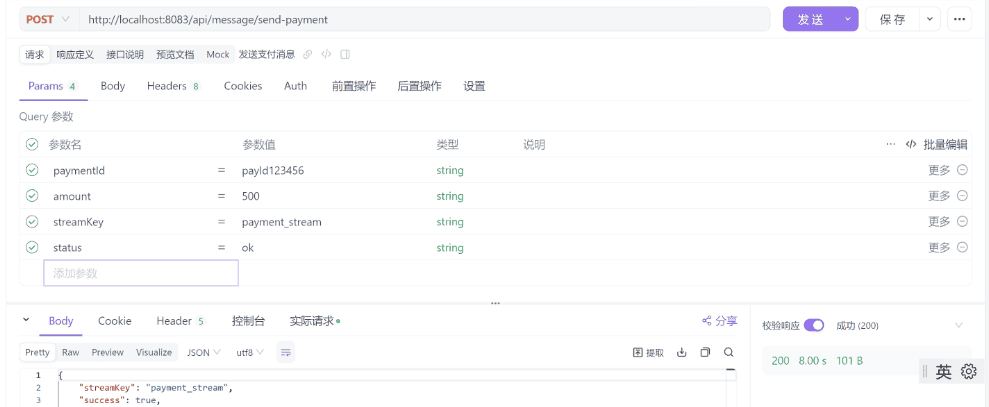
POST http://localhost:8083/api/message/send-payment

# 请求参数
streamKey:payment_stream
paymentId:payId123456
amount:500
status:ok
7.3 测试发送通知消息
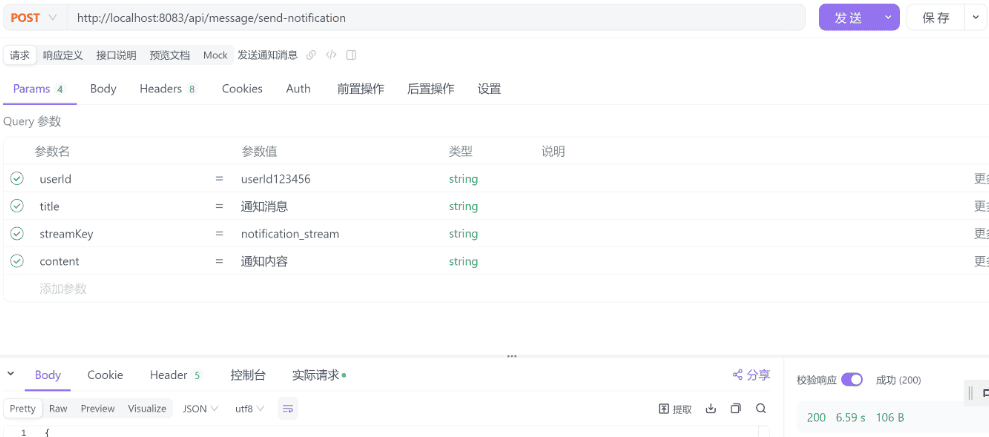
POST http://localhost:8083/api/message/send-notification

# 请求参数
streamKey:notification_stream
userId:userId123456
title:通知消息
content:通知内容
7.4 测试发送通知消息

POST http://localhost:8083/api/message/send-custom

# 请求参数
streamKey:custom_stream

# 请求体
{
    "key1": "value1",
    "key2": "valuie2"
}
8.启动多个SpringBoot实例,测试实例是否会重复处理事件
跟案例1的操作一致,以发送订单消息的事件作为验证示例
8.1 通过修改端口号,启动多个实例
实例1
server:
  port: 8083
实例2
server:
  port: 8084
8.2 发送订单事件消息,查看实例日志,确认事件未被重复消费
实例1

实例2

可以看到只有一个实例处理
1764865303698-0
9.触发多个消息,造成堵塞,检查告警日志

模拟大量出现订阅消息,导致事件堵塞的情况。
10. Redis 查看队列消息
10.1 查看当前redis的所有keys
# 查看当前redis的所有keys
172.17.0.6:6379> KEYS *
1) "payment_stream"
2) "mystream"
3) "notification_stream"
4) "custom_stream"
5) "order_stream"
172.17.0.6:6379>
10.2 查询所有order队列消息
XRANGE order_stream - +

# 查询消息如下:
140) 1) "1764898453817-0"
     2)  1) "amount"
         2) "500"
         3) "messageType"
         4) "ORDER"
         5) "orderId"
         6) "order123456"
         7) "messageId"
         8) "98e48bde-88df-46c1-a0a1-ac917ac14fa6"
         9) "timestamp"
        10) "1764898453753"
141) 1) "1764898468568-0"
     2)  1) "amount"
         2) "500"
         3) "messageType"
         4) "ORDER"
         5) "orderId"
         6) "order123456"
         7) "messageId"
         8) "93978d1c-d18e-4760-8657-8cf0042906a2"
         9) "timestamp"
        10) "1764898468507"
172.17.0.6:6379>
10.3 分页查询,每次返回3条
# 分页查询,每次返回3条
XRANGE order_stream - + COUNT 3

# 执行如下:
172.17.0.6:6379> XRANGE order_stream - + COUNT 3
1) 1) "1764268213474-0"
   2) 1) "source"
      2) "TEST_CONTROLLER"
      3) "type"
      4) "TEST_MESSAGE"
      5) "content"
      6) "test msg"
      7) "timestamp"
      8) "1764268202906"
2) 1) "1764268564758-0"
   2)  1) "amount"
       2) "500"
       3) "messageType"
       4) "ORDER"
       5) "orderId"
       6) "order123456"
       7) "messageId"
       8) "eb1a1fc1-12a9-4a80-84f4-f219a05094b5"
       9) "timestamp"
      10) "1764268564695"
3) 1) "1764268699963-0"
   2)  1) "amount"
       2) "500"
       3) "messageType"
       4) "ORDER"
       5) "orderId"
       6) "order123456"
       7) "messageId"
       8) "419c1c9a-7bcb-4f4e-b08c-70e86c5e7387"
       9) "timestamp"
      10) "1764268693593"
172.17.0.6:6379>
10.4 反向查询(从新到旧)
# 反向查询(从新到旧)
XREVRANGE order_stream + - COUNT 3
10.5 查询队列总数
172.17.0.6:6379> XLEN order_stream
(integer) 141
172.17.0.6:6379>
11. 总结
上面的项目是通过
StringRedisTemplate
@Autowired
private StringRedisTemplate stringRedisTemplate;
所以下一章节,我将会使用
RedissonClient
四、SpringBoot 使用 RedissonClient 集成 Redis Stream 进阶:配置多个消费组
1. 添加依赖
<parent>
    <groupId>org.springframework.boot</groupId>
    <artifactId>spring-boot-starter-parent</artifactId>
    <version>2.7.18</version>
    <relativePath/> <!-- lookup parent from repository -->
</parent>

<!-- Spring Boot 2.7.18 兼容的 redisson 版本 -->
<!-- 注意:Redisson 3.20.1需要Spring Boot 3.x,Spring Boot 2.7使用3.17.x版本 -->
<dependency>
    <groupId>org.redisson</groupId>
    <artifactId>redisson-spring-boot-starter</artifactId>
    <version>3.17.7</version>
</dependency>
2.配置文件
配置多个消费组key,跟上一个案例的配置一致
# redis stream 配置多个消费组key
app:
  stream:
    groups:
      - key: "order_stream"
        group: "order_group"
        consumer-prefix: "consumer_"
      - key: "payment_stream"
        group: "payment_group"
        consumer-prefix: "consumer_"
      - key: "notification_stream"
        group: "notification_group"
        consumer-prefix: "consumer_"

spring:
  # redisson配置
  redisson:
    config: |
      singleServerConfig:
        address: "redis://127.0.0.1:6379"
        database: 0
        # 连接超时时间(毫秒),默认3000
        connectionTimeout: 10000
        # 命令执行超时时间(毫秒),默认3000,增加超时时间避免PING超时
        timeout: 10000
        # 空闲连接超时时间(毫秒),默认10000
        idleConnectionTimeout: 10000
        # PING连接间隔(毫秒),默认0(禁用),设置为0可以禁用PING避免超时
        # 如果Redis服务器稳定,可以设置为0禁用PING
        pingConnectionInterval: 0
        # 重试次数
        retryAttempts: 3
        # 重试间隔(毫秒)
        retryInterval: 1500
        # 保持连接活跃
        keepAlive: true
        # TCP无延迟
        tcpNoDelay: true
        # 连接池配置
        connectionPoolSize: 64
        connectionMinimumIdleSize: 24
        # 如果Redis设置了密码,取消下面的注释并填写密码
        # password: your_password
3.Redis Stream消费组配置属性
package com.lijw.mp.config.redisstream;

import lombok.Data;
import org.springframework.boot.context.properties.ConfigurationProperties;
import org.springframework.stereotype.Component;

import java.util.List;

/**
 * Redis Stream消费组配置属性
 * - 读取 app.stream 配置前缀下的所有配置项
 *
 * @author Aron.li
 * @date 2025/11/30 11:21
 */
@Data
@Component
@ConfigurationProperties(prefix = "app.stream")
public class StreamGroupProperties {

    /**
     * 消费组列表
     */
    private List<StreamGroupConfig> groups;

    /**
     * 单个消费组配置
     */
    @Data
    public static class StreamGroupConfig {
        /**
         * Stream键名
         */
        private String key;

        /**
         * 消费组名称
         */
        private String group;

        /**
         * 消费者名称前缀
         */
        private String consumerPrefix;
    }
}
4. 消息生产者服务
package com.lijw.mp.event;

import com.lijw.mp.config.redisstream.StreamGroupProperties;
import lombok.extern.slf4j.Slf4j;
import org.redisson.api.RStream;
import org.redisson.api.RedissonClient;
import org.redisson.api.StreamMessageId;
import org.springframework.beans.factory.annotation.Autowired;
import org.springframework.stereotype.Service;

import java.util.Map;
import java.util.UUID;

/**
 * Redis Stream消息生产者服务
 * 负责向Redis Stream发送消息
 */
@Service
@Slf4j
public class MessageProducerService {

    /**
     * Redisson客户端
     */
    @Autowired
    private RedissonClient redissonClient;

    /**
     * Stream消费组配置属性
     */
    @Autowired
    private StreamGroupProperties streamGroupProperties;

    /**
     * 发送消息到Redis Stream(根据消息类型自动选择stream)
     *
     * @param messageType 消息类型
     * @param data 消息数据
     * @return 消息ID
     */
    public String sendMessage(String messageType, Map<String, String> data) {
        // 根据消息类型自动选择stream key
        String streamKey = getStreamKeyByMessageType(messageType);
        return sendMessage(streamKey, messageType, data);
    }

    /**
     * 发送消息到指定的Redis Stream
     *
     * @param streamKey Stream键名
     * @param messageType 消息类型
     * @param data 消息数据
     * @return 消息ID
     */
    /**
     * 发送消息到指定的Redis Stream
     *
     * @param streamKey Stream键名
     * @param messageType 消息类型
     * @param data 消息数据
     * @return 消息ID
     */
    public String sendMessage(String streamKey, String messageType, Map<String, String> data) {
        try {
            // 添加消息类型和时间戳
            data.put("messageType", messageType);
            data.put("timestamp", String.valueOf(System.currentTimeMillis()));
            data.put("messageId", UUID.randomUUID().toString());

            // 使用Redisson发送消息
            RStream<String, String> stream = redissonClient.getStream(streamKey);
            // Redisson 3.17.7中,add方法直接接受Map参数
            StreamMessageId messageId = stream.addAll(data);

            log.info("消息发送成功 - Stream: {}, MessageId: {}", streamKey, messageId);
            return messageId.toString();
        } catch (Exception e) {
            log.error("消息发送失败 - Stream: {}", streamKey, e);
            throw new RuntimeException("消息发送失败", e);
        }
    }

    /**
     * 根据消息类型获取对应的stream key
     *
     * @param messageType 消息类型
     * @return Stream键名
     */
    private String getStreamKeyByMessageType(String messageType) {
        if (streamGroupProperties.getGroups() == null || streamGroupProperties.getGroups().isEmpty()) {
            throw new RuntimeException("未配置任何消费组");
        }

        // 根据消息类型前缀匹配stream key
        String upperMessageType = messageType.toUpperCase();
        if (upperMessageType.contains("ORDER")) {
            return findStreamKey("order");
        } else if (upperMessageType.contains("PAYMENT") || upperMessageType.contains("PAY")) {
            return findStreamKey("payment");
        } else if (upperMessageType.contains("NOTIFICATION") || upperMessageType.contains("NOTIFY")) {
            return findStreamKey("notification");
        } else {
            // 默认使用第一个stream
            log.warn("未匹配到消息类型对应的stream,使用默认stream: {}", messageType);
            return streamGroupProperties.getGroups().get(0).getKey();
        }
    }

    /**
     * 根据关键字查找stream key
     *
     * @param keyword 关键字
     * @return Stream键名
     */
    private String findStreamKey(String keyword) {
        if (streamGroupProperties.getGroups() != null) {
            for (StreamGroupProperties.StreamGroupConfig groupConfig : streamGroupProperties.getGroups()) {
                if (groupConfig.getKey().toLowerCase().contains(keyword.toLowerCase())) {
                    return groupConfig.getKey();
                }
            }
        }
        // 如果找不到,返回第一个stream
        if (streamGroupProperties.getGroups() != null && !streamGroupProperties.getGroups().isEmpty()) {
            return streamGroupProperties.getGroups().get(0).getKey();
        }
        throw new RuntimeException("未找到匹配的stream key: " + keyword);
    }
}
5. 消息消费者服务(支持幂等性)
package com.lijw.mp.event;

import com.lijw.mp.config.redisstream.StreamGroupProperties;
import lombok.extern.slf4j.Slf4j;
import org.redisson.api.RBucket;
import org.redisson.api.RStream;
import org.redisson.api.RedissonClient;
import org.redisson.api.StreamMessageId;
import org.springframework.beans.factory.annotation.Autowired;
import org.springframework.stereotype.Component;

import java.util.Map;
import java.util.concurrent.CompletableFuture;
import java.util.concurrent.ConcurrentHashMap;
import java.util.concurrent.TimeUnit;

/**
 * Redis Stream消息消费者服务
 * 负责消费Redis Stream中的消息并进行业务处理
 */
@Component
@Slf4j
public class MessageConsumerService {

    /**
     * Redisson客户端
     */
    @Autowired
    private RedissonClient redissonClient;

    /**
     * Stream消费组配置属性
     */
    @Autowired
    private StreamGroupProperties streamGroupProperties;

    /**
     * 缓存stream key到group name的映射关系
     */
    private final Map<String, String> streamToGroupMap = new ConcurrentHashMap<>();

    /**
     * 消息消费处理方法
     * 当Redis Stream中有新消息时,会调用此方法
     *
     * 多实例部署安全性:
     * 1. Redis Stream Consumer Group 保证每条消息只会被一个消费者读取
     * 2. 分布式锁防止多实例同时处理同一条消息
     * 3. 幂等性检查作为双重保障
     *
     * @param streamKey Stream键名
     * @param messageId 消息ID
     * @param messageBody 消息内容
     * @param groupName 消费组名称
     */
    public void onMessage(String streamKey, String messageId, Map<String, String> messageBody, String groupName) {

        if (groupName == null) {
            log.error("未找到stream key对应的消费组: {}, 消息ID: {}", streamKey, messageId);
            return;
        }

        // 幂等性检查:防止重复处理(第一道防线)
        if (isMessageProcessed(messageId)) {
            log.info("消息已处理,跳过: {}", messageId);
            acknowledgeMessage(streamKey, messageId, groupName);
            return;
        }

        // 分布式锁:防止多实例同时处理同一条消息(第二道防线)
        String lockKey = "message:process:lock:" + messageId;
        RBucket<String> lockBucket = redissonClient.getBucket(lockKey);
        boolean lockAcquired = lockBucket.trySet("1", 5, TimeUnit.MINUTES);

        if (!lockAcquired) {
            log.info("消息正在被其他实例处理,跳过: {}", messageId);
            return;
        }

        try {
            log.info("消费者收到消息 - Stream: {}, Group: {}, ID: {}, 内容: {}", streamKey, groupName, messageId, messageBody);

            // 再次幂等性检查(双重检查,防止在获取锁的过程中消息已被处理)
            if (isMessageProcessed(messageId)) {
                log.info("消息在处理过程中已被其他实例处理,跳过: {}", messageId);
                acknowledgeMessage(streamKey, messageId, groupName);
                return;
            }

            // 处理业务逻辑(根据stream key路由到不同的业务处理)
            boolean processSuccess = processBusiness(streamKey, messageBody);

            if (processSuccess) {
                // 标记消息已处理
                markMessageProcessed(messageId);
                // 清除重试次数
                clearRetryCount(messageId);
                // 手动确认消息
                acknowledgeMessage(streamKey, messageId, groupName);
                log.info("消息处理完成: {}", messageId);
            } else {
                log.error("业务处理失败,消息将重试: {}", messageId);
                handleRetry(streamKey, messageId, messageBody, groupName, "业务处理失败");
            }

        } catch (Exception e) {
            log.error("消息处理异常: {}", messageId, e);
            handleRetry(streamKey, messageId, messageBody, groupName, "消息处理异常");
        } finally {
            // 释放分布式锁
            try {
                lockBucket.delete();
            } catch (Exception e) {
                log.warn("释放分布式锁失败: {}", messageId, e);
            }
        }
    }

    /**
     * 根据stream key获取对应的消费组名称
     *
     * @param streamKey Stream键名
     * @return 消费组名称,如果未找到返回null
     */
    private String getGroupNameByStreamKey(String streamKey) {
        // 先从缓存中获取
        if (streamToGroupMap.containsKey(streamKey)) {
            return streamToGroupMap.get(streamKey);
        }

        // 从配置中查找
        if (streamGroupProperties.getGroups() != null) {
            for (StreamGroupProperties.StreamGroupConfig groupConfig : streamGroupProperties.getGroups()) {
                if (groupConfig.getKey().equals(streamKey)) {
                    streamToGroupMap.put(streamKey, groupConfig.getGroup());
                    return groupConfig.getGroup();
                }
            }
        }

        return null;
    }

    /**
     * 幂等性检查
     * 使用Redis存储,判断redis是否已存在处理key,如果存在则说明消息已处理,确保多实例间幂等性
     *
     * @param messageId 消息ID
     * @return 如果消息已处理返回true,否则返回false
     */
    private boolean isMessageProcessed(String messageId) {
        RBucket<String> bucket = redissonClient.getBucket("processed:" + messageId);
        return bucket.isExists();
    }

    /**
     * 标记消息已处理
     * 使用Redis存储事件处理ID,设置过期时间
     *
     * @param messageId 消息ID
     */
    private void markMessageProcessed(String messageId) {
        RBucket<String> bucket = redissonClient.getBucket("processed:" + messageId);
        bucket.set("1", 24, TimeUnit.HOURS);
    }

    /**
     * 业务处理逻辑(根据stream key路由到不同的业务处理)
     */
    private boolean processBusiness(String streamKey, Map<String, String> messageBody) {
        try {
            // 根据stream key路由到不同的业务处理
            if (streamKey.contains("order")) {
                return processOrderBusiness(messageBody);
            } else if (streamKey.contains("payment")) {
                return processPaymentBusiness(messageBody);
            } else if (streamKey.contains("notification")) {
                return processNotificationBusiness(messageBody);
            } else {
                log.warn("未识别的stream key: {}, 使用默认处理逻辑", streamKey);
                return processDefaultBusiness(messageBody);
            }
        } catch (Exception e) {
            log.error("业务处理异常", e);
            return false;
        }
    }

    /**
     * 处理订单业务
     */
    private boolean processOrderBusiness(Map<String, String> messageBody) {
        String messageType = messageBody.get("messageType");
        String orderId = messageBody.get("orderId");
        log.info("处理订单{}消息,订单ID: {}", messageType, orderId);
        // TODO: 实现订单业务处理逻辑
//        try {
//            // 模拟10秒处理业务
//            Thread.sleep(100000);
//        } catch (InterruptedException e) {
//            throw new RuntimeException(e);
//        }
//        throw new RuntimeException("订单业务处理异常");

        return true;
    }

    /**
     * 处理支付业务
     */
    private boolean processPaymentBusiness(Map<String, String> messageBody) {
        String messageType = messageBody.get("messageType");
        String paymentId = messageBody.get("paymentId");
        log.info("处理支付{}消息,支付ID: {}", messageType, paymentId);
        // TODO: 实现支付业务处理逻辑
        return true;
    }

    /**
     * 处理通知业务
     */
    private boolean processNotificationBusiness(Map<String, String> messageBody) {
        String messageType = messageBody.get("messageType");
        String userId = messageBody.get("userId");
        log.info("处理通知{}消息,用户ID: {}", messageType, userId);
        // TODO: 实现通知业务处理逻辑
        return true;
    }

    /**
     * 默认业务处理
     */
    private boolean processDefaultBusiness(Map<String, String> messageBody) {
        String messageType = messageBody.get("messageType");
        log.info("处理默认业务消息: {}", messageType);
        // TODO: 实现默认业务处理逻辑
        return true;
    }

    /**
     * 手动确认消息
     *
     * @param streamKey Stream键名
     * @param messageId 消息ID
     * @param groupName 消费组名称
     */
    private void acknowledgeMessage(String streamKey, String messageId, String groupName) {
        try {
            RStream<String, String> stream = redissonClient.getStream(streamKey);
            // 解析消息ID字符串为StreamMessageId
            StreamMessageId streamMessageId = parseStreamMessageId(messageId);
            stream.ack(groupName, streamMessageId);
        } catch (Exception e) {
            log.error("消息确认失败: {}", messageId, e);
        }
    }

    /**
     * 解析消息ID字符串为StreamMessageId对象
     *
     * @param messageId 消息ID字符串,格式如 "1234567890-0"
     * @return StreamMessageId对象
     */
    private org.redisson.api.StreamMessageId parseStreamMessageId(String messageId) {
        // StreamMessageId格式为 "timestamp-sequence"
        String[] parts = messageId.split("-");
        if (parts.length == 2) {
            return new org.redisson.api.StreamMessageId(Long.parseLong(parts[0]), Long.parseLong(parts[1]));
        }
        // 如果格式不正确,尝试直接解析
        return new org.redisson.api.StreamMessageId(Long.parseLong(messageId), 0);
    }

    /**
     * 增加重试次数
     *
     * @param messageId 消息ID
     * @return 当前重试次数
     */
    private int incrementRetryCount(String messageId) {
        String retryKey = "retry:count:" + messageId;
        RBucket<String> bucket = redissonClient.getBucket(retryKey);
        String countStr = bucket.get();
        int retryCount = countStr == null ? 0 : Integer.parseInt(countStr);
        retryCount++;
        // 设置重试次数,过期时间为24小时
        bucket.set(String.valueOf(retryCount), 24, TimeUnit.HOURS);
        return retryCount;
    }

    /**
     * 清除重试次数
     *
     * @param messageId 消息ID
     */
    private void clearRetryCount(String messageId) {
        String retryKey = "retry:count:" + messageId;
        RBucket<String> bucket = redissonClient.getBucket(retryKey);
        bucket.delete();
    }

    /**
     * 处理消息重试逻辑
     *
     * @param streamKey Stream键名
     * @param messageId 消息ID
     * @param messageBody 消息内容
     * @param groupName 消费组名称
     * @param errorDescription 错误描述
     */
    private void handleRetry(String streamKey, String messageId, Map<String, String> messageBody,
                             String groupName, String errorDescription) {
        // 记录重试次数
        int retryCount = incrementRetryCount(messageId);
        // 检查是否超过最大重试次数
        int maxRetryCount = 3; // 最大重试次数,可根据业务需求调整
        if (retryCount >= maxRetryCount) {
            log.error("消息{}重试次数已达上限({}),将停止重试并记录: {}", errorDescription, maxRetryCount, messageId);
            // 记录失败消息到死信队列或告警(可根据业务需求实现)
            handleMaxRetryExceeded(messageId, messageBody, retryCount);
            // 确认消息,避免无限重试
            acknowledgeMessage(streamKey, messageId, groupName);
            return;
        }

        log.warn("消息{},当前重试次数: {}/{}, 消息ID: {}", errorDescription, retryCount, maxRetryCount, messageId);
        // 异步延迟重新处理消息
        scheduleRetry(streamKey, messageId, messageBody, groupName, retryCount);
    }

    /**
     * 调度消息重试
     * 使用异步方式延迟重新处理消息,避免立即重试
     *
     * @param streamKey Stream键名
     * @param messageId 消息ID
     * @param messageBody 消息内容
     * @param groupName 消费组名称
     * @param retryCount 当前重试次数
     */
    private void scheduleRetry(String streamKey, String messageId, Map<String, String> messageBody,
                               String groupName, int retryCount) {
        // 计算延迟时间:重试次数越多,延迟时间越长(指数退避策略)
        long delaySeconds = (long) Math.pow(2, retryCount - 1);
        log.info("消息将在{}秒后重新处理,消息ID: {}", delaySeconds, messageId);

        // 异步延迟重新处理消息
        CompletableFuture.runAsync(() -> {
            try {
                Thread.sleep(delaySeconds * 1000);
                log.info("开始重新处理消息,消息ID: {}", messageId);
                // 重新调用onMessage处理消息
                onMessage(streamKey, messageId, messageBody, groupName);
            } catch (InterruptedException e) {
                Thread.currentThread().interrupt();
                log.warn("消息重试被中断,消息ID: {}", messageId);
            } catch (Exception e) {
                log.error("消息重试处理异常,消息ID: {}", messageId, e);
            }
        });
    }

    /**
     * 处理超过最大重试次数的消息
     * 记录失败消息详情,可根据业务需求扩展(如存储到数据库、发送告警等)
     *
     * @param messageId 消息ID
     * @param messageBody 消息内容
     * @param retryCount 重试次数
     */
    private void handleMaxRetryExceeded(String messageId, Map<String, String> messageBody, int retryCount) {
        try {
            // 记录失败消息详情(可根据业务需求实现,如存储到数据库、发送告警等)
            String failedKey = "failed:message:" + messageId;
            String failedInfo = String.format("消息ID: %s, 重试次数: %d, 消息内容: %s, 失败时间: %s",
                    messageId, retryCount, messageBody, System.currentTimeMillis());
            RBucket<String> bucket = redissonClient.getBucket(failedKey);
            bucket.set(failedInfo, 7, TimeUnit.DAYS);
            log.error("失败消息已记录: {}", failedInfo);
            // TODO: 可根据业务需求添加其他处理逻辑,如:
            // 1. 发送告警通知
            // 2. 存储到数据库死信表
            // 3. 发送到死信队列
        } catch (Exception e) {
            log.error("处理超过最大重试次数消息异常: {}", messageId, e);
        }
    }
}
6. 消费者容器配置(支持多实例负载均衡)
package com.lijw.mp.config.redisstream;

import com.lijw.mp.event.MessageConsumerService;
import lombok.extern.slf4j.Slf4j;
import org.redisson.api.RStream;
import org.redisson.api.RedissonClient;
import org.redisson.api.StreamMessageId;
import org.springframework.beans.factory.annotation.Autowired;
import org.springframework.boot.context.event.ApplicationReadyEvent;
import org.springframework.context.annotation.Configuration;
import org.springframework.context.event.EventListener;
import org.springframework.scheduling.concurrent.ThreadPoolTaskExecutor;

import java.net.InetAddress;
import java.lang.management.ManagementFactory;
import java.util.HashMap;
import java.util.List;
import java.util.Map;
import java.util.UUID;
import java.util.concurrent.ExecutorService;
import java.util.concurrent.Executors;
import java.util.concurrent.TimeUnit;

/**
 * Redis Stream配置类
 * 负责创建消费组、配置消息监听容器等
 * 使用Redisson实现消息消费
 */
@Configuration
@Slf4j
public class RedisStreamConfig {

    /**
     * Redisson客户端
     */
    @Autowired
    private RedissonClient redissonClient;

    /**
     * Stream消费组配置属性
     */
    @Autowired
    private StreamGroupProperties streamGroupProperties;

    /**
     * 消息消费者服务
     */
    @Autowired
    private MessageConsumerService messageConsumerService;

    /**
     * 消费者线程池
     */
    private ExecutorService consumerExecutor;

    /**
     * 应用启动完成后,初始化消费组并启动消费者
     */
    @EventListener(ApplicationReadyEvent.class)
    public void initStreamConsumers() {
        if (streamGroupProperties.getGroups() == null || streamGroupProperties.getGroups().isEmpty()) {
            log.warn("未配置任何消费组");
            return;
        }

        // 创建消费者线程池
        consumerExecutor = createConsumerThreadPool();

        // 创建所有消费组
        createAllConsumerGroups();

        // 启动所有消费者
        startAllConsumers();
    }

    /**
     * 确保stream存在,如果不存在则创建
     *
     * @param streamKey Stream键名
     */
    private void ensureStreamExists(String streamKey) {
        try {
            RStream<String, String> stream = redissonClient.getStream(streamKey);
            // 检查stream是否存在
            Long size = stream.size();
            if (size == null || size == 0) {
                // Stream不存在,创建一条临时消息来初始化stream
                Map<String, String> tempData = new HashMap<>();
                tempData.put("_init", "true");
                tempData.put("_timestamp", String.valueOf(System.currentTimeMillis()));
                stream.addAll(tempData);
                log.debug("创建stream成功: {}", streamKey);
            }
        } catch (Exception e) {
            // Stream不存在,创建它
            try {
                RStream<String, String> stream = redissonClient.getStream(streamKey);
                Map<String, String> tempData = new HashMap<>();
                tempData.put("_init", "true");
                tempData.put("_timestamp", String.valueOf(System.currentTimeMillis()));
                stream.addAll(tempData);
                log.info("创建stream成功: {}", streamKey);
            } catch (Exception ex) {
                log.warn("创建stream失败: {}, {}", streamKey, ex.getMessage());
            }
        }
    }

    /**
     * 启动所有消费者
     */
    private void startAllConsumers() {
        if (streamGroupProperties.getGroups() == null || streamGroupProperties.getGroups().isEmpty()) {
            log.warn("未配置任何消费组,无法启动消费者");
            return;
        }

        for (StreamGroupProperties.StreamGroupConfig groupConfig : streamGroupProperties.getGroups()) {
            startConsumer(groupConfig);
        }
    }

    /**
     * 创建所有消费者组(如果不存在)
     * 如果stream不存在,会先创建stream
     */
    private void createAllConsumerGroups() {
        if (streamGroupProperties.getGroups() == null || streamGroupProperties.getGroups().isEmpty()) {
            log.warn("未配置任何消费组");
            return;
        }

        for (StreamGroupProperties.StreamGroupConfig groupConfig : streamGroupProperties.getGroups()) {
            try {
                // 先检查stream是否存在,如果不存在则创建
                ensureStreamExists(groupConfig.getKey());

                // 创建消费组
                RStream<String, String> stream = redissonClient.getStream(groupConfig.getKey());
                stream.createGroup(groupConfig.getGroup(), StreamMessageId.ALL);
                log.info("创建消费者组成功: stream={}, group={}", groupConfig.getKey(), groupConfig.getGroup());
            } catch (Exception e) {
                // 如果消费组已存在,这是正常情况
                String errorMsg = e.getMessage() != null ? e.getMessage() : "";
                if (errorMsg.contains("BUSYGROUP") || errorMsg.contains("already exists")) {
                    log.info("消费者组已存在: stream={}, group={}", groupConfig.getKey(), groupConfig.getGroup());
                } else {
                    log.warn("创建消费者组失败: stream={}, group={}, error={}",
                            groupConfig.getKey(), groupConfig.getGroup(), errorMsg);
                    // 即使创建失败,也继续处理其他消费组
                }
            }
        }
    }

    /**
     * 启动单个消费组的消费者
     *
     * @param groupConfig 消费组配置
     */
    private void startConsumer(StreamGroupProperties.StreamGroupConfig groupConfig) {
        // 为每个实例生成唯一消费者名称
        String consumerName = generateUniqueConsumerName(groupConfig.getConsumerPrefix());

        // 启动消费者线程
        consumerExecutor.submit(() -> {
            consumeMessages(groupConfig, consumerName);
        });

        log.info("Redis Stream消费者启动成功 - Stream: {}, Group: {}, Consumer: {}",
                groupConfig.getKey(), groupConfig.getGroup(), consumerName);
    }

    /**
     * 消费消息的循环方法
     *
     * @param groupConfig 消费组配置
     * @param consumerName 消费者名称
     */
    private void consumeMessages(StreamGroupProperties.StreamGroupConfig groupConfig, String consumerName) {
        String streamKey = groupConfig.getKey();
        String groupName = groupConfig.getGroup();
        RStream<String, String> stream = redissonClient.getStream(streamKey);

        log.info("开始消费消息 - Stream: {}, Group: {}, Consumer: {}", streamKey, groupName, consumerName);

        while (!Thread.currentThread().isInterrupted()) {
            try {
                // 读取消息(从未确认的消息开始,读取最多10条)
                Map<StreamMessageId, Map<String, String>> messages = stream.readGroup(
                        groupName,
                        consumerName,
                        10
                );

                if (messages != null && !messages.isEmpty()) {
                    // 处理每条消息
                    for (Map.Entry<StreamMessageId, Map<String, String>> entry : messages.entrySet()) {
                        StreamMessageId messageId = entry.getKey();
                        Map<String, String> messageBody = entry.getValue();

                        // 调用消费者服务处理消息
                        messageConsumerService.onMessage(streamKey, messageId.toString(), messageBody, groupName);
                    }
                } else {
                    // 没有消息时,短暂休眠避免CPU空转
                    Thread.sleep(100);
                }
            } catch (InterruptedException e) {
                log.info("消费者线程被中断 - Stream: {}, Group: {}, Consumer: {}", streamKey, groupName, consumerName);
                Thread.currentThread().interrupt();
                break;
            } catch (Exception e) {
                log.error("消费消息异常 - Stream: {}, Group: {}, Consumer: {}",
                        streamKey, groupName, consumerName, e);
                // 发生异常时短暂休眠,避免快速重试导致CPU占用过高
                try {
                    Thread.sleep(1000);
                } catch (InterruptedException ie) {
                    Thread.currentThread().interrupt();
                    break;
                }
            }
        }

        log.info("消费者线程结束 - Stream: {}, Group: {}, Consumer: {}", streamKey, groupName, consumerName);
    }

    /**
     * 生成唯一消费者名称(支持多实例部署的关键)
     * 使用IP+进程ID确保集群环境下唯一性
     *
     * @param prefix 消费者名称前缀
     * @return 唯一的消费者名称
     */
    private String generateUniqueConsumerName(String prefix) {
        try {
            String hostAddress = InetAddress.getLocalHost().getHostAddress();
            String processId = ManagementFactory.getRuntimeMXBean().getName().split("@")[0];
            return (prefix != null ? prefix : "consumer_") + hostAddress + "_" + processId + "_" + System.currentTimeMillis();
        } catch (Exception e) {
            //  fallback:使用UUID
            return (prefix != null ? prefix : "consumer_") + UUID.randomUUID().toString().substring(0, 8);
        }
    }

    /**
     * 创建专用线程池
     * 用于处理Redis Stream消息消费
     *
     * @return 线程池执行器
     */
    private ExecutorService createConsumerThreadPool() {
        ThreadPoolTaskExecutor executor = new ThreadPoolTaskExecutor();
        executor.setCorePoolSize(2); // 核心线程数
        executor.setMaxPoolSize(10); // 最大线程数
        executor.setQueueCapacity(100); // 队列容量
        executor.setThreadNamePrefix("redis-stream-consumer-"); // 线程名前缀
        executor.setDaemon(false); // 非守护线程,确保应用关闭时能正常结束
        executor.initialize();
        return executor.getThreadPoolExecutor();
    }
}
7. 定时处理消息告警、重试pending消息
package com.lijw.mp.config.redisstream;

import com.lijw.mp.event.MessageConsumerService;
import lombok.extern.slf4j.Slf4j;
import org.redisson.api.RBucket;
import org.redisson.api.RStream;
import org.redisson.api.RedissonClient;
import org.redisson.api.StreamMessageId;
import org.springframework.beans.factory.annotation.Autowired;
import org.springframework.scheduling.annotation.Scheduled;
import org.springframework.stereotype.Component;

import java.time.Duration;
import java.util.HashMap;
import java.util.Map;
import java.util.concurrent.TimeUnit;

/**
 * 待处理消息重试服务
 * 定时检查并处理Redis Stream中未被确认(ACK)的消息
 *
 * 生产环境特性:
 * 1. 定时扫描pending消息
 * 2. 读取pending消息并重新处理
 * 3. 复用MessageConsumerService进行业务处理
 * 4. 支持消息空闲时间检查和告警
 */
@Component
@Slf4j
public class PendingMessageRetryService {

    /**
     * Redisson客户端
     */
    @Autowired
    private RedissonClient redissonClient;

    /**
     * Stream消费组配置属性
     */
    @Autowired
    private StreamGroupProperties streamGroupProperties;

    /**
     * 消息消费者服务(用于重新处理pending消息)
     */
    @Autowired
    private MessageConsumerService messageConsumerService;


    /**
     * 定时监控各个消费队列的数量
     * 执行时机:每10秒执行一次
     */
    @Scheduled(fixedDelay = 10000)
    public void monitorQueueStats() {
        if (streamGroupProperties.getGroups() == null || streamGroupProperties.getGroups().isEmpty()) {
            return;
        }

        long totalMessages = 0;
        long totalPendingMessages = 0;
        StringBuilder statsBuilder = new StringBuilder("消息队列监控统计 | ");

        // 遍历所有配置的消费组
        for (StreamGroupProperties.StreamGroupConfig groupConfig : streamGroupProperties.getGroups()) {
            try {
                RStream<String, String> stream = redissonClient.getStream(groupConfig.getKey());

                // 获取总消息数
                Long messageCount = stream.size();
                messageCount = messageCount != null ? messageCount : 0L;

                // 获取pending消息数
                long pendingCount = getPendingMessageCount(groupConfig);

                // 计算已处理消息数
                long processedCount = messageCount - pendingCount;

                totalMessages += messageCount;
                totalPendingMessages += pendingCount;

                // 构建单条日志信息
                statsBuilder.append(String.format("[%s/%s: 总数=%d, Pending=%d, 已处理=%d] ",
                        groupConfig.getKey(),
                        groupConfig.getGroup(),
                        messageCount,
                        pendingCount,
                        Math.max(0, processedCount)));

            } catch (Exception e) {
                log.error("监控Stream统计信息失败 - Stream: {}, Group: {}",
                        groupConfig.getKey(), groupConfig.getGroup(), e);
                statsBuilder.append(String.format("[%s/%s: 统计失败] ",
                        groupConfig.getKey(), groupConfig.getGroup()));
            }
        }

        // 添加总计信息
        statsBuilder.append(String.format("| 总计: 总数=%d, Pending=%d, 已处理=%d",
                totalMessages,
                totalPendingMessages,
                Math.max(0, totalMessages - totalPendingMessages)));

        // 打印单条日志
        log.info(statsBuilder.toString());
    }

    /**
     * 定时处理未确认的消息
     * 执行时机:每30秒(30000)执行一次(通过@Scheduled注解配置)
     */
    @Scheduled(fixedDelay = 30000)
    public void retryPendingMessages() {
        if (streamGroupProperties.getGroups() == null || streamGroupProperties.getGroups().isEmpty()) {
            return;
        }

        // 遍历所有配置的消费组
        for (StreamGroupProperties.StreamGroupConfig groupConfig : streamGroupProperties.getGroups()) {
            try {
                // 获取待处理消息数量(通过读取pending消息来统计)
                long totalPending = getPendingMessageCount(groupConfig);

                if (totalPending > 0) {
                    log.info("发现待处理消息 - Stream: {}, Group: {}, 待处理数量: {}",
                            groupConfig.getKey(), groupConfig.getGroup(), totalPending);

                    // 根据pending消息数量进行告警
                    if (totalPending > 1000) {
                        log.error("【严重告警】待处理消息数量过多 - Stream: {}, Group: {}, 数量: {}, " +
                                "建议:1.检查消费者是否正常运行 2.增加消费实例 3.检查消息处理逻辑",
                                groupConfig.getKey(), groupConfig.getGroup(), totalPending);
                    } else if (totalPending > 100) {
                        log.warn("【警告】待处理消息数量较多 - Stream: {}, Group: {}, 数量: {}, " +
                                "建议:考虑增加消费实例或检查消息处理性能",
                                groupConfig.getKey(), groupConfig.getGroup(), totalPending);
                    }

                    // 读取并处理pending消息
                    readAndProcessPendingMessages(groupConfig);
                }
            } catch (Exception e) {
                log.error("处理待处理消息异常 - Stream: {}, Group: {}",
                        groupConfig.getKey(), groupConfig.getGroup(), e);
            }
        }
    }

    /**
     * 获取待处理消息数量
     * 通过读取pending消息来统计数量
     *
     * @param groupConfig 消费组配置
     * @return 待处理消息数量
     */
    private long getPendingMessageCount(StreamGroupProperties.StreamGroupConfig groupConfig) {
        try {
            RStream<String, String> stream = redissonClient.getStream(groupConfig.getKey());
            String consumerName = "count-consumer";

            // 尝试读取pending消息(使用0作为起始ID,读取最多1000条来统计)
            Map<StreamMessageId, Map<String, String>> messages = stream.readGroup(
                    groupConfig.getGroup(),
                    consumerName,
                    1000,
                    new StreamMessageId(0, 0)
            );

            return messages != null ? messages.size() : 0;
        } catch (Exception e) {
            log.warn("获取pending消息数量失败 - Stream: {}, Group: {}",
                    groupConfig.getKey(), groupConfig.getGroup(), e);
            return 0;
        }
    }

    /**
     * 读取并处理pending消息
     * 使用XREADGROUP命令读取pending消息(使用0作为起始ID)
     *
     * 在Redis Stream中,使用XREADGROUP GROUP group consumer STREAMS key 0
     * 可以读取该消费者组中所有pending的消息
     *
     * @param groupConfig 消费组配置
     */
    private void readAndProcessPendingMessages(StreamGroupProperties.StreamGroupConfig groupConfig) {
        try {
            // 使用固定的消费者名称来读取pending消息
            String retryConsumerName = "retry-consumer";
            RStream<String, String> stream = redissonClient.getStream(groupConfig.getKey());

            log.info("尝试读取pending消息 - Stream: {}, Group: {}, Consumer: {}",
                    groupConfig.getKey(), groupConfig.getGroup(), retryConsumerName);

            // 读取pending消息(使用0作为起始ID读取所有pending消息,最多100条)
            // 在Redis Stream中,0表示读取所有pending消息
            Map<StreamMessageId, Map<String, String>> messages = stream.readGroup(
                    groupConfig.getGroup(),
                    retryConsumerName,
                    100,
                    new StreamMessageId(0, 0)
            );

            log.info("读取结果 - Stream: {}, Group: {}, Consumer: {}, 记录数量: {}",
                    groupConfig.getKey(), groupConfig.getGroup(), retryConsumerName,
                    messages != null ? messages.size() : 0);

            if (messages != null && !messages.isEmpty()) {
                log.info("读取到{}条pending消息,开始重新处理 - Stream: {}, Group: {}",
                        messages.size(), groupConfig.getKey(), groupConfig.getGroup());

                int successCount = 0;
                int failCount = 0;

                // 复用MessageConsumerService的业务处理方法
                for (Map.Entry<StreamMessageId, Map<String, String>> entry : messages.entrySet()) {
                    StreamMessageId streamMessageId = entry.getKey();
                    String messageId = streamMessageId.toString();
                    Map<String, String> messageBody = entry.getValue();
                    String lockKey = "pending:retry:lock:" + messageId;

                    try {
                        // 使用分布式锁防止多实例重复处理
                        RBucket<String> lockBucket = redissonClient.getBucket(lockKey);
                        boolean lockAcquired = lockBucket.trySet("1", 5, TimeUnit.MINUTES);

                        if (!lockAcquired) {
                            // 锁已被其他实例获取,跳过处理
                            log.info("pending消息正在被其他实例处理,跳过 - Stream: {}, Group: {}, MessageId: {}",
                                    groupConfig.getKey(), groupConfig.getGroup(), messageId);
                            continue;
                        }

                        // 幂等性检查:检查消息是否已被处理
                        if (isMessageProcessed(messageId)) {
                            log.info("pending消息已处理,跳过 - Stream: {}, Group: {}, MessageId: {}",
                                    groupConfig.getKey(), groupConfig.getGroup(), messageId);
                            // 释放锁
                            lockBucket.delete();
                            continue;
                        }

                        log.info("开始处理pending消息 - Stream: {}, Group: {}, MessageId: {}",
                                groupConfig.getKey(), groupConfig.getGroup(), messageId);
                        log.debug("消息内容: {}", messageBody);

                        // 复用MessageConsumerService的onMessage方法进行业务处理
                        messageConsumerService.onMessage(groupConfig.getKey(), messageId, messageBody, groupConfig.getGroup());
                        successCount++;

                        log.info("pending消息重新处理成功 - Stream: {}, Group: {}, MessageId: {}",
                                groupConfig.getKey(), groupConfig.getGroup(), messageId);

                        // 处理成功后释放锁
                        lockBucket.delete();
                    } catch (Exception e) {
                        failCount++;
                        log.error("pending消息重新处理失败 - Stream: {}, Group: {}, MessageId: {}, 错误: {}",
                                groupConfig.getKey(), groupConfig.getGroup(), messageId,
                                e.getMessage(), e);
                        // 处理失败后释放锁,允许重试
                        try {
                            RBucket<String> lockBucket = redissonClient.getBucket(lockKey);
                            lockBucket.delete();
                        } catch (Exception ex) {
                            log.warn("释放锁失败: {}", ex.getMessage());
                        }
                    }
                }

                log.info("pending消息处理完成 - Stream: {}, Group: {}, 成功: {}, 失败: {}",
                        groupConfig.getKey(), groupConfig.getGroup(), successCount, failCount);
            } else {
                log.warn("未读取到pending消息 - Stream: {}, Group: {}, 可能原因:1.消息已被其他消费者处理 2.消费者名称不匹配 3.消息已被ACK",
                        groupConfig.getKey(), groupConfig.getGroup());
            }
        } catch (Exception e) {
            log.error("读取pending消息失败 - Stream: {}, Group: {}, 错误类型: {}, 错误消息: {}",
                    groupConfig.getKey(), groupConfig.getGroup(),
                    e.getClass().getSimpleName(), e.getMessage(), e);
        }
    }

    /**
     * 幂等性检查:检查消息是否已被处理
     * 与MessageConsumerService使用相同的幂等性检查机制
     *
     * @param messageId 消息ID
     * @return 如果消息已处理返回true,否则返回false
     */
    private boolean isMessageProcessed(String messageId) {
        RBucket<String> bucket = redissonClient.getBucket("processed:" + messageId);
        return bucket.isExists();
    }
}
8.REST控制器
package com.lijw.mp.controller;

import com.lijw.mp.config.redisstream.StreamGroupProperties;
import lombok.extern.slf4j.Slf4j;
import org.redisson.api.RStream;
import org.redisson.api.RedissonClient;
import org.redisson.api.StreamMessageId;
import org.springframework.beans.factory.annotation.Autowired;
import org.springframework.http.HttpStatus;
import org.springframework.http.ResponseEntity;
import org.springframework.web.bind.annotation.*;

import java.time.LocalDateTime;
import java.util.ArrayList;
import java.util.HashMap;
import java.util.List;
import java.util.Map;

@RestController
@RequestMapping("/api/test/stream")
@Slf4j
public class StreamTestController {

    @Autowired
    private RedissonClient redissonClient;

    @Autowired
    private StreamGroupProperties streamGroupProperties;

    /**
     * 获取默认的stream key(订单stream)
     */
    private String getDefaultStreamKey() {
        if (streamGroupProperties.getGroups() != null && !streamGroupProperties.getGroups().isEmpty()) {
            // 优先查找order_stream,否则返回第一个
            for (StreamGroupProperties.StreamGroupConfig groupConfig : streamGroupProperties.getGroups()) {
                if (groupConfig.getKey().contains("order")) {
                    return groupConfig.getKey();
                }
            }
            return streamGroupProperties.getGroups().get(0).getKey();
        }
        throw new RuntimeException("未配置任何消费组");
    }

    /**
     * 发送JSON格式复杂消息
     */
    @PostMapping("/send-json")
    public ResponseEntity<Map<String, Object>> sendJsonMessage(
            @RequestBody Map<String, Object> messageData,
            @RequestParam(required = false) String streamKey) {

        try {
            // 如果未指定stream key,使用默认的
            if (streamKey == null || streamKey.isEmpty()) {
                streamKey = getDefaultStreamKey();
            }

            // 添加元数据
            messageData.put("timestamp", System.currentTimeMillis());
            messageData.put("messageType", "CUSTOM_EVENT");

            // 转换Map类型以适应Redis Template
            Map<String, String> stringMessage = new HashMap<>();
            messageData.forEach((k, v) -> stringMessage.put(k, v.toString()));

            RStream<String, String> stream = redissonClient.getStream(streamKey);
            StreamMessageId messageId = stream.addAll(stringMessage);

            Map<String, Object> result = new HashMap<>();
            result.put("success", true);
            result.put("messageId", messageId.toString());
            result.put("data", messageData);

            log.info("JSON消息发送成功: {}", messageId);
            return ResponseEntity.ok(result);

        } catch (Exception e) {
            log.error("发送JSON消息失败", e);

            Map<String, Object> result = new HashMap<>();
            result.put("success", false);
            result.put("error", e.getMessage());
            return ResponseEntity.status(HttpStatus.INTERNAL_SERVER_ERROR).body(result);
        }
    }

    /**
     * 发送订单事件测试消息
     */
    @PostMapping("/send-order")
    public ResponseEntity<Map<String, Object>> sendOrderMessage(
            @RequestParam String orderId,
            @RequestParam Double amount,
            @RequestParam String status,
            @RequestParam(required = false) String streamKey) {

        try {
            // 如果未指定stream key,使用默认的订单stream
            if (streamKey == null || streamKey.isEmpty()) {
                streamKey = getDefaultStreamKey();
            }

            Map<String, String> message = new HashMap<>();
            message.put("eventType", "ORDER_" + status.toUpperCase());
            message.put("orderId", orderId);
            message.put("amount", amount.toString());
            message.put("status", status);
            message.put("eventTime", LocalDateTime.now().toString());

            RStream<String, String> stream = redissonClient.getStream(streamKey);
            StreamMessageId messageId = stream.addAll(message);

            Map<String, Object> result = new HashMap<>();
            result.put("success", true);
            result.put("messageId", messageId.toString());
            result.put("eventType", message.get("eventType"));
            result.put("orderId", orderId);

            log.info("订单事件发送成功: {} - {}", message.get("eventType"), orderId);
            return ResponseEntity.ok(result);

        } catch (Exception e) {
            log.error("发送订单事件失败", e);

            Map<String, Object> result = new HashMap<>();
            result.put("success", false);
            result.put("error", e.getMessage());
            return ResponseEntity.status(HttpStatus.INTERNAL_SERVER_ERROR).body(result);
        }
    }

    /**
     * 查看所有配置的Stream信息
     */
    @GetMapping("/info/all")
    public ResponseEntity<Map<String, Object>> getAllStreamInfo() {
        try {
            Map<String, Object> result = new HashMap<>();
            Map<String, Long> streams = new HashMap<>();

            if (streamGroupProperties.getGroups() != null) {
                for (StreamGroupProperties.StreamGroupConfig groupConfig : streamGroupProperties.getGroups()) {
                    try {
                        RStream<String, String> stream = redissonClient.getStream(groupConfig.getKey());
                        Long streamSize = stream.size();
                        streams.put(groupConfig.getKey(), streamSize);
                    } catch (Exception e) {
                        log.warn("获取Stream信息失败: {}", groupConfig.getKey(), e);
                        streams.put(groupConfig.getKey(), -1L);
                    }
                }
            }

            result.put("streams", streams);
            result.put("timestamp", System.currentTimeMillis());
            return ResponseEntity.ok(result);

        } catch (Exception e) {
            log.error("获取所有Stream信息失败", e);
            return ResponseEntity.status(HttpStatus.INTERNAL_SERVER_ERROR).build();
        }
    }

    /**
     * 查询消息队列总数情况(监控接口)
     * 返回所有Stream的详细信息,包括总消息数、pending消息数、消费组信息等
     */
    @GetMapping("/stats")
    public ResponseEntity<Map<String, Object>> getStreamStats() {
        try {
            Map<String, Object> result = new HashMap<>();
            List<Map<String, Object>> streamStats = new ArrayList<>();
            long totalMessages = 0;
            long totalPendingMessages = 0;

            if (streamGroupProperties.getGroups() != null) {
                for (StreamGroupProperties.StreamGroupConfig groupConfig : streamGroupProperties.getGroups()) {
                    try {
                        Map<String, Object> stats = getStreamStatistics(groupConfig);
                        streamStats.add(stats);

                        // 累计统计
                        totalMessages += (Long) stats.getOrDefault("messageCount", 0L);
                        totalPendingMessages += (Long) stats.getOrDefault("pendingCount", 0L);
                    } catch (Exception e) {
                        log.warn("获取Stream统计信息失败: {}", groupConfig.getKey(), e);
                        Map<String, Object> errorStats = new HashMap<>();
                        errorStats.put("streamKey", groupConfig.getKey());
                        errorStats.put("groupName", groupConfig.getGroup());
                        errorStats.put("error", e.getMessage());
                        streamStats.add(errorStats);
                    }
                }
            }

            result.put("streams", streamStats);

            // 创建汇总信息
            Map<String, Object> summary = new HashMap<>();
            summary.put("totalStreams", streamStats.size());
            summary.put("totalMessages", totalMessages);
            summary.put("totalPendingMessages", totalPendingMessages);
            result.put("summary", summary);
            result.put("timestamp", System.currentTimeMillis());

            return ResponseEntity.ok(result);
        } catch (Exception e) {
            log.error("获取Stream统计信息失败", e);
            Map<String, Object> result = new HashMap<>();
            result.put("success", false);
            result.put("error", e.getMessage());
            return ResponseEntity.status(HttpStatus.INTERNAL_SERVER_ERROR).body(result);
        }
    }

    /**
     * 获取单个Stream的统计信息
     *
     * @param groupConfig 消费组配置
     * @return Stream统计信息
     */
    private Map<String, Object> getStreamStatistics(StreamGroupProperties.StreamGroupConfig groupConfig) {
        Map<String, Object> stats = new HashMap<>();
        RStream<String, String> stream = redissonClient.getStream(groupConfig.getKey());

        // 总消息数
        Long messageCount = stream.size();
        stats.put("streamKey", groupConfig.getKey());
        stats.put("groupName", groupConfig.getGroup());
        stats.put("messageCount", messageCount != null ? messageCount : 0L);

        // Pending消息数(通过读取pending消息来统计)
        long pendingCount = getPendingMessageCount(groupConfig);
        stats.put("pendingCount", pendingCount);

        // 已处理消息数(总消息数 - pending消息数)
        long processedCount = (messageCount != null ? messageCount : 0L) - pendingCount;
        stats.put("processedCount", Math.max(0, processedCount));

        return stats;
    }

    /**
     * 获取待处理消息数量
     *
     * @param groupConfig 消费组配置
     * @return 待处理消息数量
     */
    private long getPendingMessageCount(StreamGroupProperties.StreamGroupConfig groupConfig) {
        try {
            RStream<String, String> stream = redissonClient.getStream(groupConfig.getKey());
            String consumerName = "stats-consumer";

            // 尝试读取pending消息(使用0作为起始ID,读取最多1000条来统计)
            Map<StreamMessageId, Map<String, String>> messages = stream.readGroup(
                    groupConfig.getGroup(),
                    consumerName,
                    1000,
                    new StreamMessageId(0, 0)
            );

            return messages != null ? messages.size() : 0;
        } catch (Exception e) {
            log.warn("获取pending消息数量失败 - Stream: {}, Group: {}",
                    groupConfig.getKey(), groupConfig.getGroup(), e);
            return 0;
        }
    }

    /**
     * 清除消息队列(运维接口)
     * 注意:此操作会删除Stream中的所有消息,请谨慎使用
     *
     * @param streamKey Stream键名(必填,防止误操作)
     * @param confirm 确认参数,必须为"DELETE"才会执行删除操作
     * @return 操作结果
     */
    @DeleteMapping("/clear")
    public ResponseEntity<Map<String, Object>> clearStream(
            @RequestParam String streamKey,
            @RequestParam(required = false, defaultValue = "") String confirm) {

        try {
            Map<String, Object> result = new HashMap<>();

            // 安全检查:必须提供确认参数
            if (!"DELETE".equals(confirm)) {
                result.put("success", false);
                result.put("error", "清除操作需要确认,请在confirm参数中传入'DELETE'");
                result.put("message", "此操作会删除Stream中的所有消息,请谨慎使用");
                return ResponseEntity.status(HttpStatus.BAD_REQUEST).body(result);
            }

            // 检查stream是否存在
            RStream<String, String> stream = redissonClient.getStream(streamKey);
            Long sizeBefore = stream.size();

            if (sizeBefore == null || sizeBefore == 0) {
                result.put("success", true);
                result.put("message", "Stream为空,无需清除");
                result.put("streamKey", streamKey);
                result.put("deletedCount", 0);
                return ResponseEntity.ok(result);
            }

            // 删除Stream(删除整个Stream会清除所有消息)
            // 注意:Redisson中删除Stream需要使用Redis命令,这里使用trim到0的方式
            // 或者直接删除key
            redissonClient.getKeys().delete(streamKey);

            result.put("success", true);
            result.put("message", "Stream清除成功");
            result.put("streamKey", streamKey);
            result.put("deletedCount", sizeBefore);
            result.put("timestamp", System.currentTimeMillis());

            log.warn("Stream已清除 - Stream: {}, 删除消息数: {}", streamKey, sizeBefore);
            return ResponseEntity.ok(result);

        } catch (Exception e) {
            log.error("清除Stream失败 - Stream: {}", streamKey, e);
            Map<String, Object> result = new HashMap<>();
            result.put("success", false);
            result.put("error", e.getMessage());
            return ResponseEntity.status(HttpStatus.INTERNAL_SERVER_ERROR).body(result);
        }
    }

    /**
     * 清除指定Stream的pending消息(运维接口)
     * 只清除pending消息,保留已处理的消息
     *
     * @param streamKey Stream键名
     * @param groupName 消费组名称
     * @param confirm 确认参数,必须为"DELETE_PENDING"才会执行删除操作
     * @return 操作结果
     */
    @DeleteMapping("/clear-pending")
    public ResponseEntity<Map<String, Object>> clearPendingMessages(
            @RequestParam String streamKey,
            @RequestParam String groupName,
            @RequestParam(required = false, defaultValue = "") String confirm) {

        try {
            Map<String, Object> result = new HashMap<>();

            // 安全检查:必须提供确认参数
            if (!"DELETE_PENDING".equals(confirm)) {
                result.put("success", false);
                result.put("error", "清除pending消息操作需要确认,请在confirm参数中传入'DELETE_PENDING'");
                result.put("message", "此操作会删除Stream中所有pending消息,请谨慎使用");
                return ResponseEntity.status(HttpStatus.BAD_REQUEST).body(result);
            }

            RStream<String, String> stream = redissonClient.getStream(streamKey);

            // 读取所有pending消息并确认它们(通过ACK来清除pending状态)
            String consumerName = "clear-pending-consumer";
            int clearedCount = 0;
            int maxIterations = 100; // 防止无限循环
            int iteration = 0;

            while (iteration < maxIterations) {
                Map<StreamMessageId, Map<String, String>> messages = stream.readGroup(
                        groupName,
                        consumerName,
                        100,
                        new StreamMessageId(0, 0)
                );

                if (messages == null || messages.isEmpty()) {
                    break;
                }

                // 确认所有pending消息
                for (StreamMessageId messageId : messages.keySet()) {
                    stream.ack(groupName, messageId);
                    clearedCount++;
                }

                iteration++;
            }

            result.put("success", true);
            result.put("message", "Pending消息清除成功");
            result.put("streamKey", streamKey);
            result.put("groupName", groupName);
            result.put("clearedCount", clearedCount);
            result.put("timestamp", System.currentTimeMillis());

            log.warn("Pending消息已清除 - Stream: {}, Group: {}, 清除数量: {}",
                    streamKey, groupName, clearedCount);
            return ResponseEntity.ok(result);

        } catch (Exception e) {
            log.error("清除Pending消息失败 - Stream: {}, Group: {}", streamKey, groupName, e);
            Map<String, Object> result = new HashMap<>();
            result.put("success", false);
            result.put("error", e.getMessage());
            return ResponseEntity.status(HttpStatus.INTERNAL_SERVER_ERROR).body(result);
        }
    }
}
8.1 查询消息队列总数情况(监控接口)
GET http://localhost:8083/api/test/stream/stats
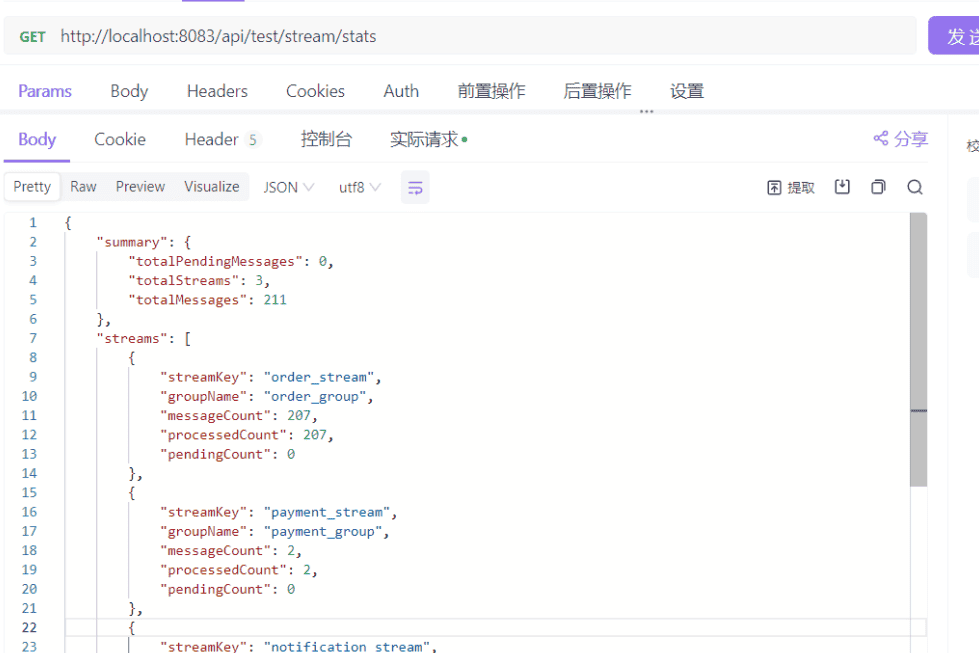
8.2 查看所有配置的Stream信息
GET http://localhost:8083/api/test/stream/info/all
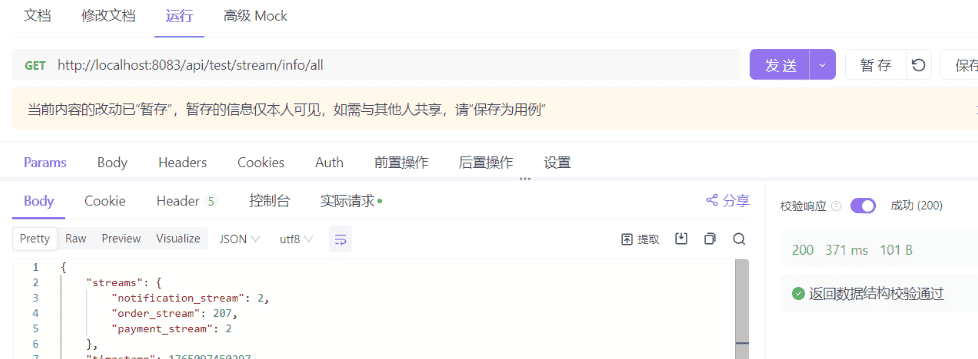
8.3 发送JSON格式复杂消息
POST http://localhost:8083/api/test/stream/send-json

# PARAM
streamKey=order_stream

# Body
{
    "orderId": "orderId123345123",
    "amount": 500,
    "messageType": "ORDER"
}
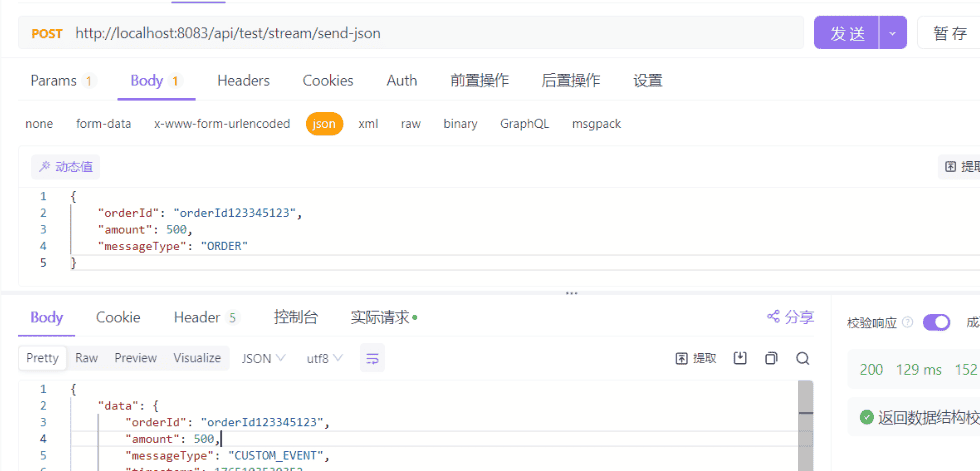
8.4 发送订单事件测试消息
POST http://localhost:8083/api/test/stream/send-order

# PARAM
streamKey:order_stream
orderId:orderId2025120701
amount:500
status:ok
messageType:order
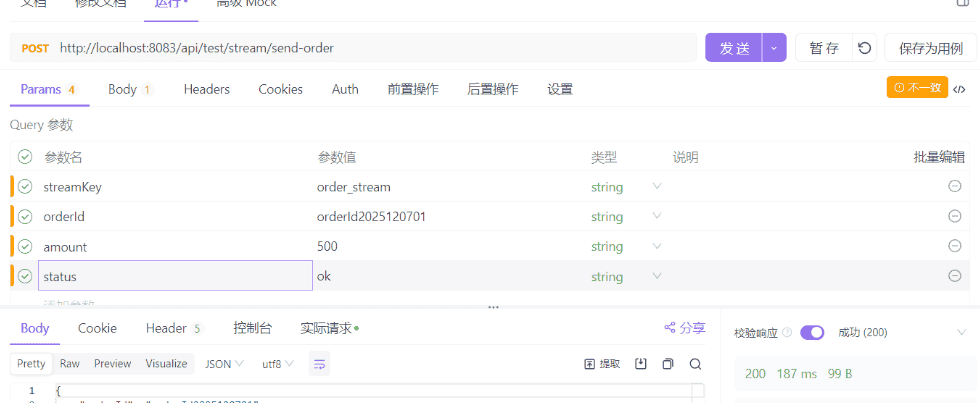
9.总结
上面的几个接口已经说明了使用方式,下面截图展示一下相应的执行日志:
消息的发送以及处理

消息的定时监控
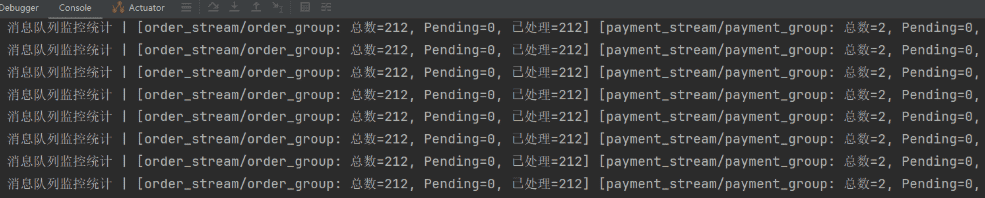
消息队列监控统计 |
[order_stream/order_group: 总数=212, Pending=0, 已处理=212]
[payment_stream/payment_group: 总数=2, Pending=0, 已处理=2] [notification_stream/notification_group: 总数=2, Pending=0, 已处理=2]
| 总计: 总数=216, Pending=0, 已处理=216
© 版权声明
文章版权归作者所有,未经允许请勿转载。
相关文章




暂无评论...