
从 0 实战:基于 Element Plus + dayjs + chinese-days 打造“法定节假日/调休/农历/节气/节日名”日历(含算法细节与完整代码片段)
基于 Element Plus + dayjs + chinese-days 打造“法定节假日/调休/班/农历/节气/节日名”日历(含算法细节、可复用代码、组件化与性能规划)
实战型长文,一文吃透业务日历:
ElCalendar 二次封装,业务零侵入法定节假日 + 调休/班 + 节气 + 农历 + 常见公历/农历节日名(母亲/父亲节等)显示优先级:法定 > 节气(当天) > 农历(空位才补节日名)“国庆/元旦只显示一次节名”,中秋/清明等“单日法定节”在长假中可以单独显示“班”与“调休”形态一致(整格淡底+徽记),但配色为蓝灰(非红)非当月置灰不靠计算,使用 ElCalendar 的 data.type导航按钮可重复点击(避免 Radio @change 限制)
代码基于:Vue 3 + Element Plus(calendar) + dayjs + chinese-daysdayjs 文档:https://dayjs.fenxianglu.cn/category/#node-jschinese-days(节假日/农历/节气):https://www.npmjs.com/package/chinese-days
目录
背景与目标在线效果与特性清单技术选型与安装关键设计与显示优先级可复制代码(模板/脚本/样式)典型问题与踩坑测试清单组件化封装思路与实现要点性能优化与未来规划参考与致谢
背景与目标
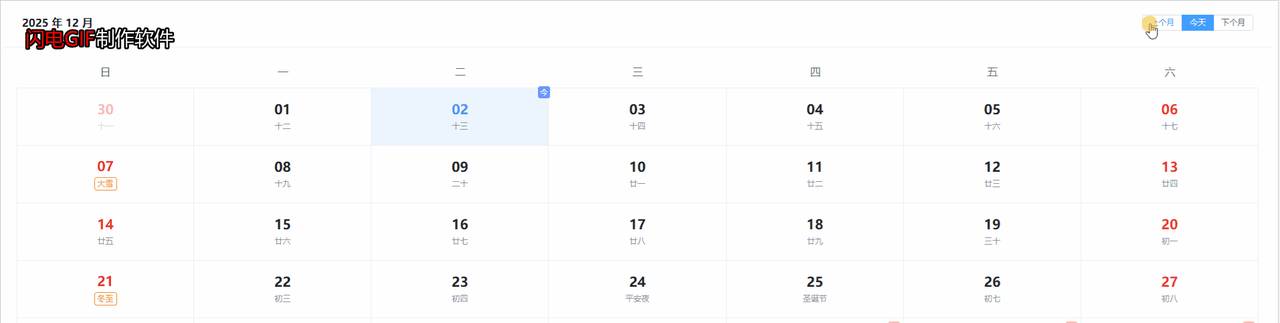
很多业务需要“看得懂”的日历:法定节假日/调休/班,一眼区分;节气/农历要对齐;还希望补上“春节、元宵、端午、七夕、万圣节、母亲/父亲节”等常见节日名。同时视觉上要接近百度日历的观感:
“休”=红色,淡红底卡片;“调”=橙色卡片;“班”=与“调”同形态(淡底卡片+徽记),但换成蓝灰色;法定节名只在块首显示一次(例如国庆只在 10/1 显示“国庆节”)。
本文完整介绍从设计到实现的全部细节,并给出可直接复用的代码片段。
在线效果与特性清单
法定节假日 + 调休/班(“休/调/班”徽记 + 卡片淡底)节气(当天 index=1 优先显示节气名)农历日(desc 文案回落显示)公历固定节日:元旦/情人节/妇女节/植树节/愚人节/劳动节/青年节/儿童节/建党/建军/教师节/国庆/万圣/平安夜/圣诞公历浮动节日:母亲节(5 月第 2 个周日)、父亲节(6 月第 3 个周日)农历大节:春节→元宵→端午→七夕→中元→中秋→重阳→腊八→除夕→小年(小年北/南差异)显示优先级:法定(仅块首)> 节气(当天) > 农历(空位才补节日名)非当月置灰:使用 ElCalendar data.type(避免错月缓存)导航:按钮方案可连续点击;如用 Radio,handle 后重置 v-model
这里放一张整体效果图
技术选型与安装
pnpm add element-plus dayjs chinese-days
引入 Element Plus 的 ElCalendar;日期运算选用 dayjs;中国法定节假日/农历/节气选用 chinese-days。
关键设计与显示优先级
1) 法定节名只在“休息块的第一天”显示
isRestHoliday = !!holidayName && !detail.workdisplayHolidayName = isRestHoliday && (!prevIsRest || SINGLE_DAY_RESTS.has(holidayName))SINGLE_DAY_RESTS = { ‘中秋节’,‘清明节’ } ——“单日法定节”允许在长假中单独显示一次
2) 非当月置灰
用 ElCalendar 的 #date-cell data.type:‘current-month’ | ‘prev-month’ | ‘next-month’置灰条件:data.type !== ‘current-month’
3) “休/调/班”样式
根元素类:holiday(仅休)、inlieu(调)、work(班)徽记类:holiday-dot.rest / .inlieu / .work配色:休=红;调=橙;班=蓝灰(与调同形态但非红)
4) desc 文案优先级
法定(仅块首)> 节气(当天index=1) > 农历(空位补 customFest 节日名)
可复制代码(模板/脚本/样式)
直接粘贴到你的组件内即可运行;如果你已有页面,只需对照修改差异处。
模板(#date-cell)
<template>
  <div class="my-calendar-container">
    <ElCalendar v-model="currentDate">
      <template #header="{ date }">
        <div class="calendar-header">
          <div><span>{{ date }}</span></div>
          <ElRadioGroup v-model="radioValue" size="small" @change="handleRadioChange">
            <ElRadioButton label="上个月" value="prev-month" />
            <ElRadioButton label="今天" value="today" />
            <ElRadioButton label="下个月" value="next-month" />
          </ElRadioGroup>
        </div>
      </template>

      <template #date-cell="{ data }">
        <div
          class="calendar-cell"
          :class="{
            selected: isSelected(data.day),
            today: cellInfoMap[data.day]?.isToday,
            disable: data.type !== 'current-month',
            holiday: !!cellInfoMap[data.day]?.holidayName && !cellInfoMap[data.day]?.work && !cellInfoMap[data.day]?.isInLieu,
            inlieu: !!cellInfoMap[data.day]?.isInLieu,
            work: !!cellInfoMap[data.day]?.work,
            solar: cellInfoMap[data.day]?.solarTerm?.index === 1,
            'is-weekend': cellInfoMap[data.day]?.isWeekendRed,
          }"
        >
          <span v-if="cellInfoMap[data.day]?.isToday" class="today-dot">今</span>

          <span
            v-if="cellInfoMap[data.day]?.holidayName"
            class="holiday-dot"
            :class="{
              rest: !cellInfoMap[data.day]?.work && !cellInfoMap[data.day]?.isInLieu,
              inlieu: !!cellInfoMap[data.day]?.isInLieu,
              work: !!cellInfoMap[data.day]?.work
            }"
          >
            {{ cellInfoMap[data.day]?.work ? '班' : cellInfoMap[data.day]?.isInLieu ? '调' : '休' }}
          </span>

          <span class="day">{{ data.day.split('-')[2] }}</span>

          <span class="desc">
            {{
              cellInfoMap[data.day]?.displayHolidayName
                ? cellInfoMap[data.day]?.holidayName
                : (cellInfoMap[data.day]?.solarTerm?.index === 1
                    ? cellInfoMap[data.day]?.solarTerm?.name
                    : (cellInfoMap[data.day]?.customFest || cellInfoMap[data.day]?.lunarDayCN))
            }}
          </span>
        </div>
      </template>
    </ElCalendar>
  </div>
</template>
脚本(节选,核心算法)
<script setup lang="ts">
import { ref, reactive, nextTick, watch } from "vue";
import { dayjs, ElCalendar, type CalendarDateType, ElRadioGroup, ElRadioButton } from "element-plus";
import "element-plus/dist/index.css";
import chineseDays from "chinese-days";
import { getSolarTermsInRange } from "chinese-days";

type CellInfo = {
  dateStr: string;
  dateObj: Date;
  isToday: boolean;
  isInLieu: boolean;
  work?: boolean;
  holidayName?: string;
  solarTerm?: { name: string; index: number } | undefined;
  lunarDayCN: string;
  lunarMonCN: string;
  lunarYearCN: string;
  yearCyl: string;
  monCyl: string;
  dayCyl: string;
  zodiac: string;
  isWeekendRed: boolean;
  customFest?: string;
  displayHolidayName?: boolean;
};

const currentDate = ref(new Date());
const radioValue = ref("today");
const cellInfoMap = reactive<Record<string, CellInfo>>({});
const selectedDate = ref<string | null>(null);

const { getDayDetail, getLunarDate, isInLieu, isWorkday } = chineseDays;

function nthWeekdayOfMonth(year:number, mon:number, wd:number, nth:number) {
  const first = dayjs(`${year}-${String(mon).padStart(2,'0')}-01`);
  const offset = (wd - first.day() + 7) % 7;
  const date = 1 + offset + (nth - 1) * 7;
  const d = first.date(date);
  return d.month() + 1 === mon ? d : null;
}

function buildFloatingSolarFests(year:number) {
  const res:Record<string,string> = {};
  const mothers = nthWeekdayOfMonth(year,5,0,2);
  const fathers = nthWeekdayOfMonth(year,6,0,3);
  if (mothers) res[mothers.format('YYYY-MM-DD')] = '母亲节';
  if (fathers) res[fathers.format('YYYY-MM-DD')] = '父亲节';
  return res;
}

const SOLAR_FESTS:Record<string,string> = {
  '01-01':'元旦','02-14':'情人节','03-08':'妇女节','03-12':'植树节',
  '04-01':'愚人节','05-01':'劳动节','05-04':'青年节','06-01':'儿童节',
  '07-01':'建党节','08-01':'建军节','09-10':'教师节',
  '10-01':'国庆节','10-31':'万圣节','12-24':'平安夜','12-25':'圣诞节',
};

const SINGLE_DAY_RESTS = new Set(['中秋节','清明节']);

function getSolarFestival(key:string, solarTerm?:{name:string; index:number}) {
  if (solarTerm?.name==='清明' && solarTerm.index===1) return '清明节';
  const mmdd = key.slice(5);
  const fixed = SOLAR_FESTS[mmdd];
  if (fixed) return fixed;
  const floats = buildFloatingSolarFests(Number(key.slice(0,4)));
  return floats[key];
}

const XIAONIAN_REGION:'north'|'south'='north';
function getLunarFestival(key:string, lunar:any) {
  const m=lunar.lunarMonCN, d=lunar.lunarDayCN;
  if (m==='正月'&&d==='初一') return '春节';
  if (m==='正月'&&d==='十五') return '元宵节';
  if (m==='五月'&&d==='初五') return '端午节';
  if (m==='七月'&&d==='初七') return '七夕节';
  if (m==='七月'&&d==='十五') return '中元节';
  if (m==='八月'&&d==='十五') return '中秋节';
  if (m==='九月'&&d==='初九') return '重阳节';
  if (m==='腊月'&&d==='初八') return '腊八节';
  if (m==='腊月') {
    if (XIAONIAN_REGION==='north'&&d==='廿三') return '小年';
    if (XIAONIAN_REGION==='south'&&d==='廿四') return '小年';
  }
  const nextKey = dayjs(key).add(1,'day').format('YYYY-MM-DD');
  const nextLunar = getLunarDate(nextKey);
  if (nextLunar.lunarMonCN==='正月'&&nextLunar.lunarDayCN==='初一') return '除夕';
  return undefined;
}

function buildViewStart(base:Date) {
  const d = dayjs(base ?? new Date());
  const first = d.startOf('month');
  return first.subtract(first.day(),'day');
}

const isSelected = (day:string)=> selectedDate.value===day;

function precomputeCells(base:Date) {
  const viewStart = buildViewStart(base);
  for(let i=0;i<42;i++){
    const cur = viewStart.add(i,'day');
    const key = cur.format('YYYY-MM-DD');

    const detail = getDayDetail(key);
    const lunar  = getLunarDate(key);
    const solarTerm:any = getSolarTermsInRange(key)?.[0];

    const festSolar = getSolarFestival(key, solarTerm);
    const festLunar = getLunarFestival(key, lunar);
    const customFest = festLunar || festSolar;

    const holidayName = detail.name ? detail.name.split(',')[1] : undefined;
    const isRestHoliday = !!holidayName && !detail.work;

    const prevKey = cur.subtract(1,'day').format('YYYY-MM-DD');
    const prevDetail = getDayDetail(prevKey);
    const prevHolidayName = prevDetail.name ? prevDetail.name.split(',')[1] : undefined;
    const prevIsRest = !!prevHolidayName && !prevDetail.work;

    const displayHolidayName = isRestHoliday && (!prevIsRest || SINGLE_DAY_RESTS.has(holidayName as string));

    const legalWorkday = isWorkday(key) === true;
    const weekendRed = !legalWorkday && !detail.work;

    cellInfoMap[key] = {
      dateStr: key,
      dateObj: cur.toDate(),
      isToday: cur.isSame(dayjs(),'day'),
      isInLieu: isInLieu(key),
      work: detail.work,
      holidayName,
      solarTerm,
      lunarDayCN: lunar.lunarDayCN,
      lunarMonCN: lunar.lunarMonCN,
      lunarYearCN: lunar.lunarYearCN,
      yearCyl: lunar.yearCyl,
      monCyl: lunar.monCyl,
      dayCyl: lunar.dayCyl,
      zodiac: lunar.zodiac,
      isWeekendRed: weekendRed,
      customFest,
      displayHolidayName,
    };
  }
}

function changeMonth(offset:number){
  currentDate.value = dayjs(currentDate.value).add(offset,'month').toDate();
}

function goToday(){
  currentDate.value = new Date();
  selectedDate.value = dayjs().format('YYYY-MM-DD');
}

function handleRadioChange(value:CalendarDateType){
  switch(value){
    case 'prev-month': changeMonth(-1); break;
    case 'today': goToday(); break;
    case 'next-month': changeMonth(1); break;
  }
  nextTick(()=>{ radioValue.value = '' as any; });
}

watch(currentDate,val=>{ precomputeCells(val); },{ immediate:true });
</script>
样式(节选)
<style scoped lang="less">
.my-calendar-container { background:#fff; padding:12px 12px 0; }

.calendar-header { display:flex; justify-content:space-between; align-items:center; padding:4px 8px 12px; }

.date-cell, .calendar-cell {
  position:relative; height:100%; border-radius:10px;
  display:flex; flex-direction:column; align-items:center; justify-content:center; gap:4px;
  cursor:pointer; transition:all .16s ease; color:#1f2329;

  &:hover { background:rgba(118,142,240,.12); }
  &.disable { opacity:.35; pointer-events:none; }

  &.today .today-dot {
    position:absolute; right:-12px; top:-12px; font-size:12px; padding:0 4px; line-height:20px;
    border-radius:4px; background:#6b88ff; color:#fff; transform:scale(.9);
  }

  &.solar .desc { color:#f28c28; border:1px solid #f28c28; border-radius:4px; padding:0 4px; }

  &.holiday:not(.work):not(.inlieu) { background:rgba(235,51,51,.06); color:#eb3333; }
  &.inlieu { background:rgba(250,140,22,.06); color:#fa8c16; }
  &.work { background:rgba(78,88,119,.08); color:#4e5877; }

  .holiday-dot.rest { background:#eb3333; color:#fff; }
  .holiday-dot.inlieu { background:#fa8c16; color:#fff; }
  .holiday-dot.work { background:#4e5877; color:#fff; }

  .day { font-size:20px; font-weight:700; line-height:24px; }
  .desc { font-size:12px; color:#8a8f99; max-width:90%; overflow:hidden; text-overflow:ellipsis; white-space:nowrap; }
}
</style>
正常无节假日视图
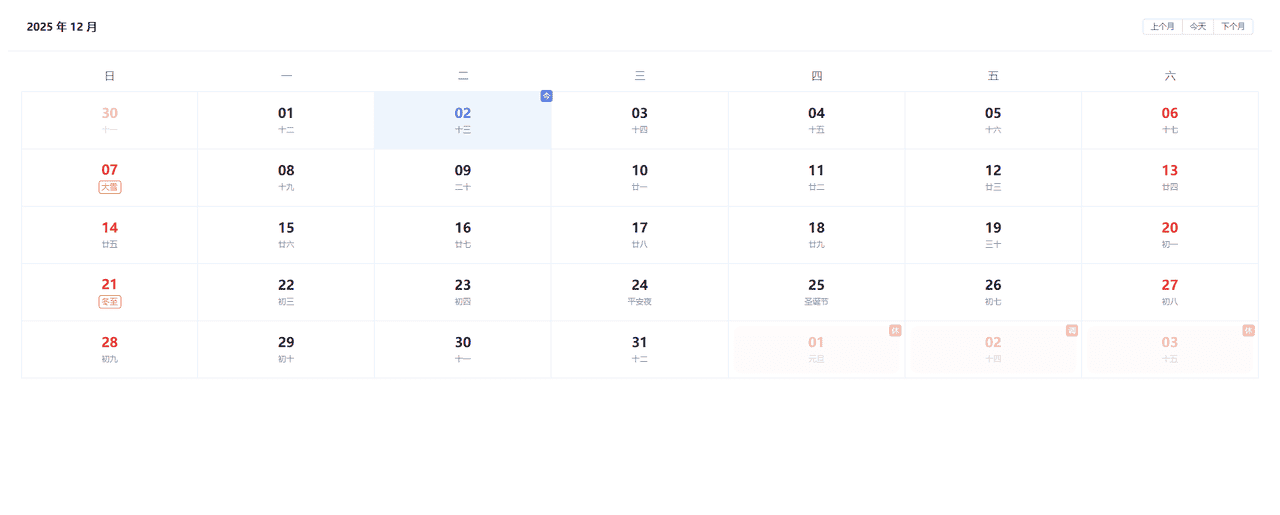
含有法定假日/节日/节气的视图

典型问题与踩坑
“国庆/元旦节名”重复显示:缺少“块首”判断或被缓存挡住,使用
displayHolidayName
data.type !== 'current-month'
radioValue
holiday
work
inlieu
Dayjs is not undefined
tsconfig.json
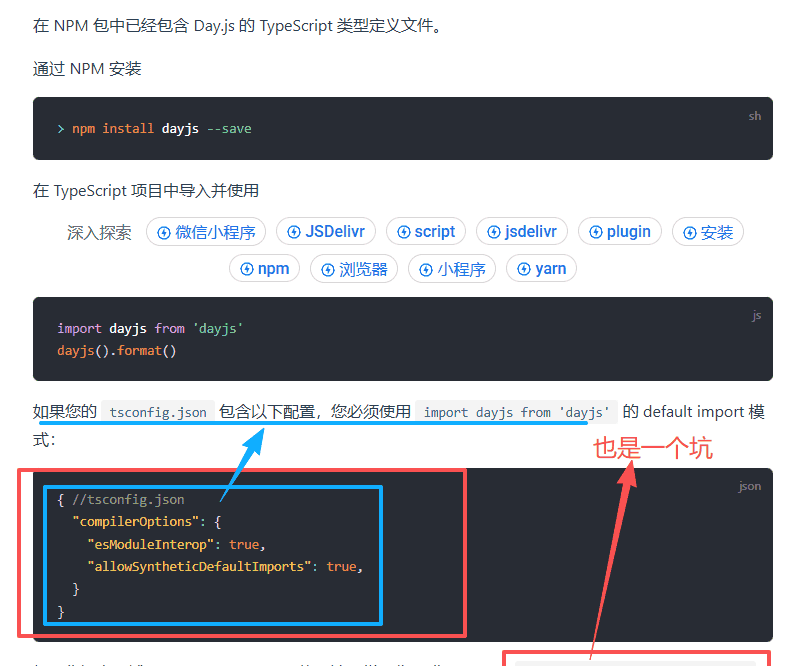 如果你不想修改配置文件那么你可以
import { dayjs } from 'element-plus'

测试清单
2025/10:10/1 显示“国庆节”;10/2–10/5 不重复;若 10/6 为“中秋节”,当天显示“中秋节”2025/12 → 2026/01:非当月置灰正确,不出现错月缓存“班”与“调休”形态一致,颜色不同(蓝灰/橙)文案优先级正确:法定(块首)> 节气(当天) > 农历(空位补节日名)母亲/父亲节(5 月第 2、6 月第 3 周日)显示正确清明为节气当天显示“清明节”导航按钮可连续点击
组件化封装思路与实现要点
目标:抽成
<MyCalendar>
Props
v-model(Date):当前面板日期xiaonianRegion: ‘north’ | ‘south’(默认 north)showCustomFest: boolean(默认 true)holidayBadge: { restColor?: string; inlieuColor?: string; workColor?: string }
Emits
update:modelValue、dateClick(dayStr)、monthChange({year,month})
Slots
header、date-cell(透出 cellInfo)
Expose
goTo(year, month)、today()
内部
useChineseDays.ts:对 chinese-days 的统一封装useFestivals.ts:公历/农历节日名工具仅暴露“节日开关/小年地域/样式定制”等必要配置
打包
tsup/rollup 输出 esm + cjs,附带 d.tsREADME 提供接入示例与截图
目录建议
src/components/MyCalendar/
  index.vue
  useFestivals.ts
  useChineseDays.ts
  types.ts
  styles.less
性能优化与未来规划
性能优化
仅计算可视 42 格,避免跨月重复易变字段(isToday/holidayName/work/customFest/displayHolidayName)每次覆盖;农历/节气可按月缓存(key=YYYY-MM)切月操作可 debounce使用类名切换减少重绘;用 CSS 变量做主题切换更快
工程化
单测:getSolarFestival / getLunarFestival / nthWeekdayOfMonth / displayHolidayNameE2E:切月、块首判断、Radio 连点、置灰i18n/时区:海外应用的节日集/时区策略(可插拔)数据更新:chinese-days 更新与每年法定节假日差异同步脚本(可选)无障碍:徽记“休/调/班”添加 aria-label
未来规划
日期范围选择/多选,结合禁用规则排班/请假数据注入,与法定/调休合并展示月/周/日模式切换(必要时自绘)主题变量体系,提供暗色/高对比模式
参考与致谢
chinese-days(节假日/农历/节气):https://www.npmjs.com/package/chinese-daysdayjs(日期库):https://dayjs.fenxianglu.cn/category/#node-jsElement Plus(ElCalendar):https://element-plus.org
© 版权声明
文章版权归作者所有,未经允许请勿转载。
相关文章





暂无评论...