组网图形
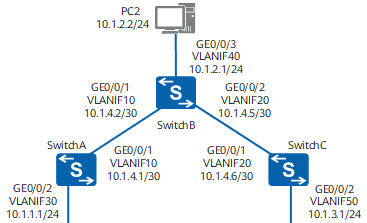
图1 配置不同网段通过静态路由实现互通组网图
静态路由简介
静态路由是一种需要管理员手工配置的特殊路由。静态路由比动态路由使用更少的带宽,并且不占用CPU资源来计算和分析路由更新。但是当网络发生故障或者拓扑发生变化后,静态路由不会自动更新,必须手动重新配置。静态路由有5个主要的参数:目的地址和掩码、出接口和下一跳、优先级。
使用静态路由的好处是配置简单、可控性高,当网络结构比较简单时,只需配置静态路由就可以使网络正常工作。在复杂网络环境中,还可以通过配置静态路由改进网络的性能,并且可以为重要的应用保证带宽。
配置注意事项
一般情况下两个设备之间的通信是双向的,因此路由也必须是双向的,在本端配置完静态路由以后,请不要忘记在对端设备上配置回程路由。在企业网络双出口的场景中,通过配置两条等价的静态路由可以实现负载分担,流量可以均衡的分配到两条不同的链路上;通过配置两条不等价的静态路由可以实现主备份,当主用链路故障的时候流量切换到备用链路上。
组网需求
如图1所示,属于不同网段的主机通过几台Switch相连,要求不配置动态路由协议,使不同网段的任意两台主机之间能够互通。
配置思路
采用如下的思路配置不同网段通过静态路由实现互通:
创建VLAN并配置各接口所属VLAN,配置各VLANIF接口的IP地址,实现相邻设备网络互通。在各主机上配置IP缺省网关,在各台Switch上配置IPv4静态路由或者静态缺省路由,实现不配置动态路由协议,使不同网段的任意两台主机之间能够互通。
操作步骤
配置各接口所属VLAN
# 配置SwitchA。SwitchB和SwitchC的配置与SwitchA类似。
<HUAWEI> system-view
[HUAWEI] sysname SwitchA
[SwitchA] vlan batch 10 30
[SwitchA] interface gigabitethernet 0/0/1
[SwitchA-GigabitEthernet0/0/1] port link-type trunk
[SwitchA-GigabitEthernet0/0/1] port trunk allow-pass vlan 10
[SwitchA-GigabitEthernet0/0/1] quit
[SwitchA] interface gigabitethernet 0/0/2
[SwitchA-GigabitEthernet0/0/2] port link-type access
[SwitchA-GigabitEthernet0/0/2] port default vlan 30
[SwitchA-GigabitEthernet0/0/2] quit
配置各VLANIF接口的IP地址
# 配置SwitchA。SwitchB和SwitchC的配置与SwitchA类似。
[SwitchA] interface vlanif 10
[SwitchA-Vlanif10] ip address 10.1.4.1 30
[SwitchA-Vlanif10] quit
[SwitchA] interface vlanif 30
[SwitchA-Vlanif30] ip address 10.1.1.1 24
[SwitchA-Vlanif30] quit
配置主机
配置主机PC1的缺省网关为10.1.1.1,主机PC2的缺省网关为10.1.2.1,主机PC3的缺省网关为10.1.3.1。
配置静态路由
# 在SwitchA配置IP缺省路由。
[SwitchA] ip route-static 0.0.0.0 0.0.0.0 10.1.4.2
# 在SwitchB配置两条IP静态路由。
[SwitchB] ip route-static 10.1.1.0 255.255.255.0 10.1.4.1
[SwitchB] ip route-static 10.1.3.0 255.255.255.0 10.1.4.6
# 在SwitchC配置IP缺省路由。
[SwitchC] ip route-static 0.0.0.0 0.0.0.0 10.1.4.5
验证配置结果
#查看SwitchA的IP路由表。
[SwitchA] display ip routing-tableRoute Flags: R – relay, D – download to fib, T – to vpn-instance
——————————————————————————
Routing Tables: Public
Destinations : 7 Routes : 7
Destination/Mask Proto Pre Cost Flags NextHop Interface
0.0.0.0/0 Static 60 0 RD 10.1.4.2 Vlanif10
10.1.1.0/24 Direct 0 0 D 10.1.1.1 Vlanif30
10.1.1.1/32 Direct 0 0 D 127.0.0.1 Vlanif30
10.1.4.0/30 Direct 0 0 D 10.1.4.1 Vlanif10
10.1.4.1/32 Direct 0 0 D 127.0.0.1 Vlanif10
127.0.0.0/8 Direct 0 0 D 127.0.0.1 InLoopBack0
127.0.0.1/32 Direct 0 0 D 127.0.0.1 InLoopBack0
# 使用ping命令验证连通性。
[SwitchA] ping 10.1.3.1
PING 10.1.3.1: 56 data bytes, press CTRL_C to break
Reply from 10.1.3.1: bytes=56 Sequence=1 ttl=253 time=62 ms
Reply from 10.1.3.1: bytes=56 Sequence=2 ttl=253 time=63 ms
Reply from 10.1.3.1: bytes=56 Sequence=3 ttl=253 time=63 ms
Reply from 10.1.3.1: bytes=56 Sequence=4 ttl=253 time=62 ms
Reply from 10.1.3.1: bytes=56 Sequence=5 ttl=253 time=62 ms
— 10.1.3.1 ping statistics —
5 packet(s) transmitted
5 packet(s) received
0.00% packet loss
round-trip min/avg/max = 62/62/63 ms
# 使用Tracert命令验证连通性。
[SwitchA] tracert 10.1.3.1
traceroute to 10.1.3.1(10.1.3.1), max hops: 30 ,packet length: 40,press CTRL_C to break
1 10.1.4.2 31 ms 32 ms 31 ms
2 10.1.3.1 62 ms 63 ms 62 ms
配置文件
SwitchA的配置文件
#
sysname SwitchA
#
vlan batch 10 30
#
interface Vlanif10
ip address 10.1.4.1 255.255.255.252
#
interface Vlanif30
ip address 10.1.1.1 255.255.255.0
#
interface GigabitEthernet0/0/1
port link-type trunk
port trunk allow-pass vlan 10
#
interface GigabitEthernet0/0/2
port link-type access
port default vlan 30
#
ip route-static 0.0.0.0 0.0.0.0 10.1.4.2
#
return
SwitchB的配置文件
#
sysname SwitchB
#
vlan batch 10 20 40
#
interface Vlanif10
ip address 10.1.4.2 255.255.255.252
#
interface Vlanif20
ip address 10.1.4.5 255.255.255.252
#
interface Vlanif40
ip address 10.1.2.1 255.255.255.0
#
interface GigabitEthernet0/0/1
port link-type trunk
port trunk allow-pass vlan 10
#
interface GigabitEthernet0/0/2
port link-type trunk
port trunk allow-pass vlan 20
#
interface GigabitEthernet0/0/3
port link-type access
port default vlan 40
#
ip route-static 10.1.1.0 255.255.255.0 10.1.4.1
ip route-static 10.1.3.0 255.255.255.0 10.1.4.6
#
return
SwitchC的配置文件
#
sysname SwitchC
#
vlan batch 20 50
#
interface Vlanif20
ip address 10.1.4.6 255.255.255.252
#
interface Vlanif50
ip address 10.1.3.1 255.255.255.0
#
interface GigabitEthernet0/0/1
port link-type trunk
port trunk allow-pass vlan 20
#
interface GigabitEthernet0/0/2
port link-type access
port default vlan 50
#
ip route-static 0.0.0.0 0.0.0.0 10.1.4.5
#
return
© 版权声明
文章版权归作者所有,未经允许请勿转载。
相关文章




暂无评论...