
概述
透视变换是一种计算机视觉技术,它可以将图像从一个视角转换到另一个视角,通过计算3×3的变换矩阵来实现图像中任意四边形区域到另一个四边形区域的映射。这种变换能够校正图像中的透视畸变,例如将倾斜拍摄的文档”拉直”为正面视图,或者从不同角度观察同一平面物体时的视角转换,广泛应用于文档扫描、建筑摄影校正、图像拼接和增强现实等领域。
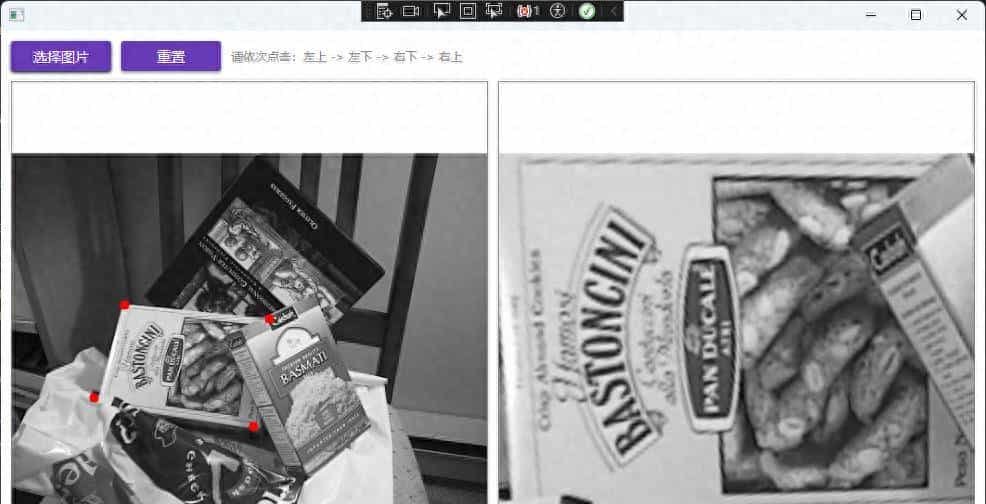
效果:
实践
第一按照顺序点击四个点获取这四个点的坐标并在图像上绘制出来:
 public void HandleMouseClick(OpenCvSharp.Point position, double actualWidth, double actualHeight)
{
if (_originalMat == null) return;

// 计算缩放比例
// Image控件一般是Uniform Stretch,所以我们需要计算实际显示的图像区域
double imageWidth = _originalMat.Width;
double imageHeight = _originalMat.Height;

double scaleX = actualWidth / imageWidth;
double scaleY = actualHeight / imageHeight;
double scale = Math.Min(scaleX, scaleY);

// 计算图像在控件中的偏移(居中显示时)
double offsetX = (actualWidth - imageWidth * scale) / 2;
double offsetY = (actualHeight - imageHeight * scale) / 2;

// 转换坐标到图像坐标系
double imgX = (position.X - offsetX) / scale;
double imgY = (position.Y - offsetY) / scale;

// 检查点击是否在图像范围内
if (imgX >= 0 && imgX = 0 && imgY
{
AddPoint((float)imgX, (float)imgY);
}
}

private void AddPoint(float x, float y)
{
if (_points.Count >= 4) return;

_points.Add(new Point2f(x, y));

// 在临时Mat上绘制点
Cv2.Circle(_tempMat, (int)x, (int)y, 5, Scalar.Red, -1);

// 更新显示图像以显示新绘制的点
DisplayImage = ConvertMatToBitmapImage(_tempMat);

if (_points.Count == 4)
{
PerformPerspectiveTransform;
}
}
然后执行透视变换:
 private void PerformPerspectiveTransform
{
Point2f srcPoints = _points.ToArray;
Point2f dstPoints = new Point2f
{
new Point2f(0, 0),
new Point2f(0, 480),
new Point2f(640, 480),
new Point2f(640, 0),
};

try
{
usingvar matrix = Cv2.GetPerspectiveTransform(srcPoints, dstPoints);
usingvar dst = new Mat(new Size(640, 480), MatType.CV_8UC3);
Cv2.WarpPerspective(_originalMat, dst, matrix, dst.Size);
ResultImage = ConvertMatToBitmapImage(dst);
}
catch (Exception ex)
{
MessageBox.Show($"变换失败: {ex.Message}");
}
}
这个过程主要用到了
Cv2.GetPerspectiveTransform与Cv2.WarpPerspective函数,我们只需搞懂这两个函数怎么用就知道怎么使用透视变换了。
先查看
Cv2.GetPerspectiveTransform的函数签名:
public static Mat GetPerspectiveTransform(IEnumerable
这个函数根据四对对应点计算透视变换矩阵,将源图像中的四边形区域映射到目标图像中的四边形区域。
|
参数名 |
类型 |
说明 |
|---|---|---|
|
src |
IEnumerable |
源图像中四边形顶点的坐标集合(4个点) |
|
dst |
IEnumerable |
目标图像中对应四边形顶点的坐标集合(4个点) |
目前查看WarpPerspective的函数签名:
 public static void WarpPerspective(
InputArray src, OutputArray dst, InputArray m, Size dsize,
InterpolationFlags flags = InterpolationFlags.Linear,
BorderTypes borderMode = BorderTypes.Constant,
Scalar? borderValue = null)
这个函数将透视变换应用到输入图像上,根据给定的3×3变换矩阵将图像从一个视角转换到另一个视角。
|
参数名 |
类型 |
说明 |
|---|---|---|
|
src |
InputArray |
输入图像 |
|
dst |
OutputArray |
输出图像,具有dsize指定的尺寸和与src一样的类型 |
|
m |
InputArray |
3×3透视变换矩阵 |
|
dsize |
Size |
输出图像的尺寸 |
|
flags |
InterpolationFlags |
插值方法组合(INTER_LINEAR或INTER_NEAREST)和可选标志WARP_INVERSE_MAP(设置M为逆变换) |
|
borderMode |
BorderTypes |
像素外推方法(BORDER_CONSTANT或BORDER_REPLICATE) |
|
borderValue |
Scalar? |
常数边界时使用的值,默认为0 |
这样就可以实现透视变换了。
© 版权声明
文章版权归作者所有,未经允许请勿转载。
相关文章




暂无评论...