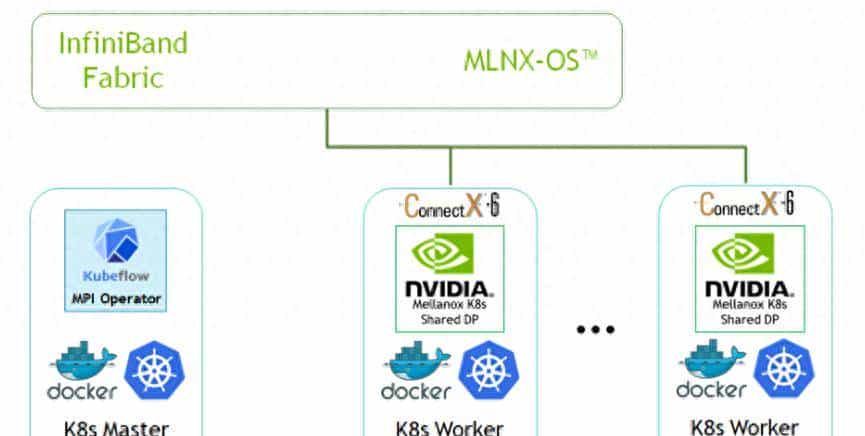
在AI时代,GPU已成为企业最宝贵的计算资源之一。如何在Kubernetes中高效管理、调度和共享这些昂贵的异构计算资源,是每个云原生AI平台必须解决的核心问题。
引言:AI计算的新挑战
传统GPU使用模式的痛点:
- 资源孤岛:GPU服务器独立管理,无法形成资源池
- 利用率低下:单个任务无法充分利用整卡资源,平均GPU利用率不到30%
- 调度困难:手动分配GPU,缺乏统一的调度和排队机制
- 成本高昂:A100/H100等高端GPU单卡成本数万到数十万
Kubernetes GPU管理的价值:
- 资源池化:将分散的GPU资源统一管理,形成共享资源池
- 弹性伸缩:根据AI任务需求动态分配和释放GPU资源
- 成本优化:通过vGPU切分和混部提升资源利用率
- 标准化运维:统一的监控、运维和故障处理机制
一、Kubernetes GPU基础架构
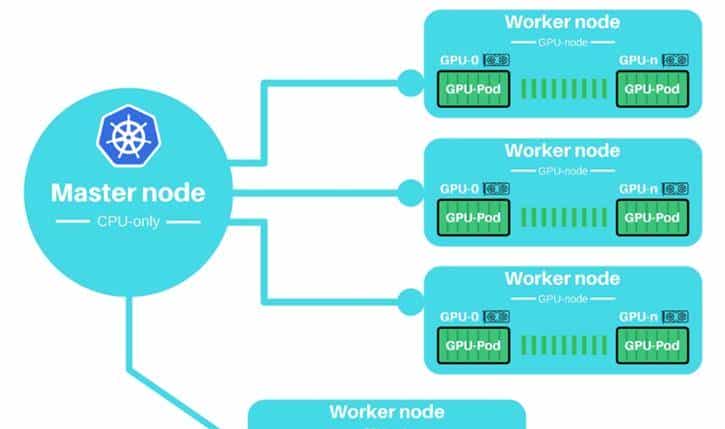
1.1 设备插件(Device Plugin)机制
1.2 NVIDIA Device Plugin部署
基础部署配置
# nvidia-device-plugin-daemonset.yaml
apiVersion: apps/v1
kind: DaemonSet
metadata:
  name: nvidia-device-plugin-daemonset
  namespace: kube-system
  labels:
    k8s-app: nvidia-device-plugin
spec:
  updateStrategy:
    type: RollingUpdate
    rollingUpdate:
      maxUnavailable: 1
  selector:
    matchLabels:
      k8s-app: nvidia-device-plugin
  template:
    metadata:
      labels:
        k8s-app: nvidia-device-plugin
    spec:
      priorityClassName: system-node-critical
      tolerations:
      - key: CriticalAddonsOnly
        operator: Exists
      - key: nvidia.com/gpu
        operator: Exists
        effect: NoSchedule
      nodeSelector:
        # 仅在有GPU的节点上运行
        nvidia.com/gpu.present: "true"
      containers:
      - image: nvcr.io/nvidia/k8s-device-plugin:v0.14.1
        name: nvidia-device-plugin-ctr
        securityContext:
          allowPrivilegeEscalation: false
          capabilities:
            drop: ["ALL"]
        volumeMounts:
        - name: device-plugin
          mountPath: /var/lib/kubelet/device-plugins
        - name: nvidia-driver
          mountPath: /usr/local/nvidia
          readOnly: true
        env:
        - name: PASS_DEVICE_SPECS
          value: "true"
        - name: FAIL_ON_INIT_ERROR
          value: "true"
        - name: NVIDIA_VISIBLE_DEVICES
          value: "all"
        - name: NVIDIA_DRIVER_CAPABILITIES
          value: "compute,utility"
        - name: LD_LIBRARY_PATH
          value: /usr/local/nvidia/lib:/usr/local/nvidia/lib64
        resources:
          requests:
            cpu: 50m
            memory: 100Mi
          limits:
            cpu: 100m
            memory: 300Mi
      volumes:
      - name: device-plugin
        hostPath:
          path: /var/lib/kubelet/device-plugins
      - name: nvidia-driver
        hostPath:
          path: /usr/lib/modules/nvidia
节点标签与污点
# 标记GPU节点
kubectl label nodes <node-name> nvidia.com/gpu.present=true
kubectl label nodes <node-name> accelerator=nvidia-tesla-a100
kubectl label nodes <node-name> gpu-type=a100
kubectl label nodes <node-name> gpu-memory=40Gi

# 添加污点(可选)
kubectl taint nodes <node-name> nvidia.com/gpu=true:NoSchedule

# 查看节点GPU信息
kubectl describe node <node-name> | grep -A 10 "Capacity"
1.3 GPU资源请求与限制
# gpu-pod-example.yaml
apiVersion: v1
kind: Pod
metadata:
  name: gpu-pod
  labels:
    app: ai-training
spec:
  # 节点选择
  nodeSelector:
    accelerator: nvidia-tesla-a100

  # 容忍GPU污点
  tolerations:
  - key: nvidia.com/gpu
    operator: Exists
    effect: NoSchedule

  containers:
  - name: cuda-container
    image: nvidia/cuda:12.1.0-base-ubuntu22.04
    command: ["/bin/bash"]
    args: ["-c", "nvidia-smi && sleep infinity"]

    # GPU资源请求
    resources:
      limits:
        # 请求整张GPU卡
        nvidia.com/gpu: 1

        # 也可以指定具体型号
        # nvidia.com/gpu.a100: 1
        # nvidia.com/gpu.v100: 2

        # GPU内存限制(需要MIG或vGPU)
        # nvidia.com/gpumem: 10Gi

        # 其他资源
        cpu: "4"
        memory: "16Gi"
      requests:
        nvidia.com/gpu: 1
        cpu: "2"
        memory: "8Gi"

    # 安全上下文(需要特权才能访问GPU)
    securityContext:
      privileged: true

    # 环境变量
    env:
    - name: NVIDIA_VISIBLE_DEVICES
      value: "all"
    - name: NVIDIA_DRIVER_CAPABILITIES
      value: "compute,utility,graphics,video"

    # 挂载NVIDIA驱动
    volumeMounts:
    - name: nvidia-driver
      mountPath: /usr/local/nvidia
      readOnly: true

  volumes:
  - name: nvidia-driver
    hostPath:
      path: /usr/local/nvidia
二、vGPU技术深度解析
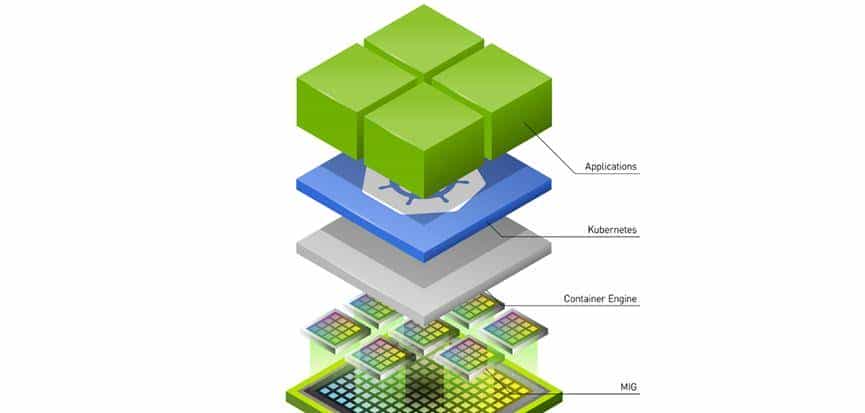
2.1 vGPU架构对比
|
技术方案 |
提供商 |
原理 |
隔离级别 |
适用场景 |
|
NVIDIA MIG |
NVIDIA |
物理GPU切分 |
硬件隔离 |
A100/H100,多租户 |
|
NVIDIA vGPU |
NVIDIA |
虚拟化层 |
虚拟化隔离 |
虚拟桌面,图形渲染 |
|
GPU Sharing |
社区 |
时间片共享 |
软件隔离 |
推理服务,小模型 |
|
AMD MxGPU |
AMD |
SR-IOV虚拟化 |
硬件隔离 |
虚拟化环境 |
|
Intel GVT-g |
Intel |
图形虚拟化 |
虚拟化隔离 |
集成显卡 |
2.2 NVIDIA MIG(Multi-Instance GPU)
MIG配置管理
# 检查GPU是否支持MIG
nvidia-smi -i 0 --query-gpu=pci.bus_id,mig.mode.current --format=csv

# 启用MIG模式
sudo nvidia-smi -i 0 -mig 1

# 查看可用的MIG配置
sudo nvidia-smi mig -i 0 -lgip

# 创建MIG实例
# 对于A100 40GB,可以创建以下配置:
# 7个 1g.5gb 实例
# 3个 2g.10gb 实例
# 1个 3g.20gb 实例 + 1个 1g.5gb 实例
sudo nvidia-smi mig -i 0 -cgi 9,14  # 创建2g.10gb和3g.20gb实例

# 创建GPU实例
sudo nvidia-smi mig -i 0 -gi 0 -cgi 9  # 在GPU0上创建2g.10gb实例
Kubernetes MIG Device Plugin
# mig-device-plugin.yaml
apiVersion: apps/v1
kind: DaemonSet
metadata:
  name: nvidia-mig-device-plugin
  namespace: kube-system
spec:
  selector:
    matchLabels:
      name: nvidia-mig-device-plugin
  template:
    metadata:
      labels:
        name: nvidia-mig-device-plugin
    spec:
      nodeSelector:
        nvidia.com/mig.config: "all-disabled"  # 需要先配置MIG
      containers:
      - name: nvidia-mig-device-plugin
        image: nvidia/mig-parted:latest
        env:
        - name: MIG_PARTED_TOOL
          value: "nvidia-smi"
        - name: WITH_REBOOT
          value: "false"
        securityContext:
          privileged: true
        volumeMounts:
        - name: device-plugin
          mountPath: /var/lib/kubelet/device-plugins
        - name: nvidia-driver
          mountPath: /usr/local/nvidia
          readOnly: true
        - name: mig-parted-config
          mountPath: /etc/mig-parted
      volumes:
      - name: device-plugin
        hostPath:
          path: /var/lib/kubelet/device-plugins
      - name: nvidia-driver
        hostPath:
          path: /usr/local/nvidia
      - name: mig-parted-config
        configMap:
          name: mig-parted-config
---
# MIG配置
apiVersion: v1
kind: ConfigMap
metadata:
  name: mig-parted-config
  namespace: kube-system
data:
  config.yaml: |
    version: v1
    mig-configs:
      all-disabled:
        - devices: all
          mig-enabled: false
      all-1g.5gb:
        - devices: all
          mig-enabled: true
          mig-devices: {}
      a100-40gb-7x1g.5gb:
        - devices: [0]
          mig-enabled: true
          mig-devices:
            1g.5gb: 7
使用MIG实例的Pod配置
apiVersion: v1
kind: Pod
metadata:
  name: mig-pod
spec:
  containers:
  - name: cuda-container
    image: nvidia/cuda:12.1.0-base
    command: ["/bin/bash"]
    args: ["-c", "nvidia-smi && sleep infinity"]
    resources:
      limits:
        # 请求特定MIG实例
        nvidia.com/mig-1g.5gb: 1  # 1个1g.5gb实例
        # 或者
        nvidia.com/mig-2g.10gb: 1  # 1个2g.10gb实例
      requests:
        nvidia.com/mig-1g.5gb: 1
    securityContext:
      privileged: true
2.3 GPU共享与时间片调度
基于GPU共享的Device Plugin
# gpu-sharing-device-plugin.yaml
apiVersion: apps/v1
kind: DaemonSet
metadata:
  name: gpu-sharing-device-plugin
  namespace: kube-system
spec:
  selector:
    matchLabels:
      name: gpu-sharing-device-plugin
  template:
    metadata:
      labels:
        name: gpu-sharing-device-plugin
    spec:
      nodeSelector:
        gpu-sharing: "enabled"
      containers:
      - name: gpu-sharing-device-plugin
        image: aliyun/gpushare-device-plugin:v1.0
        securityContext:
          privileged: true
        volumeMounts:
        - name: device-plugin
          mountPath: /var/lib/kubelet/device-plugins
        - name: nvidia-driver
          mountPath: /usr/local/nvidia
          readOnly: true
        env:
        - name: LOG_LEVEL
          value: "info"
        - name: SHARE_MODE
          value: "memory"  # 内存共享模式
          # 可选:memory, compute, both
        resources:
          requests:
            cpu: 100m
            memory: 100Mi
          limits:
            cpu: 200m
            memory: 200Mi
      volumes:
      - name: device-plugin
        hostPath:
          path: /var/lib/kubelet/device-plugins
      - name: nvidia-driver
        hostPath:
          path: /usr/local/nvidia
共享GPU的Pod配置
apiVersion: apps/v1
kind: Deployment
metadata:
  name: gpu-share-deployment
spec:
  replicas: 4
  selector:
    matchLabels:
      app: model-serving
  template:
    metadata:
      labels:
        app: model-serving
    spec:
      nodeSelector:
        gpu-sharing: "enabled"
      containers:
      - name: model-server
        image: tensorflow/serving:latest-gpu
        args:
        - "--model_name=my_model"
        - "--model_base_path=/models/my_model"
        - "--port=8500"
        - "--rest_api_port=8501"
        resources:
          limits:
            # 共享GPU内存,单位MiB
            aliyun.com/gpu-mem: 4096  # 4GB GPU内存
            # 共享GPU算力核心(百分比)
            aliyun.com/gpu-core: 25   # 25%的GPU算力
          requests:
            aliyun.com/gpu-mem: 2048  # 最少2GB
            aliyun.com/gpu-core: 10   # 最少10%算力
        ports:
        - containerPort: 8500
        - containerPort: 8501
        volumeMounts:
        - name: model-storage
          mountPath: /models
      volumes:
      - name: model-storage
        persistentVolumeClaim:
          claimName: model-pvc
2.4 虚拟GPU(vGPU)解决方案
NVIDIA vGPU部署架构
管理平面
Kubernetes集群
物理GPU服务器
NVIDIA License Server
vGPU监控
计费系统
Device Plugin
GPU Operator
GPU节点
Pod调度
vGPU调度器
NVIDIA vGPU Manager
GPU 1 A100
GPU 2 A100
GPU 3 V100
虚拟机/容器
虚拟机/容器
虚拟机/容器
vGPU配置示例
# vgpu-device-plugin.yaml
apiVersion: apps/v1
kind: DaemonSet
metadata:
  name: nvidia-vgpu-device-plugin
  namespace: kube-system
spec:
  selector:
    matchLabels:
      name: nvidia-vgpu-device-plugin
  template:
    metadata:
      labels:
        name: nvidia-vgpu-device-plugin
    spec:
      nodeSelector:
        nvidia.com/vgpu.present: "true"
      containers:
      - name: nvidia-vgpu-device-plugin
        image: nvidia/vgpu-device-plugin:latest
        securityContext:
          privileged: true
        volumeMounts:
        - name: device-plugin
          mountPath: /var/lib/kubelet/device-plugins
        - name: nvidia-driver
          mountPath: /usr/local/nvidia
          readOnly: true
        - name: vgpu-config
          mountPath: /etc/nvidia/vgpu
        env:
        - name: NVIDIA_VISIBLE_DEVICES
          value: "all"
        - name: VGPU_CONFIG_FILE
          value: "/etc/nvidia/vgpu/vgpu-config.yaml"
        resources:
          requests:
            cpu: 100m
            memory: 100Mi
          limits:
            cpu: 200m
            memory: 200Mi
      volumes:
      - name: device-plugin
        hostPath:
          path: /var/lib/kubelet/device-plugins
      - name: nvidia-driver
        hostPath:
          path: /usr/local/nvidia
      - name: vgpu-config
        configMap:
          name: vgpu-config
---
apiVersion: v1
kind: ConfigMap
metadata:
  name: vgpu-config
  namespace: kube-system
data:
  vgpu-config.yaml: |
    version: v1
    devices:
    - name: "A100-40GB"
      type: "nvidia-a100"
      memory: 40Gi
      profiles:
      - name: "vgpu-1q"
        memory: 10Gi
        shards: 4
      - name: "vgpu-2q"
        memory: 20Gi
        shards: 2
      - name: "vgpu-4q"
        memory: 40Gi
        shards: 1
    - name: "V100-32GB"
      type: "nvidia-v100"
      memory: 32Gi
      profiles:
      - name: "vgpu-1q"
        memory: 8Gi
        shards: 4
      - name: "vgpu-2q"
        memory: 16Gi
        shards: 2
使用vGPU的Pod配置
apiVersion: v1
kind: Pod
metadata:
  name: vgpu-pod
  annotations:
    # vGPU特定注解
    nvidia.com/vgpu-profile: "vgpu-1q"
    nvidia.com/vgpu-memory: "10Gi"
spec:
  nodeSelector:
    nvidia.com/vgpu.present: "true"
  containers:
  - name: vgpu-container
    image: nvidia/cuda:12.1.0-base
    command: ["/bin/bash"]
    args: ["-c", "nvidia-smi && sleep infinity"]
    resources:
      limits:
        nvidia.com/vgpu: 1
        nvidia.com/vgpu-memory: "10Gi"
      requests:
        nvidia.com/vgpu: 1
        nvidia.com/vgpu-memory: "10Gi"
    securityContext:
      privileged: true
三、AI任务调度与资源管理
3.1 智能GPU调度器
自定义GPU调度器配置
# gpu-scheduler-config.yaml
apiVersion: kubescheduler.config.k8s.io/v1beta3
kind: KubeSchedulerConfiguration
profiles:
- schedulerName: gpu-scheduler
  plugins:
    filter:
      enabled:
      - name: NodeResourcesFit
      - name: NodeAffinity
      - name: PodTopologySpread
      - name: GPUTopology  # GPU拓扑感知
    score:
      enabled:
      - name: NodeResourcesBalancedAllocation
        weight: 1
      - name: GPUUtilization  # GPU利用率评分
        weight: 3
      - name: GPUCost  # GPU成本评分
        weight: 2
      - name: GPUTopologyScore
        weight: 2
  pluginConfig:
  - name: GPUUtilization
    args:
      utilizationThreshold: 0.8
      # 超过80%利用率的节点分数降低
  - name: GPUCost
    args:
      gpuCostMap:
        nvidia.com/a100: 10.0
        nvidia.com/v100: 5.0
        nvidia.com/t4: 2.0
        nvidia.com/a10: 3.0
  - name: GPUTopologyScore
    args:
      # GPU间通信成本矩阵
      nvlinkCost: 0.1
      pcieCost: 1.0
      sameSocketBonus: 0.5
GPU拓扑感知调度
// GPU拓扑感知插件示例
package gputopology

import (
    "context"
    "fmt"

    v1 "k8s.io/api/core/v1"
    "k8s.io/apimachinery/pkg/runtime"
    "k8s.io/kubernetes/pkg/scheduler/framework"
)

const (
    GPUTopologyName = "GPUTopology"
    nvlinkSpeed = 300  // GB/s
    pcieSpeed = 32     // GB/s
)

type GPUTopology struct {
    handle framework.Handle
}

func (g *GPUTopology) Filter(ctx context.Context, state *framework.CycleState, pod *v1.Pod, nodeInfo *framework.NodeInfo) *framework.Status {
    // 检查Pod是否请求GPU
    if !requestsGPU(pod) {
        return framework.NewStatus(framework.Success)
    }

    node := nodeInfo.Node()

    // 检查节点GPU拓扑信息
    gpuTopology, exists := node.Labels["gpu.topology"]
    if !exists {
        return framework.NewStatus(framework.Unschedulable, "节点缺少GPU拓扑信息")
    }

    // 解析GPU拓扑
    topology := parseGPUTopology(gpuTopology)

    // 检查是否有足够的互联GPU
    requestedGPUs := getRequestedGPUCount(pod)
    if !topology.hasEnoughConnectedGPUs(requestedGPUs) {
        return framework.NewStatus(framework.Unschedulable,
            fmt.Sprintf("节点没有足够的互联GPU,请求%d个,可用%d个",
                requestedGPUs, topology.connectedGPUs))
    }

    return framework.NewStatus(framework.Success)
}

func (g *GPUTopology) Score(ctx context.Context, state *framework.CycleState, pod *v1.Pod, nodeName string) (int64, *framework.Status) {
    nodeInfo, err := g.handle.SnapshotSharedLister().NodeInfos().Get(nodeName)
    if err != nil {
        return 0, framework.AsStatus(err)
    }

    node := nodeInfo.Node()
    topology := parseGPUTopology(node.Labels["gpu.topology"])

    // 计算GPU间通信效率得分
    var score int64 = 0

    // 如果有NVLink,得分更高
    if topology.hasNVLink {
        score += 50
    }

    // GPU数量越多,得分越高(适合大规模训练)
    gpuCount := topology.gpuCount
    score += int64(gpuCount * 10)

    // PCIe带宽越高,得分越高
    score += int64(topology.pcieLanes / 16 * 5)

    return score, nil
}
3.2 队列管理与优先级
GPU资源队列系统
# gpu-queue-system.yaml
apiVersion: scheduling.sigs.k8s.io/v1alpha1
kind: Queue
metadata:
  name: gpu-high-priority
spec:
  weight: 100
  capabilities:
    - name: "nvidia.com/gpu"
      value: 20  # 最多20张GPU
  priorityClassName: gpu-high
  preemptionPolicy: PreemptLowerPriority
---
apiVersion: scheduling.sigs.k8s.io/v1alpha1
kind: Queue
metadata:
  name: gpu-medium-priority
spec:
  weight: 50
  capabilities:
    - name: "nvidia.com/gpu"
      value: 40
  priorityClassName: gpu-medium
  preemptionPolicy: Never
---
apiVersion: scheduling.sigs.k8s.io/v1alpha1
kind: Queue
metadata:
  name: gpu-low-priority
spec:
  weight: 10
  capabilities:
    - name: "nvidia.com/gpu"
      value: 20
  priorityClassName: gpu-low
  preemptionPolicy: Never
---
apiVersion: v1
kind: PriorityClass
metadata:
  name: gpu-high
value: 1000000
globalDefault: false
description: "高优先级GPU任务"
---
apiVersion: v1
kind: PriorityClass
metadata:
  name: gpu-medium
value: 500000
globalDefault: false
description: "中优先级GPU任务"
---
apiVersion: v1
kind: PriorityClass
metadata:
  name: gpu-low
value: 100000
globalDefault: false
description: "低优先级GPU任务"
3.3 抢占与弹性调度
GPU感知的抢占策略
# gpu-preemption-policy.yaml
apiVersion: scheduling.k8s.io/v1
kind: PriorityClass
metadata:
  name: research-job
value: 800000
preemptionPolicy: PreemptLowerPriority
description: "研究任务,可以抢占低优先级任务"
---
apiVersion: scheduling.k8s.io/v1
kind: PriorityClass
metadata:
  name: inference-service
value: 900000
preemptionPolicy: Never  # 推理服务不可被抢占
description: "在线推理服务"
---
apiVersion: scheduling.k8s.io/v1
kind: PriorityClass
metadata:
  name: training-job
value: 700000
preemptionPolicy: PreemptLowerPriority
description: "训练任务"
基于GPU利用率的弹性调度
// GPU弹性调度控制器
type GPUElasticScheduler struct {
    client.Client
    metricsClient metrics.Interface
}

func (g *GPUElasticScheduler) Reconcile(ctx context.Context, req ctrl.Request) error {
    // 获取GPU节点
    nodes := &v1.NodeList{}
    if err := g.List(ctx, nodes, client.HasLabels{"nvidia.com/gpu.present"}); err != nil {
        return err
    }

    for _, node := range nodes.Items {
        // 获取节点GPU利用率
        utilization := g.getGPUUtilization(node.Name)

        // 如果利用率低,可以思考迁移Pod释放节点
        if utilization < 0.3 { // 低于30%
            g.evictLowPriorityPods(node.Name)
        }

        // 如果利用率高,可以思考扩展
        if utilization > 0.8 { // 高于80%
            g.scaleUpGPUCluster()
        }
    }

    return nil
}
四、AI工作负载优化实践
4.1 分布式训练优化
PyTorch DDP配置示例
# pytorch-distributed-training.yaml
apiVersion: batch/v1
kind: Job
metadata:
  name: pytorch-ddp-training
  labels:
    job-type: distributed-training
spec:
  completions: 1
  parallelism: 1
  template:
    metadata:
      annotations:
        # GPU拓扑注解
        gpu-topology: "nvlink"
        # RDMA配置
        k8s.v1.cni.cncf.io/networks: rdma-network
    spec:
      nodeSelector:
        gpu-type: a100
        gpu-topology: nvlink
      tolerations:
      - key: nvidia.com/gpu
        operator: Exists
        effect: NoSchedule

      # 使用HostNetwork提高网络性能
      hostNetwork: true
      dnsPolicy: ClusterFirstWithHostNet

      containers:
      - name: pytorch-trainer
        image: pytorch/pytorch:2.0.0-cuda11.7-cudnn8-runtime
        command:
        - "/bin/bash"
        args:
        - "-c"
        - |
          # 设置环境变量
          export MASTER_ADDR=$(hostname)
          export MASTER_PORT=29500
          export WORLD_SIZE=$(( ${GPU_COUNT} * ${NODE_COUNT} ))
          export RANK=$NODE_RANK

          # 启动分布式训练
          python -m torch.distributed.launch
            --nproc_per_node=${GPU_COUNT}
            --nnodes=${NODE_COUNT}
            --node_rank=$NODE_RANK
            --master_addr=$MASTER_ADDR
            --master_port=$MASTER_PORT
            train.py
            --batch-size=256
            --epochs=100
            --lr=0.1
        env:
        - name: GPU_COUNT
          valueFrom:
            fieldRef:
              fieldPath: spec.containers[0].resources.limits["nvidia.com/gpu"]
        - name: NODE_COUNT
          value: "4"
        - name: NODE_RANK
          valueFrom:
            fieldRef:
              fieldPath: metadata.annotations['node-rank']
        - name: NCCL_DEBUG
          value: "INFO"
        - name: NCCL_IB_HCA
          value: "mlx5_0,mlx5_1"
        - name: NCCL_SOCKET_IFNAME
          value: "eth0"
        - name: NCCL_IB_GID_INDEX
          value: "3"
        - name: OMP_NUM_THREADS
          value: "8"
        resources:
          limits:
            nvidia.com/gpu: 8
            cpu: "32"
            memory: "256Gi"
            # RDMA资源
            rdma/hca: 2
          requests:
            nvidia.com/gpu: 8
            cpu: "32"
            memory: "256Gi"
            rdma/hca: 2
        securityContext:
          privileged: true
          capabilities:
            add: ["IPC_LOCK", "SYS_RESOURCE"]
        volumeMounts:
        - name: training-data
          mountPath: /data
        - name: checkpoint
          mountPath: /checkpoints
        - name: shared-memory
          mountPath: /dev/shm
      volumes:
      - name: training-data
        persistentVolumeClaim:
          claimName: training-data-pvc
      - name: checkpoint
        persistentVolumeClaim:
          claimName: checkpoint-pvc
      - name: shared-memory
        emptyDir:
          medium: Memory
          sizeLimit: 32Gi

      # 拓扑分布约束
      topologySpreadConstraints:
      - maxSkew: 1
        topologyKey: topology.kubernetes.io/zone
        whenUnsatisfiable: DoNotSchedule
        labelSelector:
          matchLabels:
            job-type: distributed-training
4.2 推理服务优化
Triton推理服务器配置
# triton-inference-server.yaml
apiVersion: apps/v1
kind: Deployment
metadata:
  name: triton-inference-server
  labels:
    app: triton-inference
spec:
  replicas: 3
  selector:
    matchLabels:
      app: triton-inference
  template:
    metadata:
      labels:
        app: triton-inference
      annotations:
        # 自动扩缩容配置
        prometheus.io/scrape: "true"
        prometheus.io/port: "8002"
    spec:
      nodeSelector:
        gpu-type: t4  # 推理使用T4/V100
      tolerations:
      - key: nvidia.com/gpu
        operator: Exists
        effect: NoSchedule
      containers:
      - name: triton-server
        image: nvcr.io/nvidia/tritonserver:23.04-py3
        args:
        - "tritonserver"
        - "--model-repository=/models"
        - "--http-port=8000"
        - "--grpc-port=8001"
        - "--metrics-port=8002"
        - "--model-control-mode=explicit"
        - "--load-model=resnet50"
        - "--load-model=bert-base"
        ports:
        - containerPort: 8000
          name: http
        - containerPort: 8001
          name: grpc
        - containerPort: 8002
          name: metrics
        # GPU资源(使用共享模式)
        resources:
          limits:
            nvidia.com/gpu: 1
            nvidia.com/gpu-memory: "8Gi"
            cpu: "4"
            memory: "16Gi"
          requests:
            nvidia.com/gpu: 1
            nvidia.com/gpu-memory: "4Gi"
            cpu: "2"
            memory: "8Gi"
        env:
        - name: NVIDIA_VISIBLE_DEVICES
          value: "all"
        - name: TRITON_CACHE_SIZE
          value: "104857600"  # 100MB
        - name: CUDA_MPS_ENABLE_PER_DEVICE_PARTITION
          value: "1"
        # 健康检查
        livenessProbe:
          httpGet:
            path: /v2/health/live
            port: 8000
          initialDelaySeconds: 30
          periodSeconds: 30
        readinessProbe:
          httpGet:
            path: /v2/health/ready
            port: 8000
          initialDelaySeconds: 30
          periodSeconds: 10
        volumeMounts:
        - name: model-storage
          mountPath: /models
        - name: triton-cache
          mountPath: /tmp/triton-cache
      volumes:
      - name: model-storage
        persistentVolumeClaim:
          claimName: model-repository-pvc
      - name: triton-cache
        emptyDir:
          sizeLimit: 1Gi
---
# HPA配置
apiVersion: autoscaling/v2
kind: HorizontalPodAutoscaler
metadata:
  name: triton-hpa
spec:
  scaleTargetRef:
    apiVersion: apps/v1
    kind: Deployment
    name: triton-inference-server
  minReplicas: 2
  maxReplicas: 10
  metrics:
  - type: Resource
    resource:
      name: nvidia.com/gpu-memory
      target:
        type: Utilization
        averageUtilization: 70
  - type: Pods
    pods:
      metric:
        name: http_requests_per_second
      target:
        type: AverageValue
        averageValue: 1000
4.3 混合精度训练配置
# mixed-precision-training.yaml
apiVersion: batch/v1
kind: Job
metadata:
  name: mixed-precision-training
spec:
  template:
    spec:
      nodeSelector:
        gpu-architecture: ampere  # 需要安培架构支持TF32
      containers:
      - name: trainer
        image: nvcr.io/nvidia/pytorch:23.04-py3
        command:
        - "/bin/bash"
        args:
        - "-c"
        - |
          # 启用混合精度训练
          export NVIDIA_TF32_OVERRIDE=1  # 启用TF32
          export CUDA_LAUNCH_BLOCKING=1

          # PyTorch AMP配置
          python -m torch.cuda.amp.autocast_mode train.py
            --amp
            --use-cuda
            --batch-size=512
            --lr=0.01

          # 或者使用NVIDIA Apex
          # python train.py
          #   --opt-level O2
          #   --loss-scale dynamic
        env:
        - name: NVIDIA_TF32_OVERRIDE
          value: "1"
        - name: TF_ENABLE_ONEDNN_OPTS
          value: "1"
        - name: CUDA_VISIBLE_DEVICES
          value: "0,1,2,3"
        - name: CUDA_CACHE_PATH
          value: "/tmp/cuda-cache"
        resources:
          limits:
            nvidia.com/gpu: 4
            cpu: "16"
            memory: "128Gi"
        volumeMounts:
        - name: cuda-cache
          mountPath: /tmp/cuda-cache
      volumes:
      - name: cuda-cache
        emptyDir:
          sizeLimit: 10Gi
五、监控、运维与故障排除
5.1 GPU监控体系
Prometheus GPU监控配置
# gpu-monitoring.yaml
apiVersion: apps/v1
kind: DaemonSet
metadata:
  name: dcgm-exporter
  namespace: monitoring
spec:
  selector:
    matchLabels:
      app: dcgm-exporter
  template:
    metadata:
      labels:
        app: dcgm-exporter
      annotations:
        prometheus.io/scrape: "true"
        prometheus.io/port: "9400"
    spec:
      nodeSelector:
        nvidia.com/gpu.present: "true"
      tolerations:
      - key: nvidia.com/gpu
        operator: Exists
        effect: NoSchedule
      containers:
      - name: dcgm-exporter
        image: nvidia/dcgm-exporter:3.1.7-3.1.4-ubuntu20.04
        args:
        - "-f"
        - "/etc/dcgm-exporter/dcp-metrics-included.csv"
        ports:
        - containerPort: 9400
          name: metrics
        securityContext:
          privileged: true
        volumeMounts:
        - name: config
          mountPath: /etc/dcgm-exporter
        - name: nvidia-driver
          mountPath: /usr/local/nvidia
          readOnly: true
        resources:
          requests:
            cpu: 100m
            memory: 100Mi
          limits:
            cpu: 200m
            memory: 200Mi
      volumes:
      - name: config
        configMap:
          name: dcgm-exporter-config
      - name: nvidia-driver
        hostPath:
          path: /usr/local/nvidia
---
apiVersion: v1
kind: ConfigMap
metadata:
  name: dcgm-exporter-config
  namespace: monitoring
data:
  dcp-metrics-included.csv: |
    # 关键GPU监控指标
    DCGM_FI_DEV_GPU_UTIL, gauge, GPU利用率
    DCGM_FI_DEV_MEM_COPY_UTIL, gauge, 内存拷贝利用率
    DCGM_FI_DEV_ENC_UTIL, gauge, 编码器利用率
    DCGM_FI_DEV_DEC_UTIL, gauge, 解码器利用率
    DCGM_FI_DEV_FB_USED, gauge, 显存使用量
    DCGM_FI_DEV_FB_FREE, gauge, 显存空闲量
    DCGM_FI_DEV_POWER_USAGE, gauge, 功耗
    DCGM_FI_DEV_THERMAL_VIOLATION, gauge, 温度违规
    DCGM_FI_DEV_NVLINK_CRC_FLIT_ERROR_COUNT_L0, counter, NVLink错误
    DCGM_FI_DEV_GPU_TEMP, gauge, GPU温度
    DCGM_FI_DEV_SM_CLOCK, gauge, SM时钟频率
    DCGM_FI_DEV_MEM_CLOCK, gauge, 显存时钟频率
    DCGM_FI_PROF_GR_ENGINE_ACTIVE, gauge, 图形引擎活跃度
    DCGM_FI_PROF_SM_ACTIVE, gauge, SM活跃度
    DCGM_FI_PROF_SM_OCCUPANCY, gauge, SM占用率
    DCGM_FI_PROF_PIPE_TENSOR_ACTIVE, gauge, Tensor Core活跃度
GPU告警规则
# gpu-alerts.yaml
apiVersion: monitoring.coreos.com/v1
kind: PrometheusRule
metadata:
  name: gpu-alerts
  namespace: monitoring
spec:
  groups:
  - name: gpu
    rules:
    - alert: GPUHighTemperature
      expr: DCGM_FI_DEV_GPU_TEMP > 85
      for: 5m
      labels:
        severity: critical
        component: gpu
      annotations:
        summary: "GPU温度过高"
        description: "GPU {{ $labels.gpu }} 温度达到 {{ $value }}°C,超过安全阈值"

    - alert: GPUHighMemoryUsage
      expr: DCGM_FI_DEV_FB_USED / DCGM_FI_DEV_FB_FREE > 0.9
      for: 10m
      labels:
        severity: warning
        component: gpu
      annotations:
        summary: "GPU显存使用率过高"
        description: "GPU {{ $labels.gpu }} 显存使用率达到 {{ $value | humanizePercentage }}"

    - alert: GPUHighUtilization
      expr: DCGM_FI_DEV_GPU_UTIL > 95
      for: 15m
      labels:
        severity: info
        component: gpu
      annotations:
        summary: "GPU利用率持续高位"
        description: "GPU {{ $labels.gpu }} 利用率持续15分钟超过95%"

    - alert: GPUThrottling
      expr: rate(DCGM_FI_DEV_THERMAL_VIOLATION[5m]) > 0
      for: 2m
      labels:
        severity: warning
        component: gpu
      annotations:
        summary: "GPU发生热节流"
        description: "GPU {{ $labels.gpu }} 发生热节流,性能可能下降"

    - alert: NVLinkErrorRateHigh
      expr: rate(DCGM_FI_DEV_NVLINK_CRC_FLIT_ERROR_COUNT_L0[5m]) > 10
      for: 2m
      labels:
        severity: warning
        component: gpu
      annotations:
        summary: "NVLink错误率过高"
        description: "GPU {{ $labels.gpu }} NVLink错误率达到 {{ $value }} errors/min"

    - alert: GPUPowerAnomaly
      expr: abs(DCGM_FI_DEV_POWER_USAGE - avg_over_time(DCGM_FI_DEV_POWER_USAGE[1h])) > 50
      for: 5m
      labels:
        severity: warning
        component: gpu
      annotations:
        summary: "GPU功耗异常"
        description: "GPU {{ $labels.gpu }} 功耗异常波动,当前 {{ $value }}W"
5.2 GPU运维工具集
GPU健康检查脚本
#!/bin/bash
# gpu-health-check.sh

# 检查NVIDIA驱动
check_driver() {
    echo "检查NVIDIA驱动..."
    if ! command -v nvidia-smi &> /dev/null; then
        echo "错误: nvidia-smi 未找到"
        return 1
    fi

    nvidia-smi --query-gpu=driver_version --format=csv,noheader
    return $?
}

# 检查GPU设备
check_gpu_devices() {
    echo "检查GPU设备..."
    local gpu_count=$(nvidia-smi --query-gpu=count --format=csv,noheader)

    if [ "$gpu_count" -eq 0 ]; then
        echo "错误: 未检测到GPU设备"
        return 1
    fi

    echo "检测到 $gpu_count 个GPU设备"

    # 检查每个GPU状态
    for ((i=0; i<gpu_count; i++)); do
        echo "GPU $i 状态:"
        nvidia-smi -i $i --query-gpu=name,temperature.gpu,utilization.gpu,memory.total,memory.used --format=csv,noheader
    done

    return 0
}

# 检查NVLink状态
check_nvlink() {
    echo "检查NVLink..."
    if ! command -v nvidia-smi nvlink &> /dev/null; then
        echo "警告: NVLink检查不可用"
        return 0
    fi

    nvidia-smi nvlink --status
    return $?
}

# 检查MIG状态
check_mig() {
    echo "检查MIG状态..."
    if ! nvidia-smi -i 0 --query-gpu=mig.mode.current --format=csv,noheader &> /dev/null; then
        echo "MIG不支持或未启用"
        return 0
    fi

    nvidia-smi mig -lgi
    return $?
}

# 检查CUDA
check_cuda() {
    echo "检查CUDA..."
    if ! command -v nvidia-debugdump &> /dev/null; then
        echo "警告: nvidia-debugdump 未找到"
        return 0
    fi

    nvidia-debugdump --version
    return $?
}

# 运行所有检查
main() {
    echo "开始GPU健康检查..."
    echo "=================="

    local failed=0

    check_driver || failed=1
    echo "---"

    check_gpu_devices || failed=1
    echo "---"

    check_nvlink
    echo "---"

    check_mig
    echo "---"

    check_cuda

    echo "=================="
    if [ $failed -eq 0 ]; then
        echo "GPU健康检查通过"
        return 0
    else
        echo "GPU健康检查失败"
        return 1
    fi
}

main "$@"
5.3 常见故障排除
故障1:GPU无法识别
# 诊断步骤
1. 检查节点标签
kubectl describe node <node-name> | grep -i gpu

2. 检查Device Plugin日志
kubectl logs -n kube-system -l name=nvidia-device-plugin

3. 检查节点上的GPU
kubectl debug node/<node-name> -it --image=ubuntu:22.04
# 在节点上执行
nvidia-smi

4. 检查驱动安装
lsmod | grep nvidia

# 解决方案
# 1. 安装NVIDIA驱动
# 2. 重启Device Plugin
# 3. 检查GPU是否被其他进程占用
故障2:GPU内存不足
# 诊断步骤
1. 查看GPU内存使用
nvidia-smi

2. 检查哪些Pod在使用GPU
kubectl get pods --all-namespaces -o wide | grep <node-name>

3. 检查GPU内存分配
kubectl describe node <node-name> | grep -A 5 "Allocated resources"

# 解决方案
# 1. 优化模型内存使用
# 2. 使用混合精度训练
# 3. 启用GPU内存共享
# 4. 使用vGPU或MIG切分
故障3:分布式训练性能差
# 诊断步骤
1. 检查网络延迟
ping <other-node-ip>

2. 检查NVLink状态
nvidia-smi nvlink --status

3. 检查RDMA配置
ibstatus

4. 检查NCCL调试信息
export NCCL_DEBUG=INFO

# 解决方案
# 1. 优化网络拓扑
# 2. 使用NVLink互联的节点
# 3. 启用GPUDirect RDMA
# 4. 调整NCCL参数
六、成本优化与最佳实践
6.1 GPU资源成本模型
成本计算示例
# gpu-cost-model.yaml
apiVersion: v1
kind: ConfigMap
metadata:
  name: gpu-cost-model
  namespace: kube-system
data:
  cost-model.yaml: |
    version: v1
    gpuTypes:
      - name: a100-40gb
        hourlyCost: 3.50  # 美元/小时
        purchasePrice: 15000  # 美元
        powerConsumption: 300  # 瓦
        depreciation: 36  # 月

      - name: v100-32gb
        hourlyCost: 2.00
        purchasePrice: 10000
        powerConsumption: 250

      - name: t4-16gb
        hourlyCost: 0.50
        purchasePrice: 2000
        powerConsumption: 70

    utilizationTiers:
      - range: [0, 0.3]
        efficiency: 0.5  # 低利用率成本效率

      - range: [0.3, 0.7]
        efficiency: 0.8

      - range: [0.7, 1.0]
        efficiency: 1.0

    sharingEfficiency:
      mig: 0.9
      vgpu: 0.85
      timeSharing: 0.75
6.2 最佳实践总结
实践1:按需选择GPU类型
# 根据任务类型选择GPU
apiVersion: batch/v1
kind: Job
metadata:
  name: ai-task
spec:
  template:
    spec:
      nodeSelector:
        # 训练任务:使用A100/V100
        gpu-type: a100

        # 推理任务:使用T4/A10
        # gpu-type: t4

        # 开发测试:使用共享GPU
        # gpu-sharing: enabled
实践2:实施GPU资源配额
apiVersion: v1
kind: ResourceQuota
metadata:
  name: gpu-quota
  namespace: ai-team
spec:
  hard:
    # GPU数量配额
    requests.nvidia.com/gpu: "10"
    limits.nvidia.com/gpu: "20"

    # GPU内存配额
    requests.nvidia.com/gpumem: "200Gi"
    limits.nvidia.com/gpumem: "400Gi"

    # 按GPU类型配额
    requests.nvidia.com/gpu.a100: "4"
    limits.nvidia.com/gpu.a100: "8"
实践3:建立GPU资源生命周期管理
# gpu-lifecycle-policy.yaml
apiVersion: scheduling.sigs.k8s.io/v1alpha1
kind: Queue
metadata:
  name: gpu-lifecycle
spec:
  policies:
    - name: auto-scaling
      type: Scaling
      params:
        minNodes: 2
        maxNodes: 10
        scaleDownUtilization: 0.3
        scaleUpUtilization: 0.8

    - name: spot-instance
      type: CostOptimization
      params:
        useSpot: true
        maxSpotPercentage: 50
        fallbackToOnDemand: true

    - name: maintenance
      type: Maintenance
      params:
        schedule: "0 2 * * 0"  # 每周日凌晨2点
        drainTimeout: 3600
总结:构建高效AI计算平台
关键收获
- 设备插件是基础:通过Device Plugin机制将GPU资源暴露给Kubernetes
- 虚拟化提升利用率:通过MIG/vGPU/共享技术将GPU利用率从30%提升到80%+
- 智能调度是关键:通过拓扑感知、成本感知的调度算法优化资源分配
- 监控运维是保障:建立完善的监控、告警和故障处理体系
GPU管理成熟度模型
|
等级 |
特征 |
关键指标 |
|
Level 1:基础 |
整卡分配,手动管理 |
GPU利用率 < 30% |
|
Level 2:中级 |
基本调度,简单监控 |
GPU利用率 30-50% |
|
Level 3:高级 |
vGPU/MIG,智能调度 |
GPU利用率 50-80% |
|
Level 4:专家 |
混合架构,成本优化 |
GPU利用率 > 80%,成本降低30% |
|
Level 5:自治 |
AI驱动,完全自治 |
利用率 > 90%,自动优化 |
实施路线图
第一阶段(1个月):基础GPU支持
- 部署NVIDIA Device Plugin
- 支持整卡GPU调度
- 建立基础监控
第二阶段(2-3个月):资源优化
- 部署vGPU/MIG解决方案
- 实施GPU共享
- 建立成本监控
第三阶段(3-4个月):智能调度
- 部署GPU感知调度器
- 实施队列和优先级系统
- 建立分布式训练支持
第四阶段(持续):平台完善
- AI驱动的资源预测
- 自动化运维
- 多云GPU联邦
通过系统化的GPU管理和优化,企业可以构建高效、经济的AI计算平台,在保障AI业务发展的同时,显著降低计算成本,提升资源利用率,实现AI基础设施的现代化转型。
实战作业:
- 部署NVIDIA Device Plugin并验证GPU调度
- 配置MIG或vGPU实现GPU资源共享
- 部署一个分布式训练任务并优化性能
- 建立GPU成本监控和优化体系
扩展阅读:
- NVIDIA Kubernetes Device Plugin
- NVIDIA Multi-Instance GPU
- Kubernetes GPU调度最佳实践
- AI负载性能调优指南
© 版权声明
文章版权归作者所有,未经允许请勿转载。
相关文章



暂无评论...