
使用Maven之前,一直都是自己手工在网上搜索需要的jar包,然后添加到工程中。以这样的方式开发,工作了好多年,曾经以为后来也会一直这样下去。
直到碰上Maven,用了第一次,就抛弃老方法了。Maven自带的中央仓库真方便,只要在pom.xml文件中加上依赖,就能把所需的相关jar全部下载下来。自从使用了Maven,再也没有用过老式方法。
1、碰到问题

不过昨天碰到问题了,这个问题在非Maven开发方式下根本不是问题,在Maven开发方式下反而束手无策。
情况是这样的:有家合作公司给我们提供了一个jar文件形式的SDK包,我想加入到现有的Maven工程,先是IDEA编辑环境报错,编辑环境问题解决了编译又通不过了,编译问题解决了运行又找不到所需类。
折腾了大半天,虽然解决了问题,但是方法超级复杂。问题解决后,我想到一个简便的解决方案,它虽然只是小技巧,但许多人用得上,因此把使用步骤写下来共享给大家。
2、生成一个工具jar包
这里生成一个hello.jar文件,该文件中只有一个Hello类,类的内容如下:
package com.hello;
public class Hello {
  public static void sayHello(){
    System.out.println("Hello, everyone. I am sdk method.");
  }
}
3、建立一个SpringBoot模块
这里用IDEA建立一个SpringBoot模块product,该模块只生成一个简单的类:
package com.flying.product;
import org.springframework.boot.SpringApplication;
import org.springframework.boot.autoconfigure.SpringBootApplication;
@SpringBootApplication
public class ProductApplication {
  public static void main(String[] args) {
    SpringApplication.run(ProductApplication.class, args);
  }
}
目前我们要使用hello.jar中的Hello类。
4、安装hello.jar到本地仓库
在hello.jar文件所在目录,执行下面的命令,完成安装的任务:
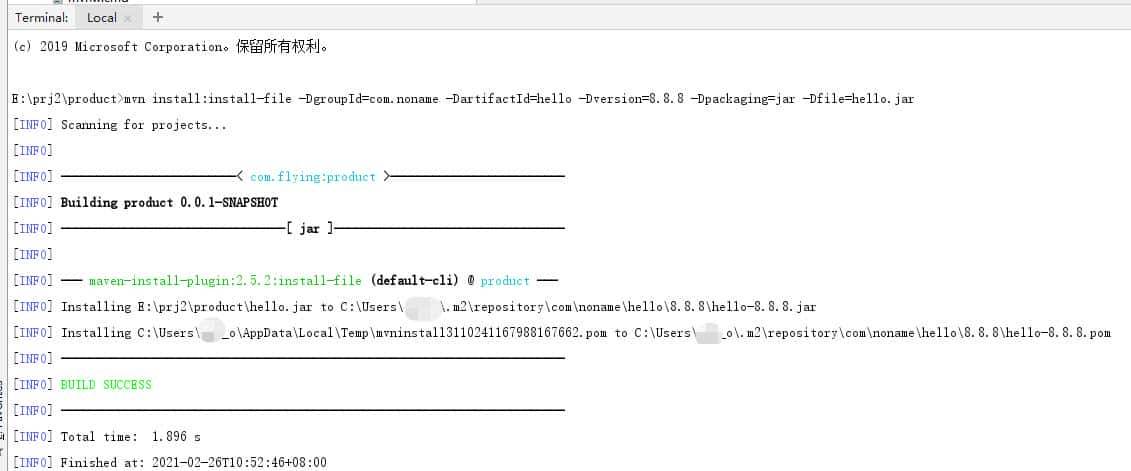
mvn install:install-file -DgroupId=com.noname -DartifactId=hello -Dversion=8.8.8 -Dpackaging=jar -Dfile=hello.jar
这条命令,要安装的包为hello.jar,我们假定该包的groupId是com.noname,artifactId是hello,版本是8.8.8。当然,这些输入的信息上是随意的,只要不和既有软件库冲突即可。这是执行的情况:
5、在product模块中添加hello.jar的依赖
修改pom.xml文件,添加下面的内容:
<dependency>
  <groupId>com.noname</groupId>
  <artifactId>hello</artifactId>
  <version>8.8.8</version>
</dependency>
6、调用Hello类
修改ProductApplication类,添加对Hello类的使用,修改后的代码如下:
package com.flying.product;
import com.hello.Hello;
import org.springframework.boot.SpringApplication;
import org.springframework.boot.autoconfigure.SpringBootApplication;
@SpringBootApplication
public class ProductApplication {
  public static void main(String[] args) {
    SpringApplication.run(ProductApplication.class, args);
    Hello.sayHello();
  }
}
7、运行程序
在IDEA环境下运行程序,这是运行情况:
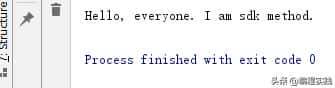
可以发现,我们使用hello.jar包和我们使用那些广为使用的Maven库没什么不同。
除了直接运行,我们对product模块打包生成可执行包也是可以的,前面许多讲都有详细介绍,这里就不再赘述了。
#pgc-card .pgc-card-href { text-decoration: none; outline: none; display: block; width: 100%; height: 100%; } #pgc-card .pgc-card-href:hover { text-decoration: none; } /*pc 样式*/ .pgc-card { box-sizing: border-box; height: 164px; border: 1px solid #e8e8e8; position: relative; padding: 20px 94px 12px 180px; overflow: hidden; } .pgc-card::after { content: ” “; display: block; border-left: 1px solid #e8e8e8; height: 120px; position: absolute; right: 76px; top: 20px; } .pgc-cover { position: absolute; width: 162px; height: 162px; top: 0; left: 0; background-size: cover; } .pgc-content { overflow: hidden; position: relative; top: 50%; -webkit-transform: translateY(-50%); transform: translateY(-50%); } .pgc-content-title { font-size: 18px; color: #222; line-height: 1; font-weight: bold; overflow: hidden; text-overflow: ellipsis; white-space: nowrap; } .pgc-content-desc { font-size: 14px; color: #444; overflow: hidden; text-overflow: ellipsis; padding-top: 9px; overflow: hidden; line-height: 1.2em; display: -webkit-inline-box; -webkit-line-clamp: 2; -webkit-box-orient: vertical; } .pgc-content-price { font-size: 22px; color: #f85959; padding-top: 18px; line-height: 1em; } .pgc-card-buy { width: 75px; position: absolute; right: 0; top: 50px; color: #406599; font-size: 14px; text-align: center; } .pgc-buy-text { padding-top: 10px; } .pgc-icon-buy { height: 23px; width: 20px; display: inline-block; background: url(https://lf3-cdn-tos.bytescm.com/obj/cdn-static-resource/pgc/v2/pgc_tpl/static/image/commodity_buy_f2b4d1a.png); }
【全2册】疯狂Java讲义(第6版)(上册+下册)
¥118
购买
<script src=”//mp.toutiao.com/mp/agw/mass_profit/pc_product_promotions_js?item_id=7262238712002658853″></script>
© 版权声明
文章版权归作者所有,未经允许请勿转载。
相关文章




暂无评论...