flutter launch安卓打不开外部浏览器
今天测试提过来一个问题,有的用户安卓手机点击打开外部浏览器,没有反应.
一查才知道,原来安卓api30的版本后来,的确 是打不开,要加一个权限.
网上查到的一段代码
<queries>
        <!-- If your app opens https URLs -->
        <intent>
            <action android:name="android.intent.action.VIEW" />
            <data android:scheme="https" />
        </intent>
        <!-- If your app makes calls -->
        <intent>
            <action android:name="android.intent.action.VIEW" />
            <data android:scheme="tel" />
        </intent>
        <!-- If your app emails -->
        <intent>
            <action android:name="android.intent.action.VIEW" />
            <data android:mimeType="*/*" />
        </intent>
    </queries>
然后放的位置就让我发难了,问了之前安卓同事,告知我放在application标签下面,然后…就运行不起来了,哈哈!最后自己试了几次,发现放在最外面就行….无了个大奈…
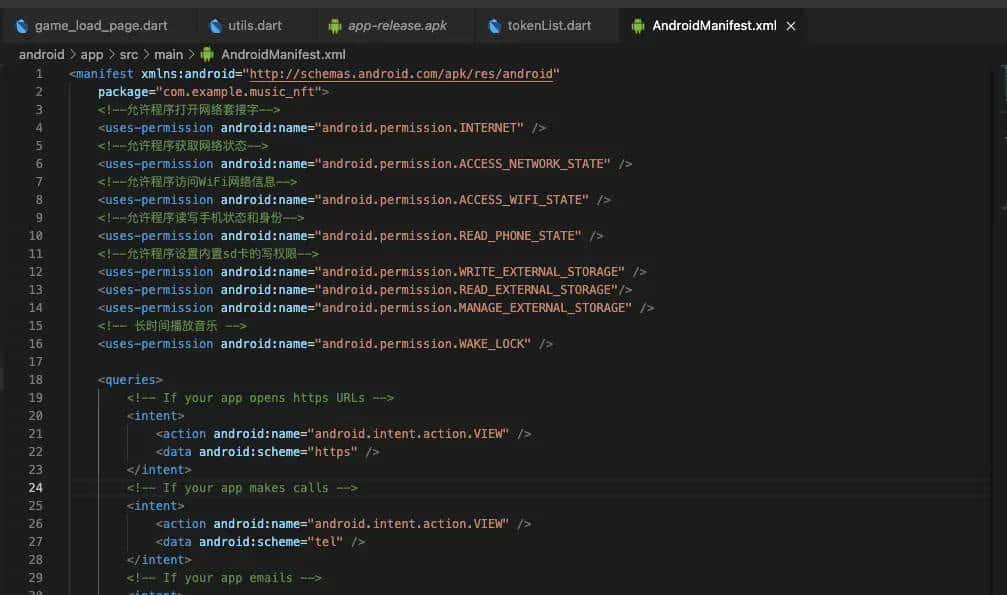
具体的位置是android->app->src->main->AndroidManifest.xml这个文件里.
内部是这样放的:
解决!
© 版权声明
文章版权归作者所有,未经允许请勿转载。
相关文章





暂无评论...