Spring Cloud实战 | 第十二篇:Sentinel+Nacos实现流控、熔断降级,赋能拥有降级功能的Feign新技能熔断,做到熔断降级双剑合璧(JMeter模拟测试)
一. Docker部署Sentinel Dashboard
1. 拉取镜像
docker pull bladex/sentinel-dashboard2. 启动容器
docker run --name sentinel -d -p 8858:8858 -d bladex/sentinel-dashboard3. 访问测试
访问:http://IP:8858 用户名/密码:sentinel/sentinel
二. Sentinel网关流控
1. gateway导入依赖
<!-- Sentinel流量控制、熔断降级 -->
<dependency>
    <groupId>com.alibaba.cloud</groupId>
    <artifactId>spring-cloud-alibaba-sentinel-gateway</artifactId>
</dependency>
<dependency>
    <groupId>com.alibaba.cloud</groupId>
    <artifactId>spring-cloud-starter-alibaba-sentinel</artifactId>
</dependency>
<!-- Sentinel规则持久化至Nacos配置 -->
<dependency>
    <groupId>com.alibaba.csp</groupId>
    <artifactId>sentinel-datasource-nacos</artifactId>
</dependency>
2. 网关配置
sentinel:
  enabled: true # sentinel开关
  eager: true
  transport:
    dashboard: 192.168.147.129:8858 # Sentinel控制台地址
  datasource:
    # 网关限流规则,gw-flow为key,随意定义
    gw-flow:
      nacos:
        server-addr: ${spring.cloud.nacos.discovery.server-addr}
        namespace: sentinel_namespace_id
        dataId: ljf-gateway-gw-flow-rules # 流控规则配置文件名:ljf-gateway-gw-flow-rules
        groupId: SENTINEL_GROUP
        data-type: json
        rule-type: gw-flow
    # 自定义API分组,gw-api-group为key,随意定义
    gw-api-group:
      nacos:
        server-addr: ${spring.cloud.nacos.discovery.server-addr}
        namespace: sentinel_namespace_id
        dataId: ${spring.application.name}-gw-api-group-rules # 流控规则配置文件名:ljf-gateway-gw-api-group-rules
        groupId: SENTINEL_GROUP
        data-type: json
        rule-type: gw-api-group
3. 网关流控客户端标识
网关流控和普通流控有许多区别,其中网关流控类型是gw-flow,普通流控类型是flow 怎么标识流控是网关类型呢? 许多博客文章都没有着重此点,由于前阵子纠结于网关流控的面板和普通流控的面板不一致而去搜相关的资料,最后还是在Sentinel官方文档中找到此开关,就是需要在ljf-gateway网关应用添加JVM启动参数。
# 注:通过 Spring Cloud Alibaba Sentinel 自动接入的 API Gateway 整合则无需此参数
-Dcsp.sentinel.app.type=1
4、nacos添加配置
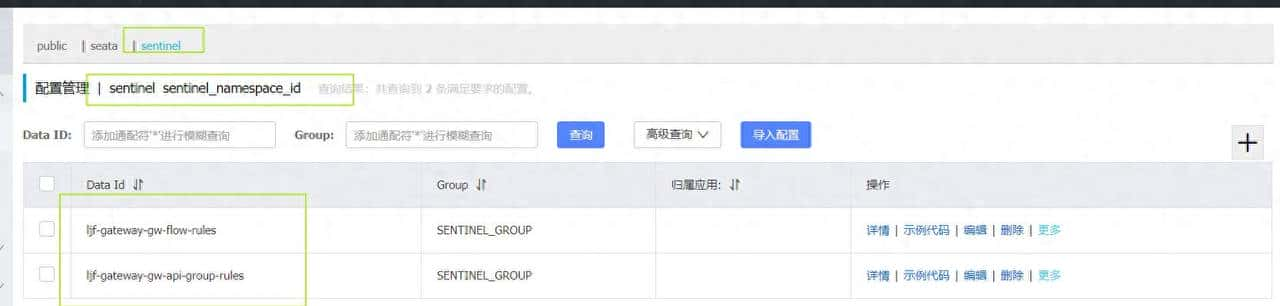
ljf-gateway-gw-flow-rules内容
[
    {
        "resource": "ReactiveCompositeDiscoveryClient_ljf-auth",
        "resourceMode": 0,
        "grade": 1,
        "count":1
    },
{
        "resource": "ReactiveCompositeDiscoveryClient_ljf-admin",
        "resourceMode": 0,
        "count": 1,
        "grade": 1
    }

]
ljf-gateway-gw-api-group-rules内容
[
    {
        "apiName": "ReactiveCompositeDiscoveryClient_ljf-mall-member",
        "predicateItems": [
            {
                "pattern": "/ljf-mall-member/*",
                "matchStrategy": 0  # 0表明准确 1表明前缀 2表明正则
            }
        ]
    },
    {
        "apiName": "ReactiveCompositeDiscoveryClient_ljf-mall-product",
        "predicateItems": [
            {
                "pattern": "/ljf-mall-product/*",
                "matchStrategy": 1
            }
        ]
    }
]
5、访问控制台
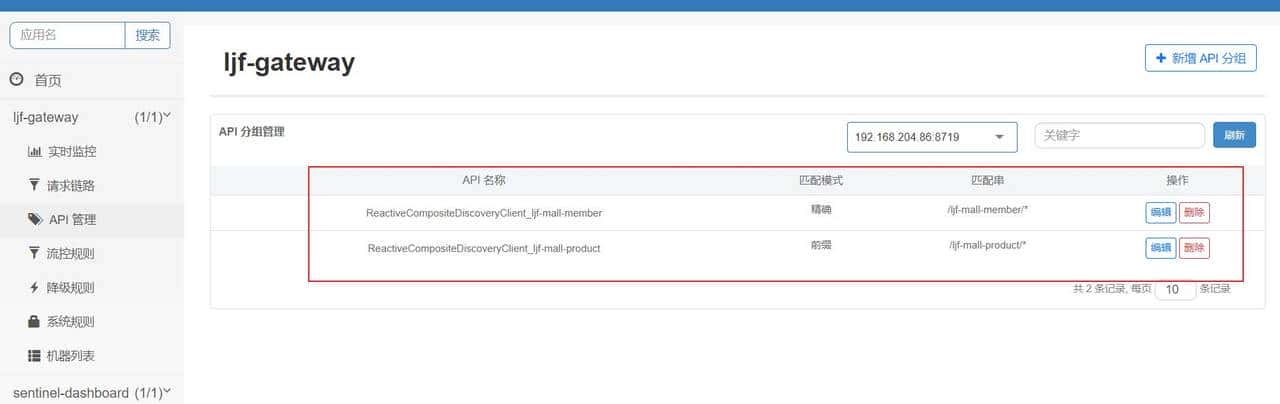
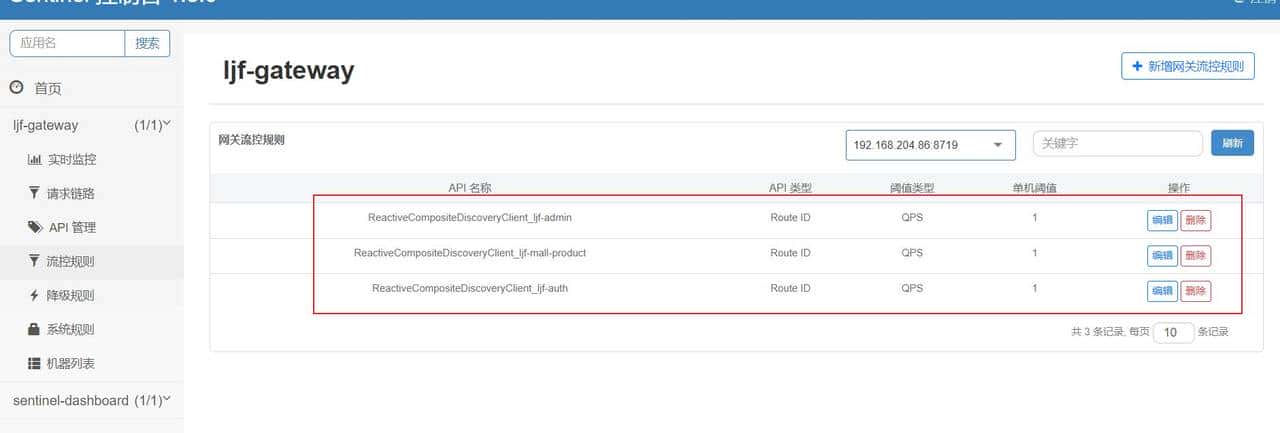
6、网关流控测试
使用jmeter测试
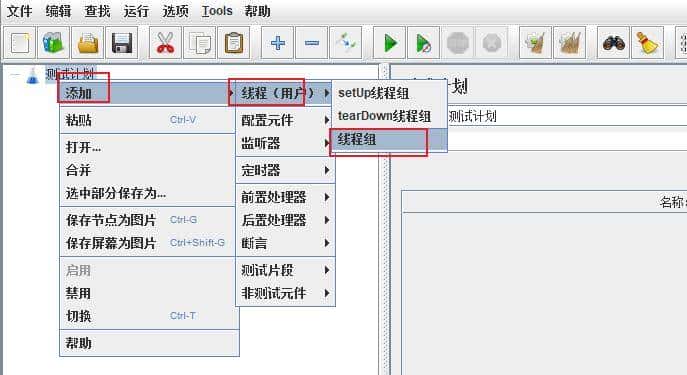
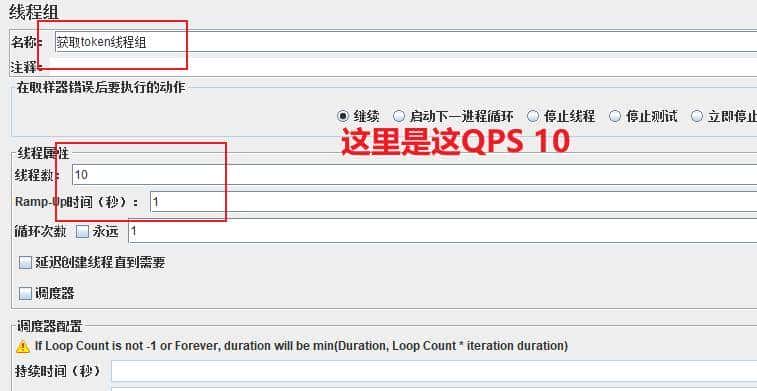
添加线程组 测试计划(鼠标右击)->添加->线程(用户)->线程组
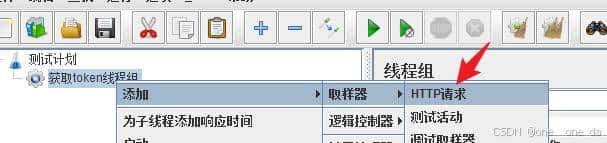
添加HTTP请求 获取token线程组(鼠标右击)->添加->取样器->HTTP请求
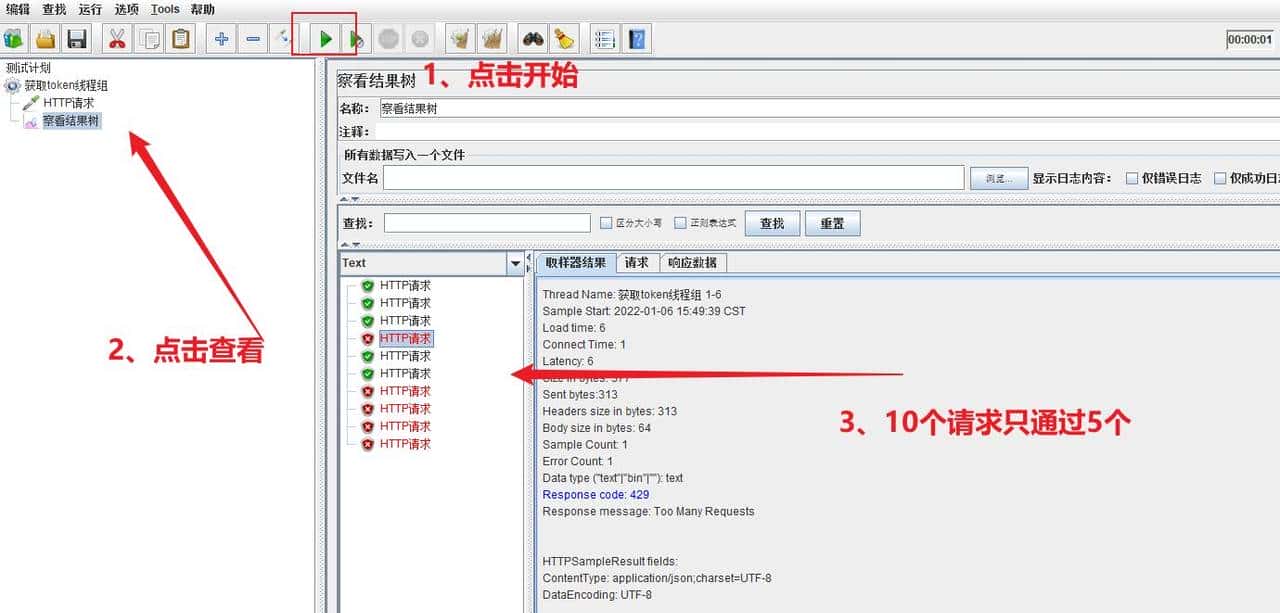
添加察看结果树 由于要看请求的响应,所以这里添加察看结果树。 获取token线程组(鼠标右击)->添加->监听器->察看结果树 启动线程组测试 启动线程组,每秒10次认证请求,需要注意的是,如果测试计划有多个线程组,需禁用除了测试之外的其他线程组。 点击察看结果树查看请求的情况
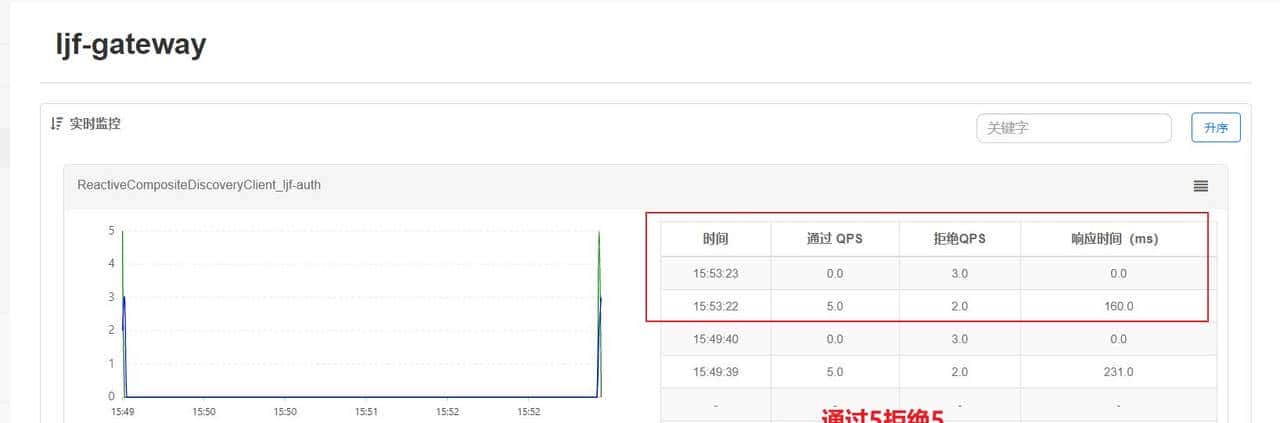
查看sentinel
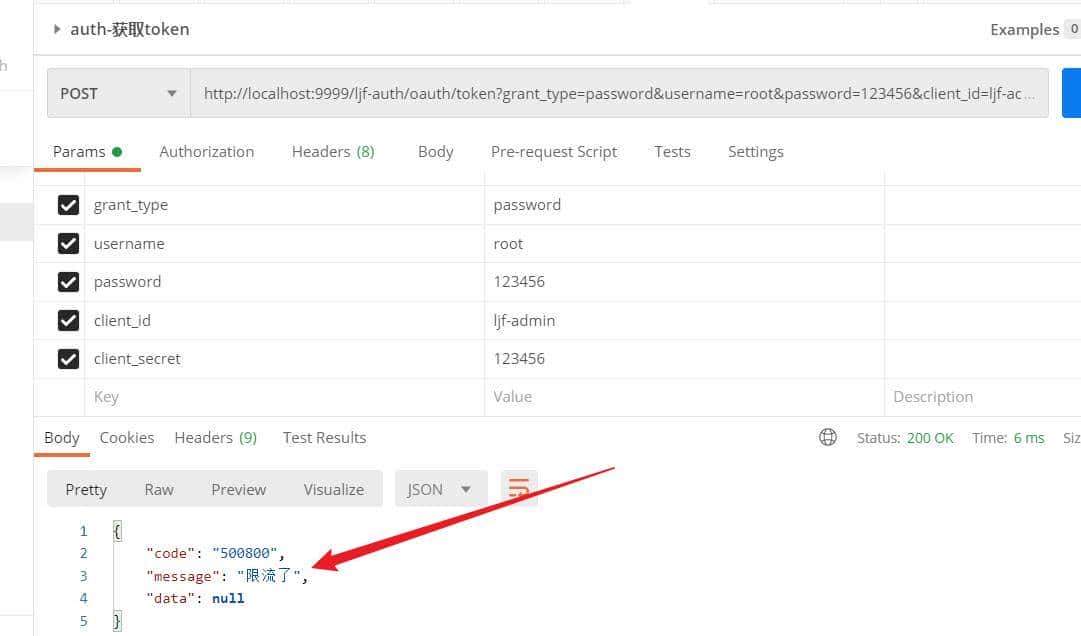
7、自定义网关限流异常
通过在GatewayCallbackManager上通过setBlockHandler方法注册回调实现 添加代码
@Slf4j
@Configuration
public class GatewaySentinelExceptionConfiguration {

    /**
     * 自定义限流
     *
     */
    @PostConstruct
    private void initBlockHandler(){
        BlockRequestHandler blockRequestHandler = new BlockRequestHandler() {
            @Override
            public Mono<ServerResponse> handleRequest(ServerWebExchange serverWebExchange, Throwable throwable) {
                log.info("自定义限流throwable:"+throwable.toString());
                return ServerResponse.status(HttpStatus.OK)
                        .contentType(MediaType.APPLICATION_JSON)
                        .body(BodyInserters.fromValue(Result.error(ResultEnum.SENTINEL_CURRENT_LIMITING)));
            }
        };
      // Lambda 表达式写法
//        BlockRequestHandler blockRequestHandler = (exchange, t) ->
//                ServerResponse.status(HttpStatus.OK)
//                        .contentType(MediaType.APPLICATION_JSON)
//                        .body(BodyInserters.fromValue(Result.error(ResultEnum.SENTINEL_CURRENT_LIMITING));


        GatewayCallbackManager.setBlockHandler(blockRequestHandler);
    }
}
三、Sentinel普通流控
1. 导入依赖
<!-- Sentinel流量控制、熔断降级 -->
<dependency>
    <groupId>com.alibaba.cloud</groupId>
    <artifactId>spring-cloud-starter-alibaba-sentinel</artifactId>
</dependency>
<!-- Sentinel规则持久化至Nacos配置 -->
<dependency>
    <groupId>com.alibaba.csp</groupId>
    <artifactId>sentinel-datasource-nacos</artifactId>
</dependency>
2.微服务配置
    sentinel:
      enabled: true
      eager: true # 撤销控制台懒加载,项目启动即连接Sentinel
      transport:
        client-ip: localhost
        dashboard: 192.168.147.129:8858
      datasource:
        # 限流规则,flow为key,随意定义
        flow:
          nacos:
            server-addr: ${spring.cloud.nacos.discovery.server-addr}
            dataId: ${spring.application.name}-flow-rules
            groupId: SENTINEL_GROUP
            data-type: json
            rule-type: flow
3、配置测试限流规则
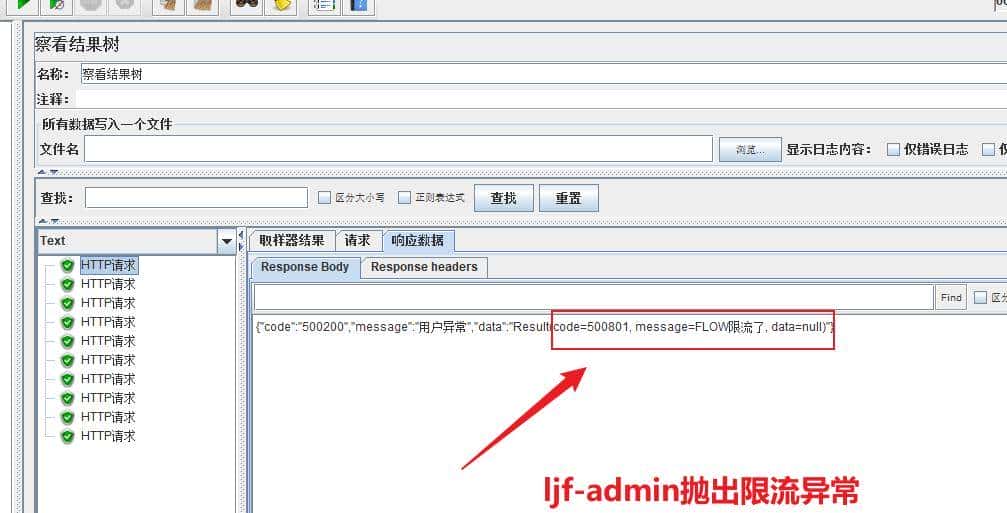
配置子服务的QPS小于主服务的QPS:ljf-admin配置5 ljf-auth配置10 此时调用ljf-auth服务时,ljf-admin抛出异常
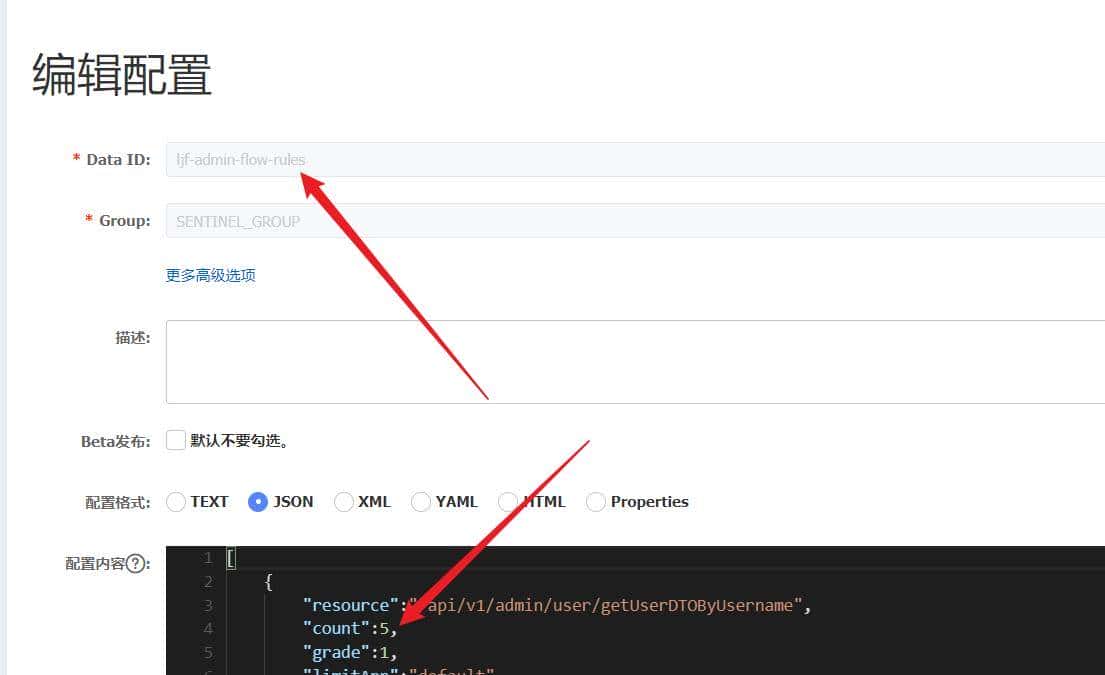
继续使用获取token的接口测试,这个接口会调用上图resource的接口。
© 版权声明
文章版权归作者所有,未经允许请勿转载。
相关文章




暂无评论...