环境:harmonyOS或者openharmony 这两个环境中都可以运行
用到的是通过官方的grid组件创建自定义键盘,这里只是我项目中用到的样式,如果有自己的特殊样式可以自己去定义。
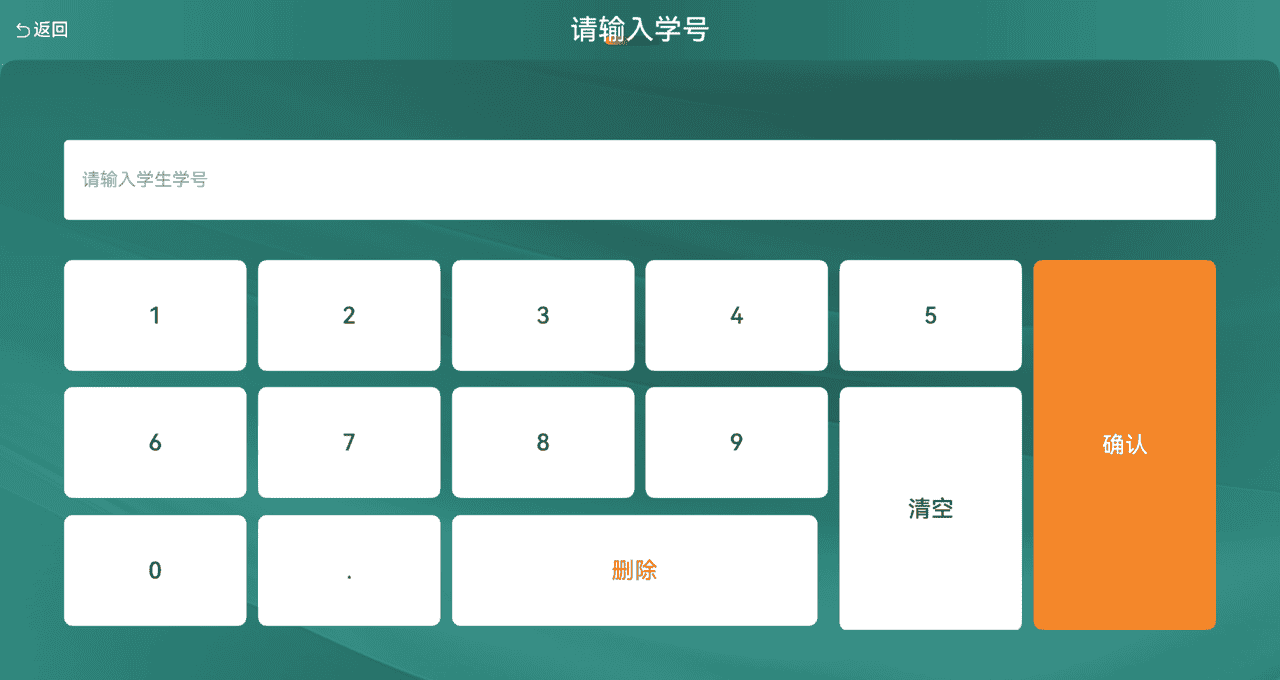
功能就是简单的输入,清空,删除,的数字键盘,主要用于数字密码输入,或者支付输入。学号输入
下面是一些是实现的源代码,整个页面的实现,
自定义键盘单独在@builder里可复制,且需要讲menu 数据模型,也复制到自己的项目中
layoutOptions中定义键盘中不同按钮位置
重点:项目中使用的是@ComponentV2 如果你是用的是@Component 需要将
@Local修改为@state
import { Color } from '@ohasasugar/hp-richtext/src/main/ets/common/types/artUIEnum'
import { forEach } from '@wolfx/lodash'
import { saveStundentNum } from '../utils/saveUtil'

class menu{
  text:string
  backGround:string
  width:string
  height:string
  textColor:string

  constructor(text:string,backGround:string,width:string,height:string,textColor:string) {
    this.text = text
    this.backGround = backGround
    this.width = width
    this.height = height
    this.textColor = textColor
  }
}


@ComponentV2
export struct studentLoginView {
  //输入的学生学号
  @Local studnetNum:string = ''
  @Local Inputs:string[] = []

  layoutOptions: GridLayoutOptions = {
    regularSize: [1, 1],
    irregularIndexes: [5, 10, 13],
    onGetIrregularSizeByIndex: (index: number) => {
      if (index === 5) {
        return [3, 1];
      }else if(index === 10){
        return [2, 1]
      }
      return [2, 1];
    }
  };

  @Local numberKeyboardData:menu[] = [
    new menu('1','#FFFFFF','100%','30%','#333333'),
    new menu('2','#FFFFFF','100%','30%','#333333'),
    new menu('3','#FFFFFF','100%','30%','#333333'),
    new menu('4','#FFFFFF','100%','30%','#333333'),
    new menu('5','#FFFFFF','100%','30%','#333333'),
    new menu('确认','#F4882A','100%','100%','#FFFFFF'),
    new menu('6','#FFFFFF','100%','30%','#333333'),
    new menu('7','#FFFFFF','100%','30%','#333333'),
    new menu('8','#FFFFFF','100%','30%','#333333'),
    new menu('9','#FFFFFF','100%','30%','#333333'),
    new menu('清空','#FFFFFF','100%','66%','#333333'),
    new menu('0','#FFFFFF','100%','30%','#333333'),
    new menu('.','#FFFFFF','100%','30%','#333333'),
    new menu('删除','#FFFFFF','200%','30%','#FF6F6F')
  ]

  @Event CallDismiss:()=> void = () =>{};
  @Event callBack: () => void = () => {};
  //自定义键盘
  @Builder customkeyBoard(){

    Grid(undefined,this.layoutOptions){

      ForEach(this.numberKeyboardData,(item:menu,index:number)=>{
        GridItem() {
          Button(item.text, { type: ButtonType.Normal })
            .fontColor(item.textColor)
            .backgroundColor(item.backGround)
            .borderRadius(8)
            .fontSize('46px')
            .padding(0)
            .width(item.width)
            .height(item.height)
            .onClick(() => {
              if (index == 5) {
                // 确认输入 保存学号 退出界面
                saveStundentNum(this.studnetNum)

                this.callBack()

              }else if(index == 10){
                //清空
                this.Inputs = []
              }else if(index == 13){
                //删除
                this.Inputs.pop()
              }else{
                this.Inputs.push(item.text)
              }
              //组合学号
              this.studnetNum = ''
              forEach(this.Inputs,(Stunum:string)=>{
                this.studnetNum += Stunum
              })

            })
        }
      }, (item: menu) => JSON.stringify(item))
    }
    .scrollBar(BarState.Off)
    .enableScrollInteraction(false) // 禁用滚动交互
    .columnsTemplate('1fr 1fr 1fr 1fr 1fr 1fr')
    .rowsGap(10)
    .columnsGap(10)
    .height('50%')
    .width('90%')
    .margin({top:'80px'})
   }

  build() {
    Stack(){
      Image($r('app.media.bg_common'))
        .width('100%')
        .height('100%')
        .objectFit(ImageFit.Fill)

      Column(){
        //头部导航
        Row(){
          Row(){
            Image($r('app.media.HW_ExamBackToMain'))
              .width('36px')
              .height('36px')
            Text('返回')
              .fontColor(Color.White)
              .fontSize('36px')
              .width('110px')
              .fontWeight(FontWeight.Medium)
          }
          .height('120px')
          .width('150px')
          .layoutWeight(0)
          .padding({left:'30px'})
          .alignItems(VerticalAlign.Center)
          .onClick(()=>{
             this.CallDismiss()

          })

          Stack(){
            Line()
              .width('120px')
              .height('18px')
              .offset({y:'21px',x:'-10px'})
              .borderRadius('9px')
              .linearGradient({
                direction:GradientDirection.Right,
                colors:[
                  ['#F36E11',0.0],
                  [Color.Transparent,1.0]
                ]
              })
            Text('请输入学号')
              .fontColor(Color.White)
              .fontSize('56px')
              .layoutWeight(1)
              .fontWeight(FontWeight.Medium)
              .textAlign(TextAlign.Center)
          }
          .width('400px')

          //充当占位 使标题能居中
          Text(' ')
            .fontColor(Color.White)
            .layoutWeight(0)
            .width('150px')
            .fontWeight(FontWeight.Medium)
            .textAlign(TextAlign.Center)
        }
        .justifyContent(FlexAlign.SpaceBetween)
        .alignItems(VerticalAlign.Center)
        .width('100%')
        .height('120px')
        .layoutWeight(0)
        .linearGradient({
          direction:GradientDirection.Right,
          colors:[
            ['#2E9084',0.0],
            ['#126C62',0.5],
            ['#2E9084',1.0]
          ]
        })
        .margin({top:'0px'})

        //主内容
        Column(){

          TextInput({placeholder:'请输入学生学号',text:this.studnetNum})
            .placeholderColor('#999999')
            .backgroundColor(Color.White)
            .borderRadius('10px')
            .height('160px')
            .width('90%')
            .margin({top:'160px'})

            this.customkeyBoard()

          }
          .borderRadius('30px')
          .backgroundColor('rgba(0,0,0,0.3)')
          .clip(true)
          .width('100%')
          .layoutWeight(1)
        }
        .width('100%')
        .layoutWeight(1)
      }
    }
}
© 版权声明
文章版权归作者所有,未经允许请勿转载。
相关文章




暂无评论...