
在大数据时代,搜索已经成为企业数据处理的重大部分。Elasticsearch 作为一款高效、分布式的搜索和分析引擎,被广泛应用于日志分析、全文检索、数据分析等领域。本篇文章将带你从零开始,搭建一个完整的 Elasticsearch 搜索系统。
1. 什么是 Elasticsearch?
Elasticsearch 简介
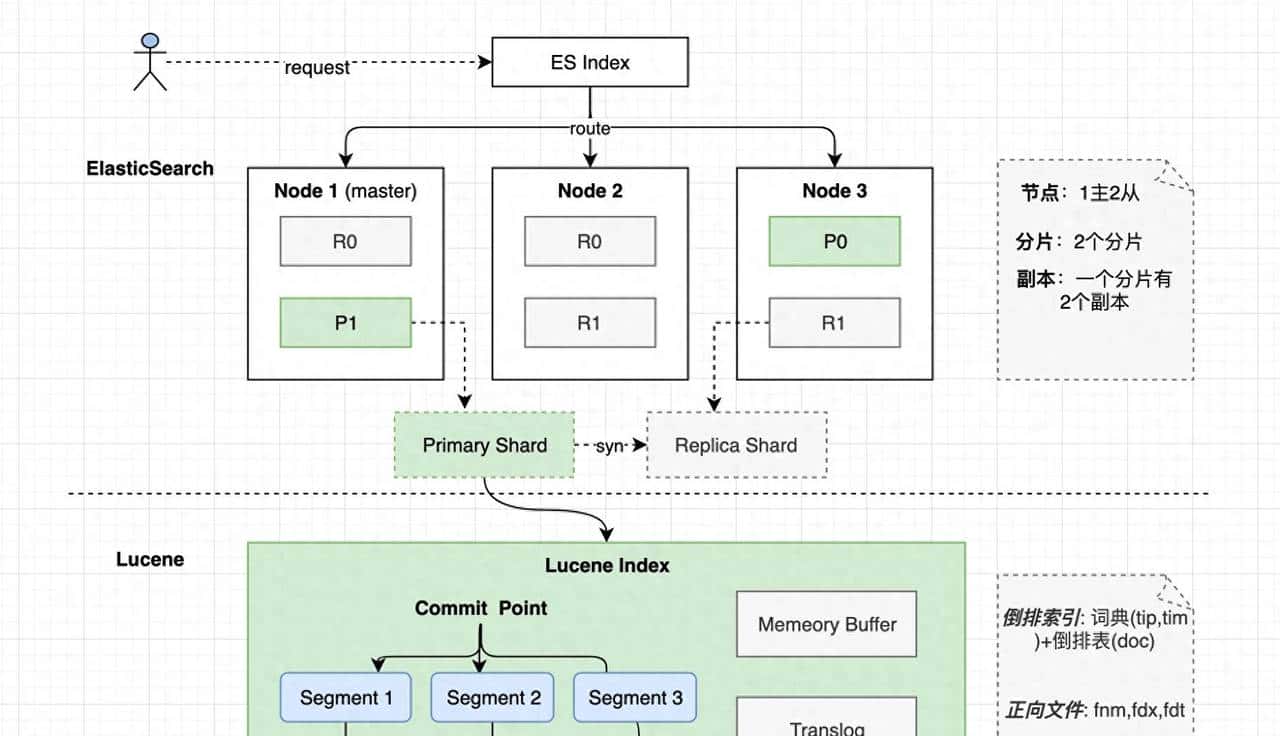
Elasticsearch 是一个基于 Apache Lucene 的分布式搜索引擎,支持 RESTful API,能够提供高效的全文检索、结构化搜索和数据分析。它广泛应用于日志管理(如 ELK Stack)、企业搜索、监控系统等。
为什么选择 Elasticsearch?
相比传统的数据库 LIKE 查询,Elasticsearch 具有以下优势:
✅ 全文搜索:支持强劲的分词和查询能力。
✅ 分布式架构:支持横向扩展,适用于大规模数据处理。
✅ 高性能:查询速度远超 SQL LIKE 语句。
✅ RESTful API:通过 HTTP 轻松操作数据。
2. 在 Linux 上安装 Elasticsearch
Step 1:下载并安装 Elasticsearch
wget https://artifacts.elastic.co/downloads/elasticsearch/elasticsearch-8.0.0-linux-x86_64.tar.gz
tar -xzf elasticsearch-8.0.0-linux-x86_64.tar.gz
cd elasticsearch-8.0.0
Step 2:修改配置文件(elasticsearch.yml)
vim config/elasticsearch.yml
修改以下配置:
network.host: 0.0.0.0
http.port: 9200
cluster.name: my-es-cluster
node.name: node-1
Step 3:启动 Elasticsearch
./bin/elasticsearch
Elasticsearch 默认监听 9200 端口,可通过 curl 测试是否正常运行:
curl http://localhost:9200
返回 Elasticsearch 版本信息即安装成功!
3. 索引、文档与查询
创建索引
curl -X PUT “http://localhost:9200/my_index” -H “Content-Type: application/json” -d'
{
“settings”: {
“number_of_shards”: 2,
“number_of_replicas”: 1
},
“mappings”: {
“properties”: {
“title”: { “type”: “text” },
“content”: { “type”: “text” },
“timestamp”: { “type”: “date” }
}
}
}'
插入文档
curl -X POST “http://localhost:9200/my_index/_doc/1” -H “Content-Type: application/json” -d'
{
“title”: “Elasticsearch 入门”,
“content”: “Elasticsearch 是一个开源搜索引擎。”,
“timestamp”: “2025-03-16T12:00:00”
}'
搜索文档
curl -X GET “http://localhost:9200/my_index/_search?q=Elasticsearch”
4. 集群与分片机制
Elasticsearch 分片(Shard)与副本(Replica)
• 分片(Shard):Elasticsearch 会将索引拆分成多个分片,以提升查询效率。
• 副本(Replica):每个主分片可以有多个副本,提高数据可靠性。
在 elasticsearch.yml 中,可以指定索引的分片和副本数:
index.number_of_shards: 3
index.number_of_replicas: 2
集群管理
curl -X GET “http://localhost:9200/_cat/nodes?v”
curl -X GET “http://localhost:9200/_cat/indices?v”
5. 可视化与运维
安装 Kibana 进行数据可视化
Kibana 是 Elastic Stack 的可视化工具,可用于数据探索和仪表盘展示。
安装 Kibana:
wget https://artifacts.elastic.co/downloads/kibana/kibana-8.0.0-linux-x86_64.tar.gz
tar -xzf kibana-8.0.0-linux-x86_64.tar.gz
cd kibana-8.0.0
./bin/kibana
然后访问 http://localhost:5601 进入 Kibana 界面。
日志监控与性能优化
• 使用 /_cluster/health 检查集群健康状态。
• 使用 /_nodes/stats 监控 Elasticsearch 运行状态。
• 调整 JVM 堆内存,优化性能:
vim config/jvm.options
修改:
-Xms2g
-Xmx2g
结语
本教程从 0 到 1 介绍了 Elasticsearch 的安装、索引管理、查询操作、集群管理与可视化,协助你构建自己的分布式搜索引擎。如果你有更复杂的搜索需求,欢迎在评论区交流!
❤️ 觉得有协助的话,记得点赞 + 关注哦!
© 版权声明
文章版权归作者所有,未经允许请勿转载。
相关文章




暂无评论...